---
schema_version: "1"
id: 08860456f6352cb8aae8967eee77b95256c4a8de95e090967e91fca2986ba994
title: Build Your App's Skeleton
collection: admin
version: current
locale: en-us
portal_url: https://docs.salesforce.com/admin/current/en-us/xcloud/264-0-0/mobile_ama_build_app_skeleton.md
canonical_url: https://help.salesforce.com/s/articleView?id=xcloud.mobile_ama_build_app_skeleton.htm&release=264.0.0&type=5
source_site: help.salesforce.com
content_type: documentation
content_hash: 12a8b7cded33269938d789406bebd1e7dd2532ba1e959935999958878f0fda2d
description: Describe an app in plain language and Agentforce creates the first version.
release: "264"
---
# Build Your App's Skeleton
Describe an app in plain language and Agentforce creates the first version.
### Required Editions
Available in: Lightning Experience
Available in: Enterprise, Performance, Unlimited, and Developer Editions with Foundations, or Agentforce 1 or Einstein 1 Editions
User Permissions
Needed
To build agentic mobile apps:
Manage mySalesforce Apps
The Create & Manage Apps screen is home for every agentic mobile app in your org. Start a new app or reopen an existing app from this screen.
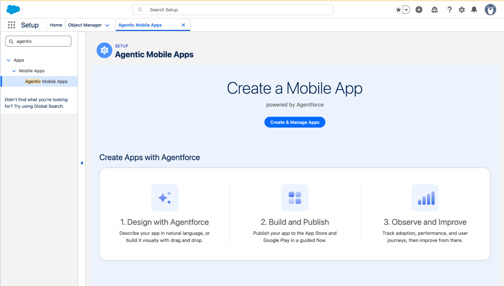
1. On the Agentic Mobile Apps page, click **Create & Manage Apps** to access the Agentforce interface and describe the app you want.
For example, enter Build an app so partners can see their opportunities and accounts.
2. Answer the clarifying questions that Agentforce asks.
You can ask Agentforce to add theming from Figma files. To do that, share a file with mobile screens designed as individual frames and attach the Figma access token. Share the Figma URL (until "?node").
3. Select a customer-facing app based on an Experience Cloud site or an employee app based on your Salesforce org.
4. Agentforce builds the first version.
The app opens in the Mobile App Designer. You can change anything until you activate and publish the app.