---
schema_version: "1"
id: 476a0429f84131403fa0a451a13168413a373bdcfd5a1df31369f7a7ef149f1d
title: Experience Cloud Passkey Prompts
collection: admin
version: current
locale: en-us
portal_url: https://docs.salesforce.com/admin/current/en-us/xcloud/264-0-0/mfa_passkey_experience_cloud_prompt.md
canonical_url: https://help.salesforce.com/s/articleView?id=xcloud.mfa_passkey_experience_cloud_prompt.htm&release=264.0.0&type=5
source_site: help.salesforce.com
content_type: documentation
content_hash: be0258096871c3da1db1510a7704421a50b2334dd68cd912a7d76568bdcb70a1
description: When an internal user accesses an Experience Cloud site, multi-factor authentication (MFA) is always required. Salesforce doesn't require MFA for external users to access Experience Cloud sites, but you can choose to enable it. Both internal and external users can see prompts to set up a passkey when they log in to an Experience Cloud site, but the prompts are slightly different.
products:
- Security
release: "264"
---
# Experience Cloud Passkey Prompts
When an internal user accesses an Experience Cloud site, multi-factor authentication (MFA) is always required. Salesforce doesn't require MFA for external users to access Experience Cloud sites, but you can choose to enable it. Both internal and external users can see prompts to set up a passkey when they log in to an Experience Cloud site, but the prompts are slightly different.
### Required Editions
Available in: both Salesforce Classic and Lightning Experience
Available in: Enterprise, Performance, Unlimited, and Developer Editions
User Permissions
Needed
To view user licenses:
View Setup and Configuration
## Internal Users
Internal users access your Salesforce org directly, but can also access Experience Cloud sites. Internal users have one of these licenses.
- [Standard Salesforce licenses](https://help.salesforce.com/s/articleView?id=platform.users_license_types_available.htm&language=en_US)
- [Chatter Only (Chatter Plus)](https://help.salesforce.com/s/articleView?id=platform.users_license_types_chatter.htm&language=en_US)
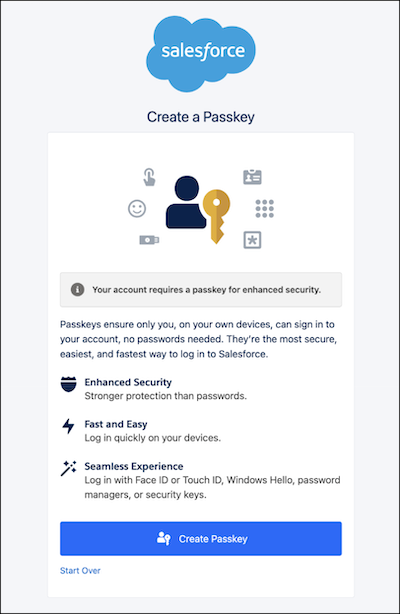
If an internal user logs in to an Experience Cloud site, Salesforce requires MFA. If the user doesn't have a registered MFA method, they see a prompt to create a passkey.

Note Salesforce requires users with privileged permissions to use a passkey for phishing-resistant MFA. Non-privileged users can choose to either set up a passkey or register another verification method. See [Recognize Passkey Creation Prompt Behavior](https://help.salesforce.com/s/articleView?id=xcloud.mfa_passkeys_prompts_understand.htm&language=en_US).
## External Users
External users, such as customers and partners, access Salesforce only via Experience Cloud sites. They don't access your Salesforce org directly. External users have one of these licenses.
- [Experience Cloud licenses](https://help.salesforce.com/s/articleView?id=platform.users_license_types_communities.htm&language=en_US)
- [Chatter External](https://help.salesforce.com/s/articleView?id=platform.users_license_types_chatter.htm&language=en_US)
- [Chatter Free](https://help.salesforce.com/s/articleView?id=platform.users_license_types_chatter.htm&language=en_US)
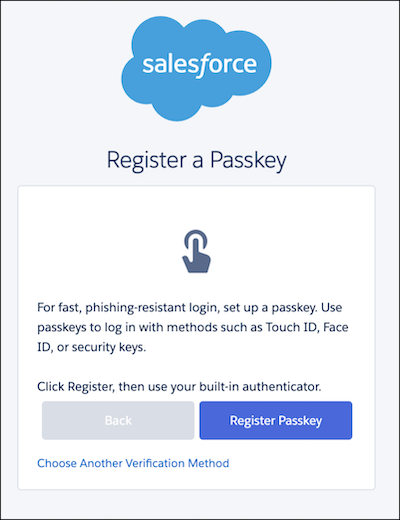
While Salesforce doesn't require MFA for external users, you can choose to require MFA by assigning the “Multi-Factor Authentication for User Interface Logins" user permission. If an external user has this permission, they can see a prompt to register a passkey. If they don't want to register a passkey, they can click **Choose Another Verification Method**.
Currently, external Experience Cloud can't disconnect passkeys from their user account by themselves. To disconnect an external user's passkey, use the [`UserManagement.deregisterVerificationMethod(userId, method)`](https://developer.salesforce.com/docs/atlas.en-us.apexref.meta/apexref/apex_class_System_UserManagement.htm) Apex method. This method disconnects only one passkey at a time. For example, if a user has 3 passkeys, this method disconnects only one passkey. To disconnect the rest, use the same method until all passkeys are disconnected.
## Identify a User's License Type
To identify whether a user is internal or external, review the user’s license.
1. From Setup, in the Quick Find box, find and select **Users**.
2. Click the user’s name, and then review the user’s license.
#### See Also
- [Troubleshoot Passkey Issues](https://help.salesforce.com/s/articleView?id=xcloud.mfa_supported_verification_methods_bia.htm&release=264.0.0&type=5 "When employee users log in and register for multi-factor authentication (MFA), passkeys are the default option. Identify and resolve issues with passkey prompts, setup, login, and more.")