---
schema_version: "1"
id: 4aff7dfbb134cf7b7a4a90fb94e67a96abe6a8c9caaf429a145417101b4cce7c
title: Mask or Delete Records on an Object
collection: admin
version: current
locale: en-us
portal_url: https://docs.salesforce.com/admin/current/en-us/xcloud/264-0-0/mask_delete_data_management_policies.md
canonical_url: https://help.salesforce.com/s/articleView?id=xcloud.mask_delete_data_management_policies.htm&release=264.0.0&type=5
source_site: help.salesforce.com
content_type: documentation
content_hash: 5e96e1171e0f9fc336d049f3bc23740f371a7964150968f6d90993e1d3b5ca5a
description: Define how an object’s records are masked or deleted from your org, and determine how related files and attachments are handled.
products:
- Security
- Cross Cloud
release: "264"
---
# Mask or Delete Records on an Object
Define how an object’s records are masked or deleted from your org, and determine how related files and attachments are handled.
### Required Editions
Available in: Developer, Enterprise, Performance, and Unlimited Editions. Requires the Privacy Center license.
User Permissions Needed
To create, edit, and schedule Data Management Policies:
Manage Privacy Center Policies
If you want the option to delete field history or field audit trail records with your policy, turn on this org setting: **Enable “Delete from Field History” and “Delete from Field History Archive” User Permissions**. The setting can be found in the User Interface node in Setup. To learn more, see [User Interface Settings](https://help.salesforce.com/s/articleView?id=xcloud.customize_ui_settings.htm&type=5&language=en_US).
Complete this task after you [add filter conditions to an object](https://help.salesforce.com/s/articleView?id=xcloud.filters_conditions_data_management_policies.htm&release=264.0.0&type=5 "Specify records to process with your Data Management Policy by selecting an object and setting filter conditions. You can process records that meet any condition, all conditions, or a custom arrangement of conditions.").
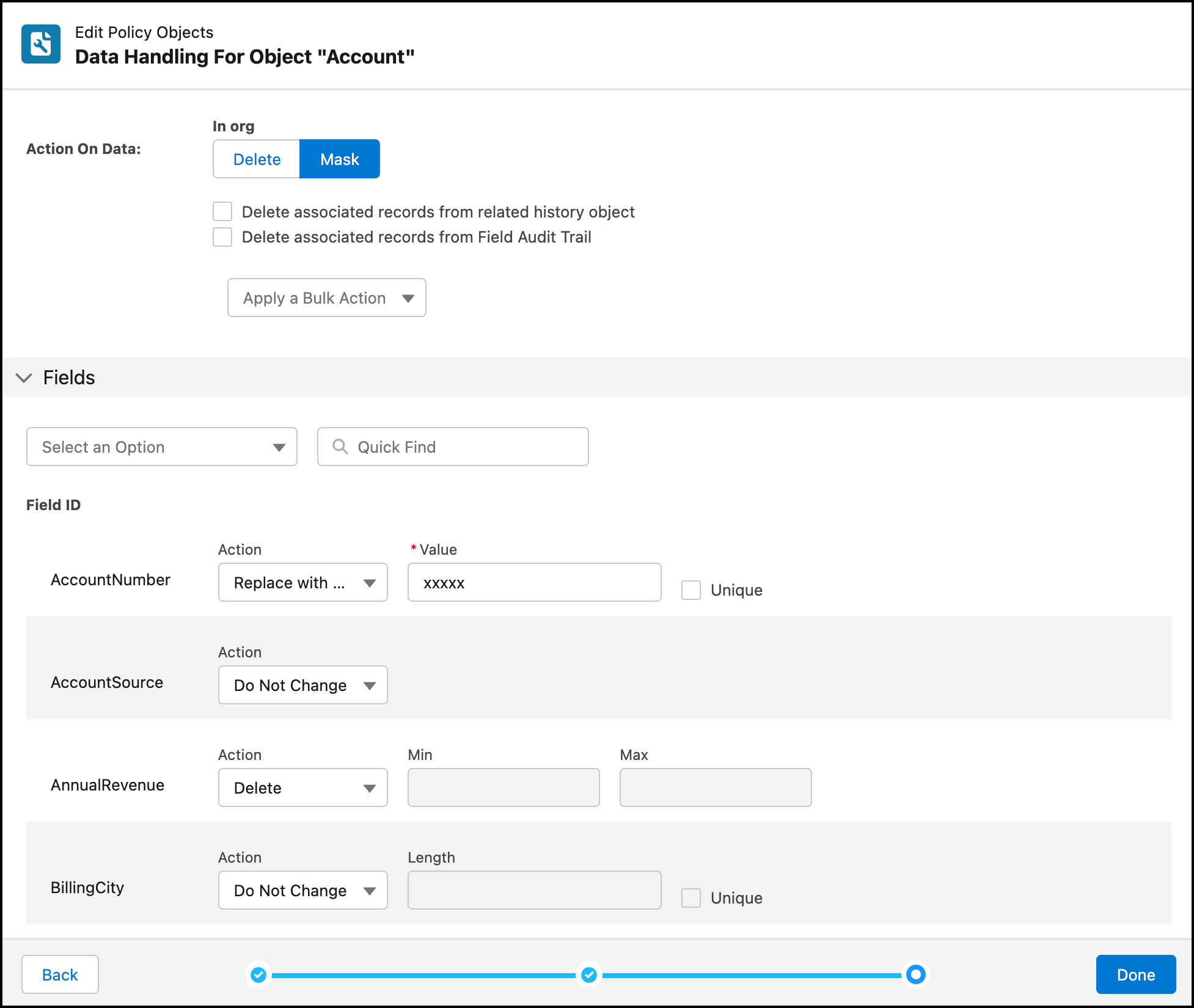
1. Under Action on Data, select how you want to process the records.
- **Delete** removes the records from your org. If you select this option, continue with Step 2.
- **Mask** obfuscates individual fields according to rules that you specify. If you select this option, continue with Step 3.
2. If you selected **Delete**, you can apply these additional record deletion settings.
- **Delete records from related history object**
Select this setting if you want associated records on the related history object to be deleted from your org.
- **Delete records from Field Audit Trail**
Select this setting if you have the Field Audit Trail add-on and you want the associated records to be deleted from your org. If you don't have Field Audit Trail, you can't select this setting because the data doesn't exist.
- **Permanently delete records**
Select this setting if you want to permanently delete records from your org instead of moving them to the Recycle Bin.

Important If you enable this setting, you can't restore deleted records from the Recycle Bin. We recommend that you back up the records before you execute the policy. That way, you can restore the records from the backup if needed.

Note You can also enable these settings for the entire policy instead of applying them to individual objects. To edit the settings at the policy level, click **Edit** on the policy details page.
3. If you selected **Mask**, you can apply these obfuscation or deletion methods to individual record fields.

Note Some fields are excluded because of field restrictions. For example, you can’t set restricted picklist fields to random characters. Also, fields with null values are not updated with a masked value.
- **Do Not Change** preserves the field’s existing value.
- **Replace with Random Characters** obfuscates the field’s value with random characters. When you select this option, you must also specify the number of characters in the Length field. If you select **Unique**, the record’s Salesforce ID is added to the field value, creating a globally unique value for the record in your org. The length of the generated Salesforce ID is truncated to meet the maximum length defined for the field. Generating a Salesforce ID increases overall run time.
- **Delete** removes the field’s value. This action doesn’t delete the entire record, and you can’t delete data in required fields.
- **Replace with Static Value** obfuscates the field’s value with a value that you enter (up to 255 characters). If you select **Unique**, the record’s Salesforce ID is added to the field value, creating a globally unique value for the record in your org. The length of the generated Salesforce ID is truncated to meet the maximum length defined for the field. Generating a Salesforce ID increases overall run time.

Tip Under Fields, you can choose a compliance category to filter for specific field types. For example, you can quickly find fields marked as containing personally identifiable information (PII).
Alternatively, you can apply a single action to all records using the Apply a Bulk Action dropdown list.
4. Under Files and Attachments, select whether related files and attachments for processed records are kept or deleted from your org. Keep in mind that if a record is deleted rather than masked, its attachments are deleted automatically.
- **Delete All** deletes every file and attachment, even if other remaining records are associated with the files.
- **Delete if Unshared** deletes files and attachments that aren’t associated with any other records.
- **Keep** preserves all files and attachments.
5. When you’re finished setting mask or deletion rules, click **Next**.
You’re ready to add data retention rules to your policy.