
After a program manager creates a game and adds its rewards, the game can be offered to customers in several ways. Admins can use Business APIs to enable customers to play games on external systems such as mobile apps or shopping sites. Program managers can also set up processes that assign games to members based on their loyalty activities. Customer service reps can assign games to customers and members as part of service recovery actions.
Required Editions
| Available in: Lightning Experience |
| Available in: Enterprise, Performance, Unlimited, and Developer Editions with Loyalty Management |
How Game Assignment Works
You can either offer the games to all customers or offer the games to customers and members based on a specific activity.
The Game Assignment Required checkbox in a game definition record determines whether a game is available for all customers or not. If the checkbox is deselected in a game definition, then the game is available for all customers to play. If the checkbox is selected, then customers and members are eligible to play the game only after the game is assigned to them.
Integrate Business API to Show Customers and Members Their Available Games
The Games Business API lists a customer or member’s list of eligible games. You can integrate the API with an external system where customers and members can view and play games.
The API takes the contact ID, account ID, or loyalty program member ID of the person whose list of eligible games you want to get. The API returns the details of the games that the customer or member is eligible to play. The API returns only the eligible games that are active and not the games that are past their end date.
The API creates two records for each game that the API returns:
| Record | Why the Record is Created | When The Record is Created |
|---|---|---|
| Game Participant | The record assigns the game to the participant. | The game isn’t already assigned to the participant. |
| Game Participant Reward |
The record tracks the reward provided to the participant after they play the game. After the participant plays the game, the reward details are updated in the record. Though the participant hasn't played the game and won a reward, a Game Participant Reward record is created. The Game Participant Reward record contains an expiration date and time that decides the date and time until which customers can play the game and win a reward. The expiration date and time is automatically calculated based on the related game definition's expiration period. |
Assign Games to Members for Eligible Loyalty Activities by Using Promotion Setup
As part of member engagement, loyalty program managers can extend rules or design new rules to assign games to members. Before a program manager adds or extends a rule to assign games, they must consider these scenarios:
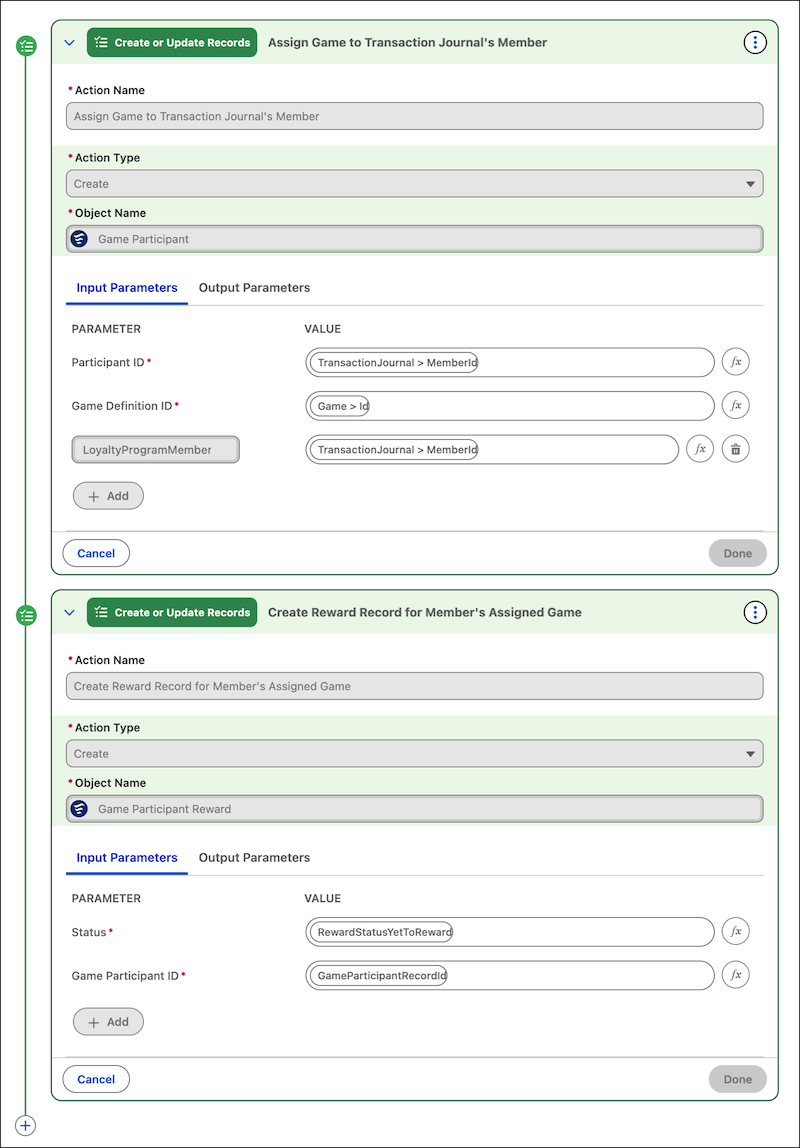
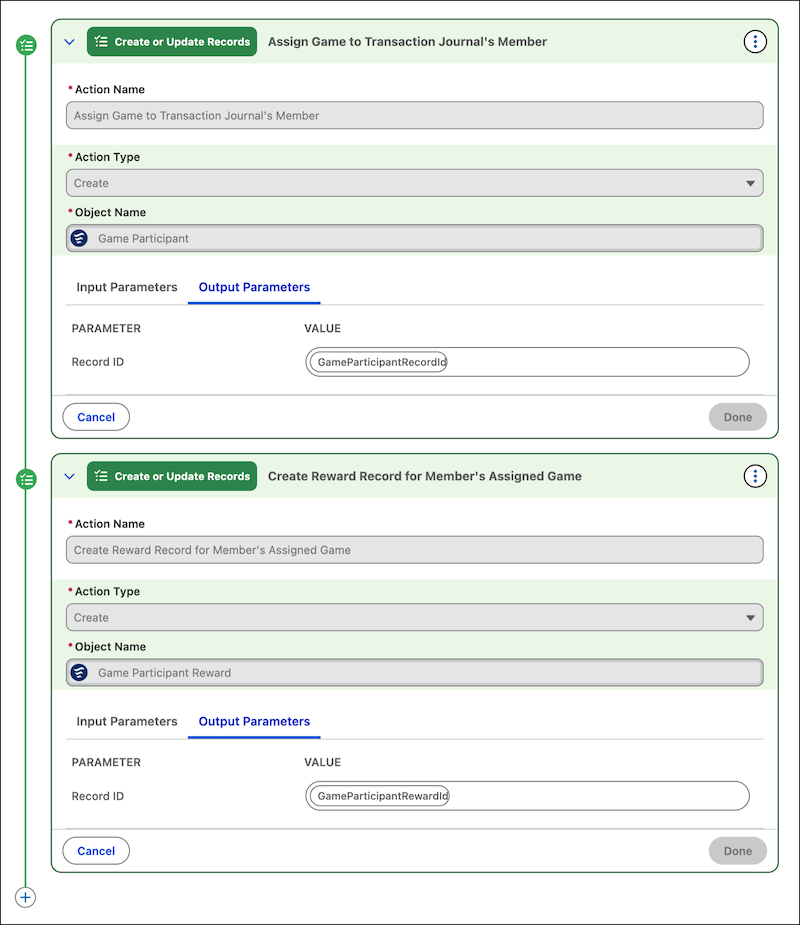
To assign a game to a member, you must add two Create or Update Records actions in the rule:
| Sequence | Action Details | Why The Is Action Needed |
|---|---|---|
| 1 | Use the action to create a Game Participant record. In the action, specify whom you want to assign the game to and the game you want to assign. | Assigns the game to the participant and creates a reward record that’s updated with the member’s reward after they play the game. |
| 2 | Use the action to create a Game Participant Reward record. In the action, specify the reward status as Yet to Reward and the ID of the Game Participant record that’s created in the preceding action. |
Here's an example of the actions and their input parameters.
Here's an example of the actions and their output parameters.

Assign Games to Customers and Members as a Service Recovery Action
Service reps in your company can assign games to customers and members as part of their service recovery action. For example, if a customer receives damaged products or provides the company a low CSAT score for a case, the service rep can offer a game to the participant.
To assign a game, the service rep must create a Game Participant record and a Game Participant Reward record. The service reps can access both items from the App Launcher.
On the Game Participant record, service reps must select the game that they want to assign and whom they want to assign the game to. In the Game Participant Reward record, service reps can select:
- The participant whom the game is assigned to.
The service rep must select the game participant that the game participant record is created for.
- The status of the reward.
The service rep can select the Yet to Reward status because the participant is yet to play the game.
- The source activity that the game was assigned to the participant for.
The service rep can select the promotion or transaction journal that the game is assigned to the participant for.
Service reps don't need to populate the Issued Reward Reference, Game Reward, and Expiration Date fields in the game participant reward record. These fields are automatically populated after the participant plays the game.
Reward Members for Playing a Game
The Game Reward Business API assigns a reward to participants after they play a game. Integrate the API with an external system where customers and members can play games and view their rewards. Run the API when the participant plays a game and use the output of the API to show the participant their game reward.
The API takes the ID of the game participant reward record as input and returns the details of the reward that the participant has won. Ensure that you specify the ID of the game participant reward record that’s associated with the game participant record that relates the game to the participant.
The API decides the reward to be given to a participant based on the win probability of all the rewards that are part of the game. For example, if a reward’s win probability is 25%, then the chance of a customer winning the reward is 25%.
The API first checks if a member’s current reward count is below the maximum reward count. For example, if the maximum reward count is set to 10 and a member has only received 7 rewards, the API proceeds to the next step. If the member qualifies, the API decides to assign rewards without bias and issues them based on a probabilistic model. It employs a randomizer to decide the rewards, ensuring that all members are treated fairly. For instance, if there are 100 members eligible for rewards, the randomizer might select 20 of them to receive a reward, with each member having an equal chance of being selected.
After the API provides the result, the game participant reward record that was provided in the input is updated with these details:
- Game Reward—Associates the game reward provided to the member.
- Status—Changes to Rewarded.
- Issue Reward Reference—Associates the voucher that was issued to the member or the transaction journal that credited the points to the member.
- Expiration Date—Gets updated with the date when the issued voucher expires or the credited points expire.
- Source Activity—Associates the transaction journal that represents the member activity that made the member eligible to play the game.
