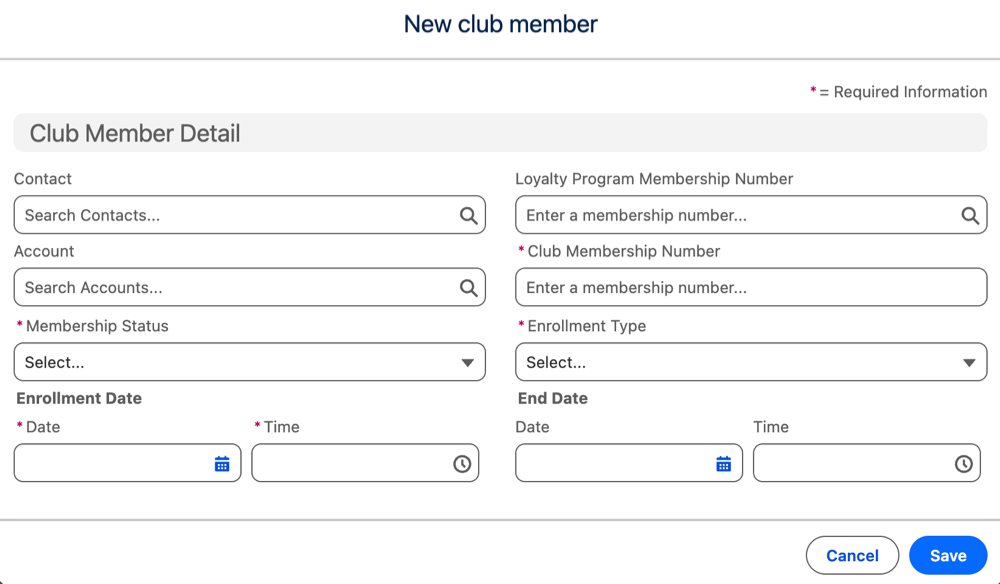
After you set up a club and activate it, you can add club members.
Required Editions
| Available in: Lightning Experience |
| Available in: Enterprise, Performance, Unlimited, and Developer Editions with Loyalty Management - Advanced |
| User Permissions Needed | |
|---|---|
| To add club members: |
Loyalty Management permission set AND Manage Loyalty Programs permission set |
- From the record page of a club. click Members.
- Click Add Club Member.
-
Enter these details:
Contact, Account, and Loyalty Program Membership Number A value for one of these parameters. Membership Status The status of the member. Enrollment Type The criteria based on which the member is enrolled. Enrollment Date and End Date Members can only enroll between the start and end date time of the club membership plan. If you don't select an end date, the club membership ends on the end date of the club. - Save your changes.