
Keep track of all your activities with the activity timeline in Lightning Experience. All the key details for each task, meeting, logged call, and sent email are bundled together, and you can quickly log calls, create tasks, send emails, and more from the handy composer.
Required Editions
| Available in: Lightning Experience |
| Available in: Essentials, Professional, Enterprise, Performance, Unlimited, and Developer Editions |
The activity timeline provides easy-to-scan summaries of past, present, and future activities on accounts, cases, claims, contacts, contracts, insurance policies, leads, opportunities, and activity-enabled custom objects.
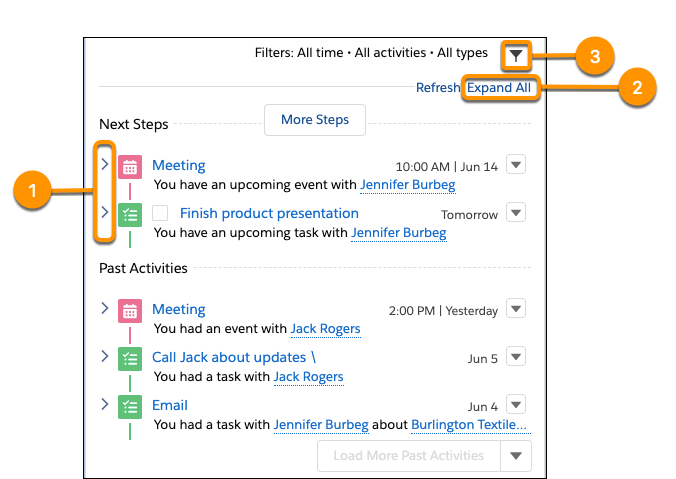
Click the arrow next to an individual activity (1) for a closer look at its description and comment fields. Or click Expand All (2) to see details for all activities in the timeline. You can choose to see only the activities that matter by filtering your timeline (3).
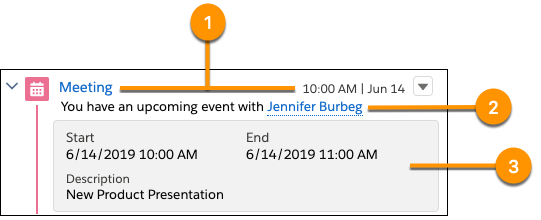
You can’t configure the first two rows of the activity timeline, but they were designed with sales rep performance in mind. For tasks, the first row (1) displays the task’s subject and due date. For events, it shows the subject and start date. And for logged calls and sent emails, it shows the subject and the logged or sent date. The second row (2) summarizes the activity. The summary is automatically generated to show the most useful information for the current context.
Customize the Activity Timeline
Salesforce admins can customize what users see in the details section (3) by changing the compact layout for the current object. The details section is visible when an activity is expanded and includes fields from the activity’s compact layout.
To customize the activity timeline:
- Review Activity Timeline Customization Considerations.
- Follow the steps in Customize the Fields that Display on Tasks in the Activity Timeline.
- Check out Create Compact Layouts for more details on customizing activity details.
- View Notes on Compact Layouts to avoid complications.