---
schema_version: "1"
id: d872f21b55a49c9230b0490102bb62de993b0524eb0d661249146165f60ae6bf
title: Enable the Japanese Imperial Calendar
collection: admin
version: current
locale: en-us
portal_url: https://docs.salesforce.com/admin/current/en-us/xcloud/264-0-0/enable_japanese_imperial_calendar.md
canonical_url: https://help.salesforce.com/s/articleView?id=xcloud.enable_japanese_imperial_calendar.htm&release=264.0.0&type=5
source_site: help.salesforce.com
content_type: documentation
content_hash: ad15c164a61ca1ff107ace00dadb29383abe8aac9b1d4ad06577870a8f76eb63
description: Display the imperial calendar for users with the Japanese (Japan) locale.
products:
  - Salesforce Platform
  - Cross Cloud
release: "264"
---
# Enable the Japanese Imperial Calendar

Display the imperial calendar for users with the Japanese (Japan) locale.

### Required Editions

<table class="slds-table slds-table_bordered slds-max-medium-table_stacked slds-m-bottom_small edition"><colgroup><col></colgroup><tbody><tr class=""><td class="slds-cell-wrap" style="vertical-align:top;">Available in: Lightning Experience</td></tr><tr class=""><td class="slds-cell-wrap" style="vertical-align:top;">Available in: <strong>Group</strong>, <strong>Professional</strong>, <strong>Enterprise</strong>, <strong>Performance</strong>, <strong>Unlimited</strong>, and <strong>Database.com</strong> Editions</td></tr></tbody></table>

<table class="slds-table slds-table_bordered slds-max-medium-table_stacked slds-m-bottom_small permission">
        <colgroup>
          <col style="width:50%">
          <col style="width:50%">
        </colgroup>
        <thead class="slds-text-title_caps ">
          <tr class="">
            <th scope="colgroup" class="slds-cell-wrap" colspan="2" style="text-align:center;vertical-align:top;" id="d133072e56">User Permissions Needed</th>
          </tr>
        </thead>
        <tbody>
          <tr class="">
            <td data-label="User Permissions Needed" class="slds-cell-wrap" style="vertical-align:top;" headers="d133072e56 ">To modify user interface settings:</td>
            <td class="slds-cell-wrap" style="vertical-align:top;" headers="d133072e56 ">Customize Application</td>
          </tr>
        </tbody>
      </table>

1. From Setup, enter User in the Quick Find box.
2. Select **User Interface**.
3. Select **Enable Japanese Imperial Calendar in Lightning Experience for the Japanese (Japan) locale**.

![Example](https://sf-zdocs-cdn-prod.zoominsoftware.com/tdta-xcloud-setup-264-0-0-production-enus/6f21df35-9ea0-4f53-ac94-45c3b5dfd5bc/images/icon_example.png)

Example

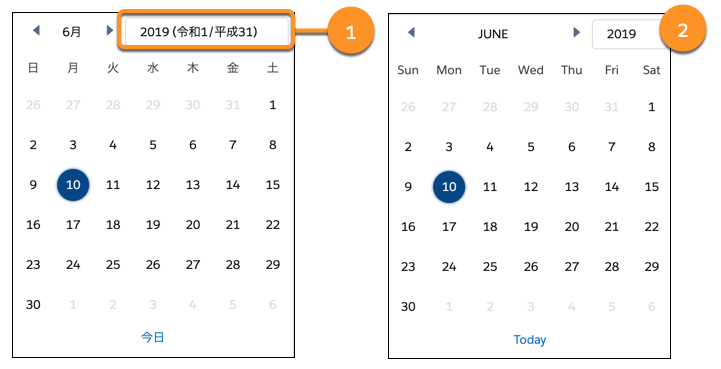
When the imperial calendar is enabled, only users with a locale of “Japanese (Japan)” can see it (1).
![Comparison of calendar with Japanese or other locale when imperial calendar is enabled](https://sf-zdocs-cdn-prod.zoominsoftware.com/tdta-xcloud-setup-264-0-0-production-enus/6f21df35-9ea0-4f53-ac94-45c3b5dfd5bc/setup/images/calendar_comparison_imperial_cal_enabled.png)

The imperial calendar information is hidden for users with other locales (2).

Make sure that users who want to view the imperial calendar set their locale to Japanese (Japan) and their language to Japanese.