---
schema_version: "1"
id: 21ba7e3b0e3319e4d5e6866b5aef7a100b1afc9c37e8909981bdd1ac07041d4c
title: Enable Partitioned Domains
collection: admin
version: current
locale: en-us
portal_url: https://docs.salesforce.com/admin/current/en-us/xcloud/264-0-0/domain_name_partitioned_domains_enable.md
canonical_url: https://help.salesforce.com/s/articleView?id=xcloud.domain_name_partitioned_domains_enable.htm&release=264.0.0&type=5
source_site: help.salesforce.com
content_type: documentation
content_hash: 28d5fedf25d2b036b61deea74a40a2638622945650886d5d50074ba18a08961c
description: To maximize the availability of your orgs, enable and deploy partitioned domains for your My Domain in your existing Developer Edition org, demo org, patch org, sandbox, scratch org, or Trailhead Playground. Partitioned domains allow Salesforce to gradually roll out service delivery changes by org type. When a domain is partitioned, it includes a word related to the org type, which also makes it easier to identify an org by a URL.
products:
- Salesforce Platform
- Cross Cloud
release: "264"
---
# Enable Partitioned Domains
To maximize the availability of your orgs, enable and deploy partitioned domains for your My Domain in your existing Developer Edition org, demo org, patch org, sandbox, scratch org, or Trailhead Playground. Partitioned domains allow Salesforce to gradually roll out service delivery changes by org type. When a domain is partitioned, it includes a word related to the org type, which also makes it easier to identify an org by a URL.
### Required Editions
Available in: both Salesforce Classic and Lightning Experience
Available in: Group, Essentials, Professional, Enterprise, Performance, Unlimited, and Developer Editions
User Permissions Needed
To edit My Domain settings:
Customize Application
Partitioned Domains are available in Developer Edition orgs, demo orgs, patch orgs, scratch orgs, and Trailhead Playgrounds with enhanced domains. Sandboxes with enhanced domains are always partitioned. Only the sandbox partition is available in Government Cloud—Defense orgs.
Qualifying new orgs get partitioned domains by default, and you can’t disable this feature in those orgs.

Warning Before you deploy partitioned domains, update your allowlists to ensure that your users can connect to the partitioned domains.
Partitioned domains change URLs formats across your org. To review the high-level steps and the recommended practices for a My Domain change, plus how to reduce the impact on your users and customers, see [Plan for a My Domain Change](https://help.salesforce.com/s/articleView?id=xcloud.domain_name_plan.htm&release=264.0.0&type=5 "Whether you change your My Domain to update your brand, to adopt enhanced domains, or to enable partitioned domains, the URLs that Salesforce hosts for your org change. Those changes can have a large impact, and making the required updates can seem like a daunting project. To make the process as smooth as possible for you, your users, and your customers, review the high-level steps, the recommended practices, and how to reduce the impact on your users and customers.").
1. From Setup, in the Quick Find box, enter My Domain, and then select **My Domain**.
2. In the My Domain Details section, click **Edit**.
3. Select **Use partitioned domains**.
You can preview your new My Domain login URL at the bottom of the screen.
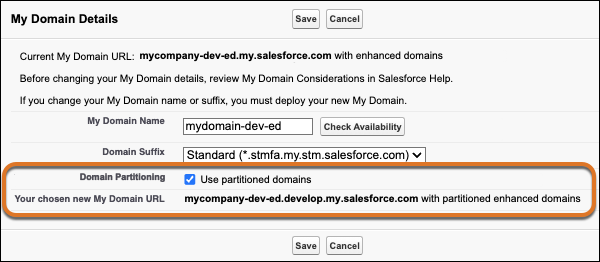
This option isn’t available in sandboxes. Sandboxes with enhanced domains are always partitioned and use the “sandbox” partition.
Otherwise, if you don’t see the Use partitioned domains option, your org doesn’t qualify for this feature.
4. Save your changes.
When you save your changes, Salesforce provisions the URLs for your My Domain with partitioned enhanced domains. The provisioning process usually finishes in a few minutes, but it can take up to 24 hours. You receive an email when your My Domain with partitioned enhanced domains is ready to be deployed and tested.
When you receive the email that your domain is ready to be deployed, [deploy your new My Domain, update your org, and test the changes](https://help.salesforce.com/s/articleView?id=xcloud.domain_name_deploy_update_test.htm&release=264.0.0&type=5 "Before you deploy a change to your My Domain, work with your users to preserve their login access to your org. To test My Domain changes, deploy the change in a sandbox. If your My Domain login URL or site URL changes, update authentication. Review and make the required updates to support the new domains. Then test access to your org and your functional workflows in Salesforce. After you complete testing in a sandbox, use the same process to update your production org. Finally, update redirection behavior for your old URLs."). After you complete testing, help your users of the non-production org get started. Provide links to pages that they use frequently and encourage them to update their bookmarks the first time that they’re redirected.
#### See Also
- [My Domain](https://help.salesforce.com/s/articleView?id=xcloud.domain_name_overview.htm&release=264.0.0&type=5 "Showcase your company’s brand with a customer-specific subdomain name in your Salesforce org URLs. With My Domain, you can include your company name in your URLs, for example, https://mycompany.my.salesforce.com. With these org-specific URLs, you can set up a custom login page, set a custom login policy, offer single sign-on, and allow users to log in with a social account. My Domain also allows you to work in multiple Salesforce orgs in the same browser at the same time.")
- [Partitioned Domains](https://help.salesforce.com/s/articleView?id=xcloud.domain_name_partitioned_domains.htm&release=264.0.0&type=5 "With partitioned domains, My Domain host names for your Developer Edition org, demo org, patch org, sandbox, scratch org, or Trailhead Playground include a word related to the org type. For example, partitioned domains for Developer Edition and patch orgs include the word develop. Partitioned domains allow Salesforce to maximize the availability of your orgs by gradually rolling out delivery changes. And it’s easier to identify an org by a URL when the domain is partitioned.")
- [Enhanced Domains](https://help.salesforce.com/s/articleView?id=xcloud.domain_name_enhanced.htm&release=264.0.0&type=5 "Enhanced domains are the current version of My Domain that meets the latest browser requirements. With enhanced domains, all URLs across your org contain your company-specific My Domain name, including URLs for your Experience Cloud sites, Salesforce Sites, Visualforce pages, and content files. This feature changed domain suffixes (the part after the My Domain name) to meet the latest security standards. With no instance names, enhanced My Domain URLs are easier for users to remember and don’t change when your org is moved to another Salesforce instance. Because enhanced domains meet the latest browser requirements, this feature was enforced in Winter ’24.")