Map the fields of the Communications Subscription Channel Types object that you want to
ingest into Data 360.
Required Editions
| Available in: Developer, Enterprise, Performance, and
Unlimited Editions. Requires the Salesforce Privacy Center license.
|
| User Permissions Needed |
| To use Preference Manager: |
Use Preference Manager |
-
In Data 360, click Data Streams, and then click
CommSubscriptionChannelType_Home.
-
On the Data Stream detail page, under Data Mapping, click
Start.
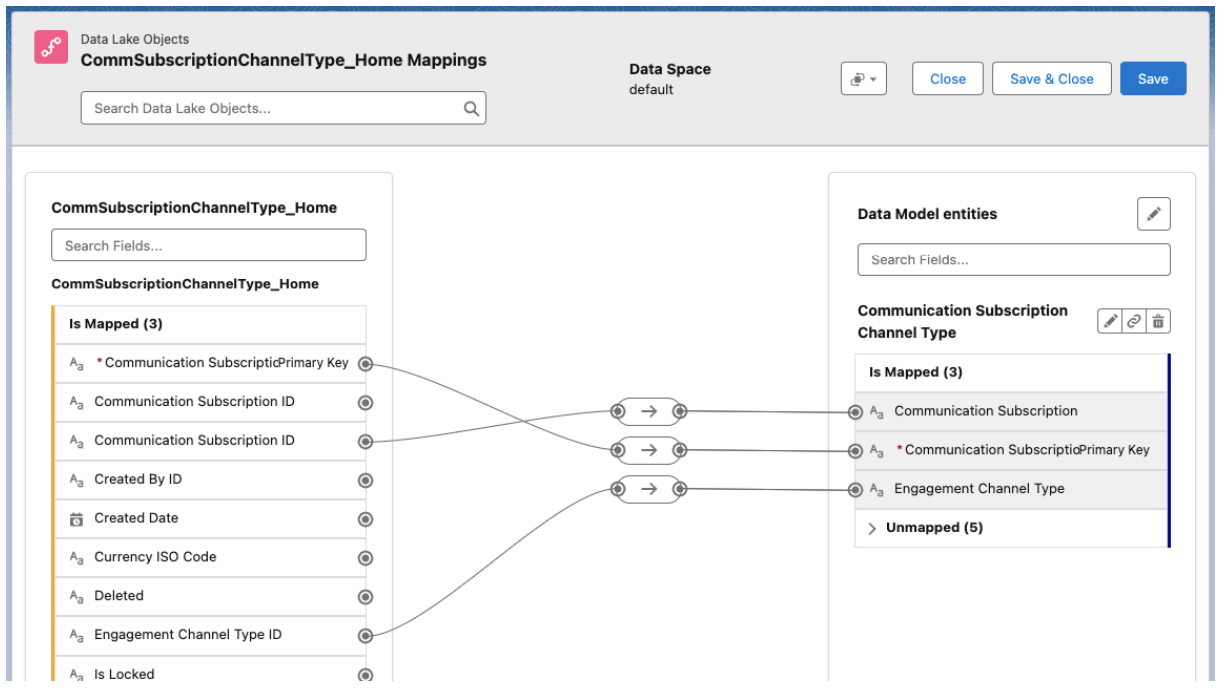
The Data 360 field mapping canvas opens.
-
Under Data Model Entities, click Select Objects and select
Communication Subscription Channel Type.
-
Map the fields.
Some data model object fields might already be mapped to the data lake object fields.
Review the existing mappings and map any other fields required for your data stream. At
minimum, you must map these fields.
- Communication Subscription Primary Key to Communication Subscription Primary Key
- Communication Subscription ID with the API name CommunicationSubscriptionId__c to
Communication Subscription (there is more than one data lake object field for Communication
Subscription ID).
- Engagement Channel Type ID to Engagement Channel Type
-
Save your work.

 Note To use Data Governance features, grant permissions to the listed objects according to Assign Data Access. If you have more than one data space, you must grant access to objects in each data space. Object names in non default data spaces follow the convention of <DataSpace Prefix>_<Object Name>.