---
schema_version: "1"
id: 18d414e36ec329aeca499d32325b88a8106d468d83c69eb76514bceec7452b06
title: Configurations
collection: admin
version: current
locale: en-us
portal_url: https://docs.salesforce.com/admin/current/en-us/xcloud/264-0-0/consent_data_model_mc_configurations.md
canonical_url: https://help.salesforce.com/s/articleView?id=xcloud.consent_data_model_mc_configurations.htm&release=264.0.0&type=5
source_site: help.salesforce.com
content_type: documentation
content_hash: 024ef41932ddac83efafd1320182c8e211994659c5cc72d1ba9eb40a3064c1d4
description: Follow these configuration steps to use the Salesforce Consent Data Model to manage and respect consent preferences in Marketing Cloud Engagement.
products:
- Marketing Cloud Account Engagement
- Cross Cloud
release: "264"
---
# Configurations
Follow these configuration steps to use the Salesforce Consent Data Model to manage and respect consent preferences in Marketing Cloud Engagement.
## Connect Consent Data to Engagement
- [Synchronize consent related objects](https://help.salesforce.com/s/articleView?id=mktg.mc_cab_data_integration_for_your_account_with_synchronized_data_sources.htm&type=5&language=en_US) to Engagement via Marketing Cloud Connect. To ensure correct data extension mapping, synchronize objects in this order.
- Contact and User
- Business Brand, Data Use Purpose, and Individual
- Contact Point Email, Contact Point Phone, and Contact Point Address
- Contact Point Consent and Contact Point Type Consent
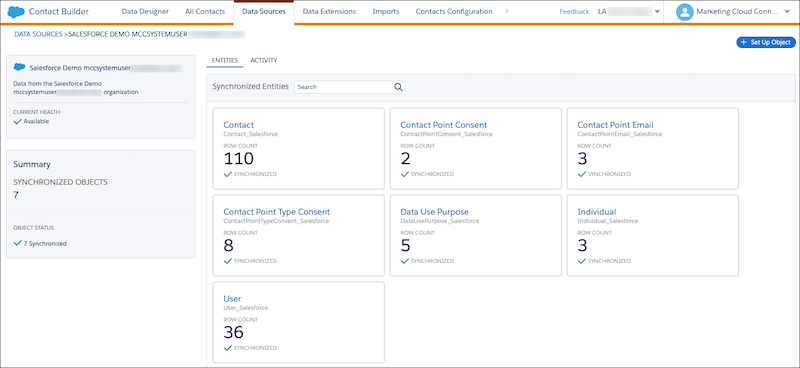
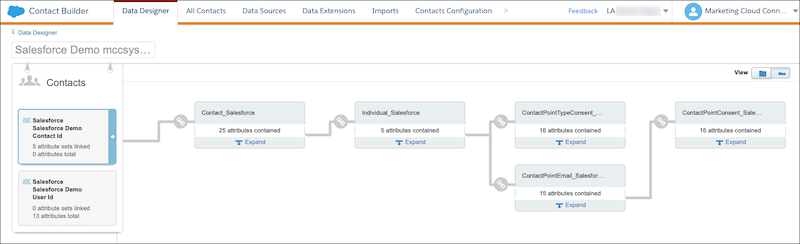
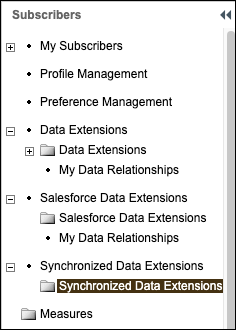
Your synchronized data appears in your local Synchronized Data Extension folder.
## Connecting Consent Data to Subscribers in Engagement
- Create a query that joins the subscriber’s contact ID with contact point consent records using Brand as a filter. For example:
```
Select c.Id, c.Email, cp.EmailAddress, cpc.Name, cpc.PrivacyConsentStatus
From Contact_Salesforce c
Join Individual_Salesforce i On c.IndividualId = i.Id
Join ContactPointEmail_Salesforce cp On i.Id = cp.ParentId
Join ContactPointConsent_Salesforce cpc On cp.Id = cpc.ContactPointId
```
- After the query is created, determine how to make the information available according to your business requirements for marketing use cases. For example:
- Update or create an automation in Automation Studio, and run these queries on a schedule.
- Write query results to a data extension in a shared folder, and make the folder available to the required child Business Units for marketing activities.
- If necessary, write additional queries or parameters that include the Data Use Purpose record.
## Retrieving Changes to Subscriber Status in Engagement

Note Retrieving changes to subscriber status is only intended to account for changes that happen natively in the Engagement [feedback loop](https://help.salesforce.com/s/articleView?id=000353531&type=1&language=en_US) and [reply mail management](https://help.salesforce.com/s/articleView?id=mktg.mc_es_reply_mail_management.htm&type=5&language=en_US) processes. This solution assumes that any profile or preference center updates are written directly to Sales Cloud or Service Cloud for customer-initiated changes.
Identify related consent objects in core and update privacy preferences. The specific consent objects affected vary depending on how the unsubscribe was received and how the customer manages consent. If a customer only manages consent by contact point type consent, then that is the only object impacted by the unsubscribe action in Engagement.
- Use `ReasonUnsub` to determine the consent object impacted. The default values are:
- Spam Complaint
- Unsubscribed from list details on subscriber properties dialog
- Unsubscribed by ExactTarget RMM service based on subscriber Leave or Reply email
- Unsubscribed by the Engagement RMM service based on subscriber Leave or Reply email
- Unsubscribed by subscriber edit API call
- Unsubscribed from the Subscription Center
- Unsubscribed via Import
- Create an [invocable action](https://developer.salesforce.com/docs/atlas.en-us.api_rest.meta/api_rest/resources_actions_invocable.htm) that executes the API to [retrieve the SubscriberStatusEvent](https://developer.salesforce.com/docs/marketing/marketing-cloud/guide/retrieving_the_subscriberstatusevent.html).
[Use complex filter parts](https://developer.salesforce.com/docs/marketing/marketing-cloud/guide/using_complex_filter_parts.html), and include the date since the last batch execution. For example:
```
CurrentStatusequalsUnsubscribedANDCreatedDategreaterThan2011-04-07T19:58:33.434707Z
```
To filter on a specific ReasonUnsub value, change the filter to use a different [SimpleOperators](https://developer.salesforce.com/docs/marketing/marketing-cloud/guide/simpleoperators.html). For example:
```
ReasonUnsublikeUnsubscribedANDCreatedDategreaterThan2022-01-01T19:58:33.434707Z
```
- To retrieve unsubscribe events from Engagement for the last 24 hours using an API call, create a schedule-triggered flow.
- Pick a date and time for the first run of the flow.
- To run the flow every 24 hours, schedule the flow to run daily.
- Create a scheduled-triggered flow to perform weekly refreshes that review all subscribers with an unsubscribed status in the All Subscribers list.
An invocable action can perform the work for both executions by allowing the primary invocable method to accept multiple dates to act as a date range using a filter. For example:
```
CurrentStatusequalsHeldANDCreatedDatebetween2009-01-01T19:58:33.434707Z2010-04-07T19:58:33.434707Z
```

Note If a subscriber resubscribes in the future, resubscribe them in Engagement as a separate action from updates to the Salesforce Consent Data Model.
#### See Also
- [_Marketing Cloud Engagement APIs and SDKs_: Retrieve the SubscriberStatusEvent](https://developer.salesforce.com/docs/marketing/marketing-cloud/guide/retrieving_the_subscriberstatusevent.html)
- [_Automate Your Business Processes_: Schedule-Triggered Flow Considerations](https://help.salesforce.com/s/articleView?id=platform.flow_considerations_trigger_schedule.htm&type=5&language=en_US)
