---
schema_version: "1"
id: 06759fea2d22a5ff22e19be64f0d31b398a2895462b87b2678e1fad886bec753
title: Connect External Objects to Your Salesforce Org
collection: admin
version: current
locale: en-us
portal_url: https://docs.salesforce.com/admin/current/en-us/xcloud/264-0-0/connect_external_objects.md
canonical_url: https://help.salesforce.com/s/articleView?id=xcloud.connect_external_objects.htm&release=264.0.0&type=5
source_site: help.salesforce.com
content_type: documentation
content_hash: 3299a8f44cfa17ce4d3534329e2312f91de9b9b7f33c7e9a7ca3a31baf378669
description: Set up the OData service as an External Data Source, and customize object tabs and External Object layouts.
products:
- Security
- Cross Cloud
release: "264"
---
# Connect External Objects to Your Salesforce Org
Set up the OData service as an External Data Source, and customize object tabs and External Object layouts.
### Required Editions
Available in: all editions
User Permissions Needed
To set up the OData service as an External Data Source:
ModifyAllData and PrivacyCenter
To customize object tabs and External Object layouts:
ModifyAllData and PrivacyCenter
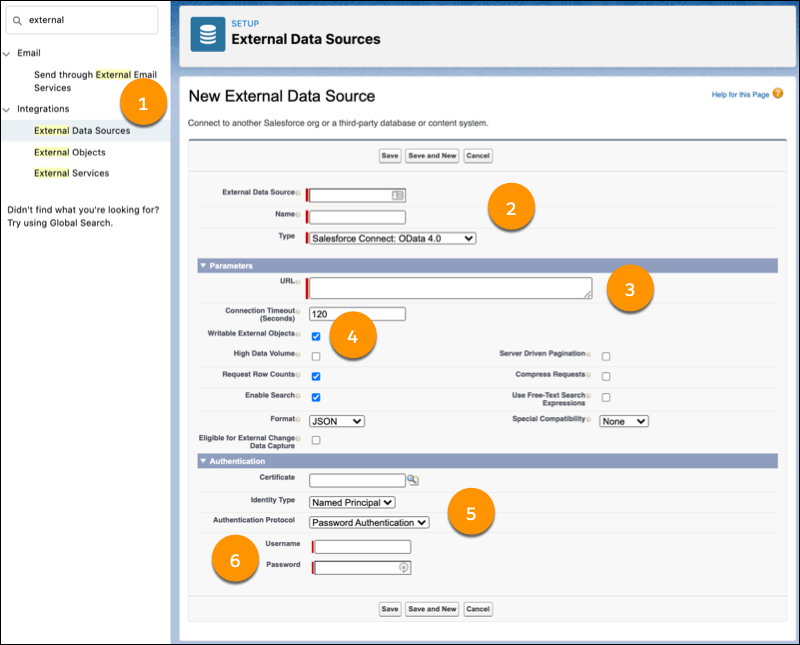
1. From Setup, in the Quick Find box, enter External, then select **External Data Sources** in the dropdown. Click **New External Data Source**.
2. Enter an External Data Source and Name, and select **Salesforce Connect: OData 4.0** as the Type.
3. Paste the OData 4.0 Service URL into the URL parameter.
4. To use the read/write capabilities of OData 4.0, select **Writable External Objects.**
5. Choose **Named Principal** as the Identity Type and **Password Authentication** as the Authentication Protocol.
6. Enter your username and password.
7. Save your work.
8. Click **Validate and Sync**. Check your connection to the external system, and select the tables you want as External Objects.

Note Initially, table names have $ characters instead of periods, but you can edit the labels later.
9. To create custom object tabs and customize layouts for External Objects, click **Edit** beside the name of the object you want to update.
To make SOQL queries against your external object, use the API name \[object name\]\_x. For example, for the external object public\_customer, the associated API name is public\_customer\_x.