The Digital Experiences app is where you access the Digital Experiences Home, all CMS
workspaces, CMS channels, all sites, and Experience Builder.
Required Editions
| Available in: Lightning Experience |
| Available in: Enterprise, Performance, Unlimited, and
Developer Editions
|
You enable access to the Digital Experiences app (previously named Salesforce CMS) through
the user profile in Salesforce Setup.
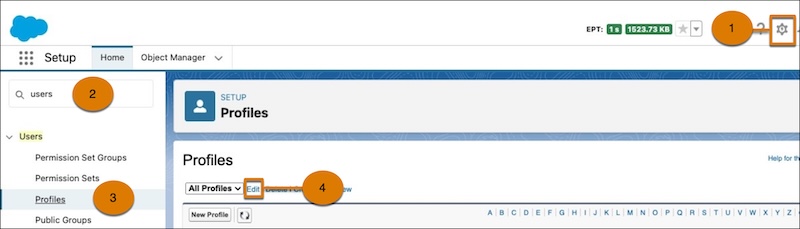
- From Setup (1), enter Users in the Quick Find box (2), then select
Profiles (3).
- Open the relevant user profile and click Edit (4).
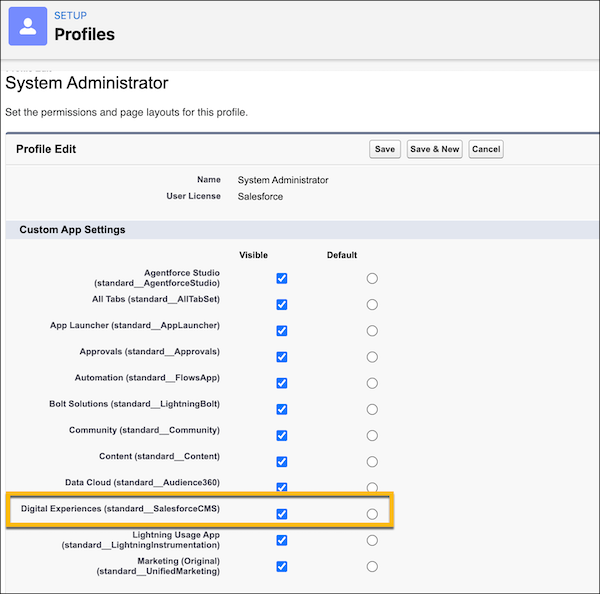
- Set Digital Experiences Home to Visible.
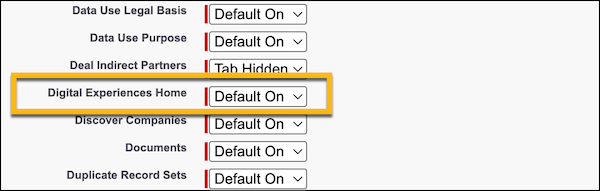
- In the Tab Settings section, set the tabs for Digital Experiences Home, CMS Channels, CMS
Workspaces, and All Sites to Default On.
- Save your changes.