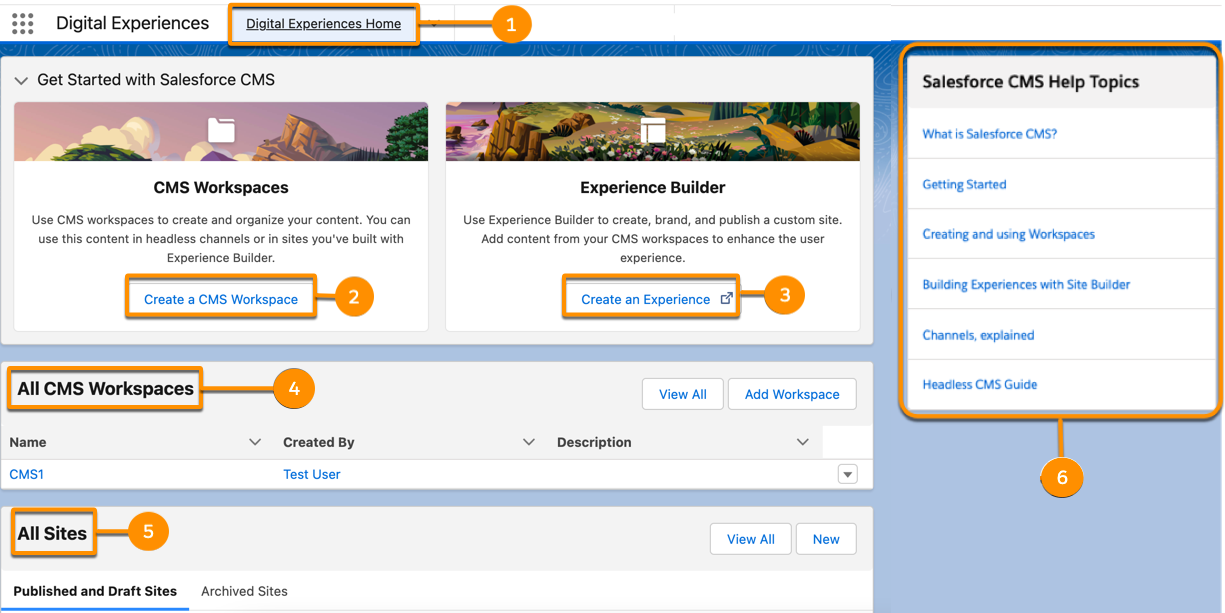
Access your CMS workspaces and site detail pages from the Digital Experiences Home tab.
Jump to CMS channels, workspaces, and sites. View existing CMS Workspaces and All Sites, or
create them from the home page. Access valuable help links to important resources without
leaving the app.
Required Editions
| Available in: Lightning Experience |
| Available in: Enterprise, Performance, Unlimited, and
Developer Editions
|
You access the Digital Experiences Home tab from the Digital Experiences App. In
Lightning Experience, from the App Launcher, open the Digital Experiences app (previously
named Salesforce CMS).
Use the Digital Experiences Home tab to jump to CMS Home, CMS Channels, All Sites,
and CMS Workspaces from anywhere in the app (1). Get quick access to the create CMS
workspace guided setup process (2). In the Experience Builder tile, get quick access to
Experience Builder, where you can create sites that use your CMS workspace content (3). From
the All CMS Workspaces tile, manage recent CMS workspaces or create them. To view all your
workspaces, click View All (4). From the All Sites tiles, manage
recent sites or create them. To view all your sites, click View All
(5). From the Salesforce CMS Help Topics tile, access links to help topics, blogs, and
Trailhead content (6).