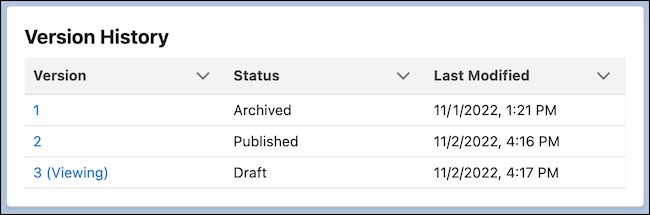
On the content detail page, the Version History list shows all versions of a content item, its status, and the date and time it was last modified.
Required Editions
| Available in: Lightning Experience |
| Available in: Enterprise, Performance, Unlimited, and Developer Editions |
Version history gives you a point-in-time snapshot of your content, so you can compare versions and see the date and time they were published. Version History works a bit differently between a CMS workspace and an enhanced CMS workspace.
Content Version History in a CMS Workspace
The version currently open in your content preview window is labeled Viewing. Your content can have a status of Draft, Staged, Published, or Archived.
- Draft: Content that hasn’t been published or scheduled for publication
- Staged: Content that’s scheduled to publish or unpublish
- Published: Content that’s published and available for use in your live sites
- Archived: Previously published versions of content that has been unpublished and is no longer available on your sites
One draft or published version exists at a time, but you can have many archived versions. To view an iteration of the content, click the version number. Depending on its status, you can review, copy, edit, publish, or unpublish the content.
To update your view of the versions, select Refresh Tab in the tab menu.