
In Experience Builder, you can create a privacy policy page and link to it from within your Mobile Publisher for Experience Cloud app.
Required Editions
| User Permissions Needed | |
|---|---|
| To customize an Experience Cloud site: |
|
| To publish an Experience Cloud site: |
|
Use these steps to set up a publicly available privacy policy page and a customizable User Profile menu. From the customizable User Profile menu, you can add a menu item that links to your privacy policy page.
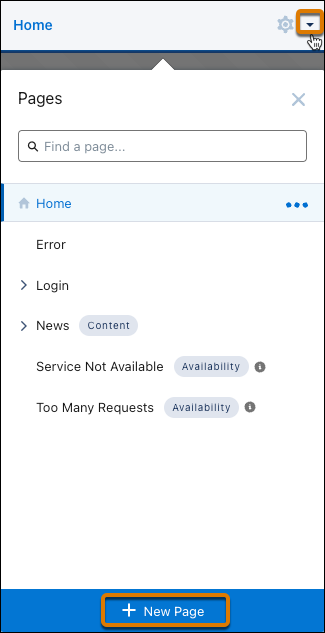
- In Experience Builder, click the Pages menu on the top toolbar, and
then click New Page at the bottom of the menu.
- From the New Page window, select Standard Page.
- Select a layout and click Next.
- In the Name field, enter Privacy Policy.
- Enter the URL for your privacy policy, or keep the auto-generated URL.
- Click Create. The Privacy Policy page opens in Builder.
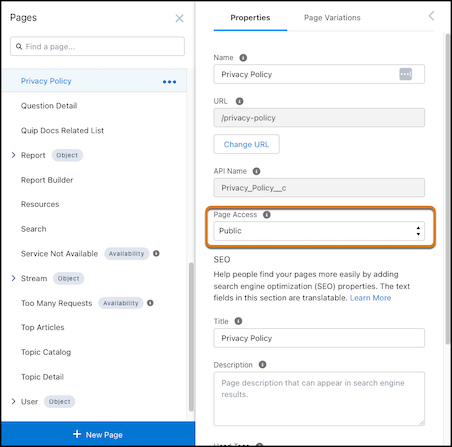
- Click the Page Properties icon.

- On the Properties tab, from the Page Access field, select Public,
and then close the Pages panel.
- Add your privacy policy content to the page.
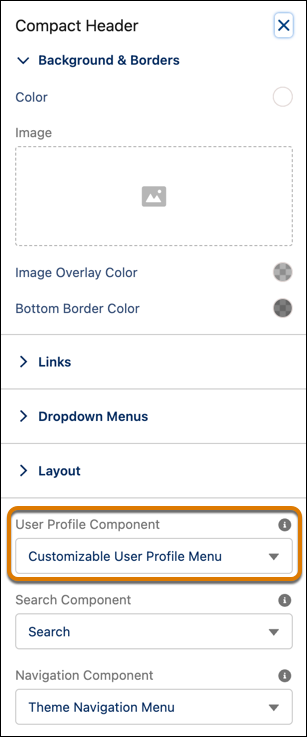
- Click the header component on the canvas to open its property panel.
- From the User Profile Component field, select Customizable User Profile
Menu.
- Publish your site.