When using Mobile Publisher, you can apply biometric ID credentials to make your environment more secure. To use biometric ID credentials, your device must have a device passcode or PIN enabled and FaceID (for iOS) or Android Security and Privacy | Biometrics.
Required Editions
| Setup for Mobile Publisher available in: Lightning Experience |
| Setup for Mobile Publisher available in: production only (not sandbox) |
| Available in Lightning Experience in: Enterprise, Performance, and Unlimited Editions |
| User Permissions Needed | |
|---|---|
| To create and modify a Mobile Publisher project: | Manage mySalesforce Apps |

Mobile Publisher apps support biometric ID app unlock using face or fingerprint credentials when the biometric authentication method is available on the Android or iOS device. Depending on the mobile device, Mobile Publisher also supports Swipe and PIN unlock.
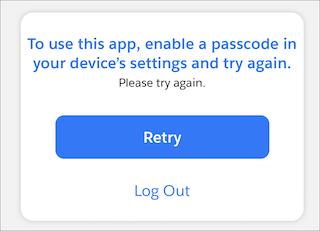
When you enable biometric ID app unlock, users are prompted for their biometric credentials when they open the app with a cold start. A cold start is when the user opens the app for the first time or opens the app after closing the app entirely (swiping up to quit the app). If the user has no security settings enabled, they’re forced to log out of the app.
If you enable the Biometric ID App Unlock feature alone without the User Opt-In Biometric Login feature, users can’t log in to your app without configuring biometric login.
- From Setup, in the Quick Find box, enter External Client App Manager, and then select External Client App Manager.
- Select the external client app that you want to enable biometric ID unlock for.
- In the Custom Attributes section, click the add button.
- For the attribute key, enter ENABLE_BIOMETRICS_UNLOCK. For the attribute value, enter “TRUE”.
- Save your changes.
After you enable biometric ID app unlock, your app users must configure their devices to enable unlocking apps with biometric ID credentials in order to use this login method.
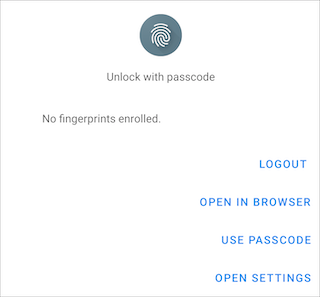
If Android app users don’t configure their biometric ID credentials, they’re prompted to proceed with one of these options: log out, log in on a browser, log in with a passcode, or to open their device’s settings.
If iOS app users don’t configure their biometric ID credentials, they’re prompted to log in with a passcode. If the iOS app user doesn't have biometric ID app unlock or passcode unlock configured on their device, the user is prompted to enable a passcode.