
After you set up your external client app, you can see its settings in the External Client App Settings tab.
Required Editions
| Setup for Mobile Publisher available in: Lightning Experience |
| Setup for Mobile Publisher available in: production only (not sandbox) |
| Available in Lightning Experience in: Enterprise, Performance, and Unlimited Editions |
| User Permissions Needed | |
|---|---|
| To create and modify a Mobile Publisher project: | Manage mySalesforce Apps |
| To create and modify a site: | Create and Set Up Experiences |
-
Click View to see the ECA’s detail page and version history. The
version history includes where the ECA is deployed.
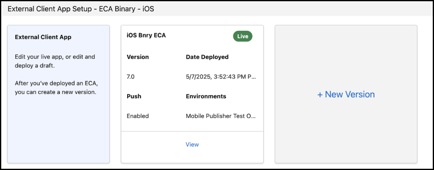
- After an ECA is deployed, you can’t edit it. Click + New Version to create and deploy a new version of the app. If a draft version already exists, this card will be replaced with a link to your draft.
- Clicking + New Version takes you back to the ECA setup form, pre-filled with the details from your last version. The version number is automatically updated.
- To view older versions, click View more.

Note You can only have one ECA version in an org.