
Choose which orientations to support in your Mobile Publisher for Experience Cloud app. You can also opt in to support users who want to experience your branded Experience Cloud app on an iPad.
Required Editions
| Setup for Mobile Publisher available in: Lightning Experience |
| Setup for Mobile Publisher available in: production only (not sandbox) |
| Available in Lightning Experience in: Enterprise, Performance, and Unlimited Editions |
| User Permissions Needed | |
|---|---|
| To create and modify a Mobile Publisher project: | Manage mySalesforce Apps |
| To create and modify a site: | Create and Set Up Experiences |
Mobile Publisher for Experience Cloud supports both portrait and landscape modes for iPhone, Android phone, and Android tablet devices. Portrait mode only is selected by default, but you can choose to support both landscape and portrait orientations in Mobile Publisher setup.
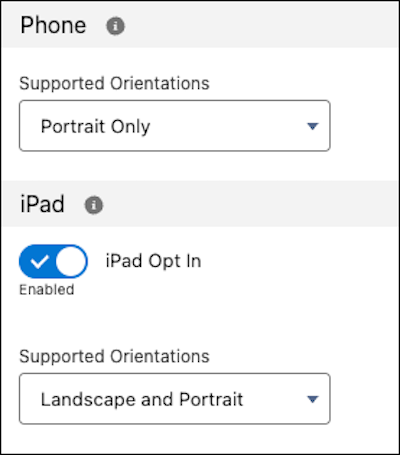
You can choose to opt in to iPad support for your branded Experience Cloud app in Mobile Publisher.
Mobile Publisher supports these orientation modes for iPad:
- Portrait only
- Landscape only
- Landscape and Portrait

It’s important to keep in mind that components that work in one orientation mode might not work with another orientation mode. For example, if your component works in Portrait mode, it might not work as expected in Landscape mode.
Use the Publisher Playground app to test and confirm that your components work in your preferred orientation mode before you decide to opt in to support iPad.