
Full content push notifications are alerts that appear on a mobile device when users have your app installed, but aren’t actively using it. These alerts can consist of text, icons, and sounds, depending on the device type.
Required Editions
| Setup for Mobile Publisher available in: Lightning Experience |
| Setup for Mobile Publisher available in: production only (not sandbox) |
| Available in Lightning Experience in: Enterprise, Performance, and Unlimited Editions |
| User Permissions Needed | |
|---|---|
| To create and modify a Mobile Publisher project: | Manage mySalesforce Apps |
| To create and modify a site: | Create and Set Up Experiences |
- From Setup, enter Connected Apps in the Quick Find box, then select Manage Connected Apps.
- Choose the Connected App you want to edit.
- Select Display full content push notifications and click Save.
Ensure that you have the following check-boxes selected in Delivery Settings.
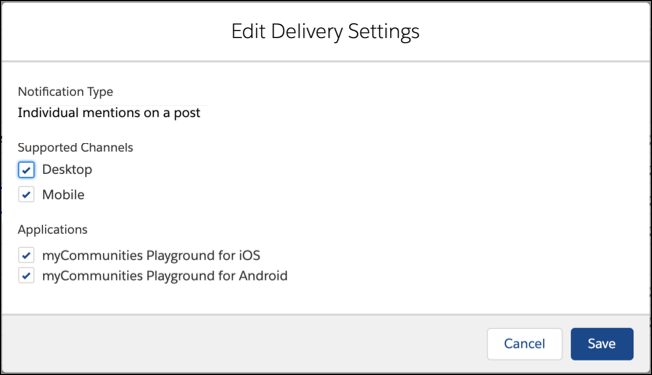
Mobile Publisher supports all custom notifications configured through Notification Builder, Process Builder, or Flow Builder. Notifications created using the Notifications API are also supported.
These notification types are supported in all Experience Cloud sites: Lightning Web Runtime (LWR), Aura, and Visualforce. They’re supported for standard components and functionality found in LWR and Aura sites, and any custom components created in those sites.

Unless otherwise noted, notifications for the following events are available only in Aura sites, since the following functionality is only standard for Aura sites.
- Group manager post announcements
- Group mentions on a post
- Individual mentions on a post
- New comments on a post
- Posts to a group
- Posts to a profile
- New messages (direct messages) - LWR and AuraNote To enable the New messages notification type for your Mobile Publisher app, create a support case.