
When you create an Apple Auth. Provider in Salesforce for your Mobile Publisher app, Salesforce generates important client configuration URLs.
Required Editions
| Setup for Mobile Publisher available in: Lightning Experience |
| Setup for Mobile Publisher available in: production only (not sandbox) |
| Available in Lightning Experience in: Enterprise, Performance, and Unlimited Editions |
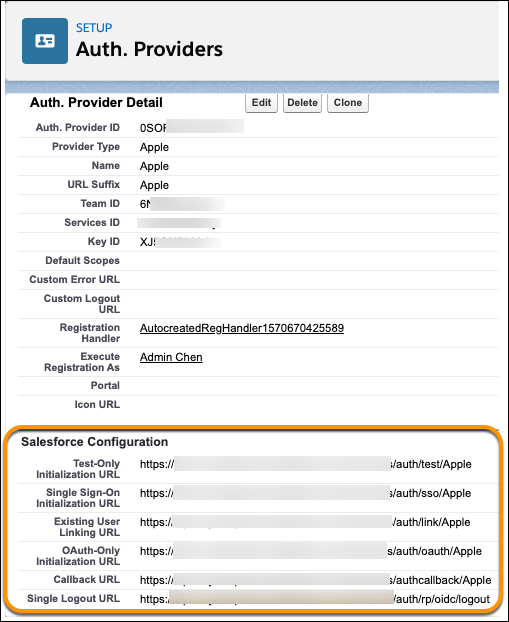
Test-Only Initialization URL
Use this URL to ensure that the third-party provider is set up correctly. The admin opens this URL in a browser, signs in to Apple, and is redirected back to Salesforce with a map of attributes.

Single Sign-On Initialization URL
Use this URL to perform SSO into Salesforce from Apple (using Apple credentials). The user opens this URL in a browser and signs in to the third party. Apple either creates a user or updates an existing user. Then Apple signs the user into Salesforce as that user.
Existing User Linking URL
Use this URL to link existing Salesforce users to their Apple account. The user opens this URL in a browser, signs in to Apple, logs in to Salesforce, and approves the link.
OAuth-Only Initialization URL
Use this URL to obtain OAuth access tokens for Apple. Users must authenticate with Salesforce for the Apple service to get a token. This flow doesn’t provide for future SSO functionality.
Callback URL
Use this URL for the endpoint that the Sign In with Apple service uses to call back to Salesforce. Apple redirects to the callback URL with information for each client configuration URL.