---
schema_version: "1"
id: 3bfaf2f6d8f9e7d1588c9078c8c6250386cc19569350ebf6cfc729520812b220
title: Add Topics to Records in Salesforce Classic
collection: admin
version: current
locale: en-us
portal_url: https://docs.salesforce.com/admin/current/en-us/xcloud/264-0-0/basics_add_topics_records.md
canonical_url: https://help.salesforce.com/s/articleView?id=xcloud.basics_add_topics_records.htm&release=264.0.0&type=5
source_site: help.salesforce.com
content_type: documentation
content_hash: 2996c6cd5d8cded79f9e22cc896ab76a117308eb3b818cafde8eed0ee8ba7878
description: Add topics to quickly organize records around common themes, retrieve them in list views, and (with Chatter) view them on topic detail pages.
products:
- Salesforce Platform
- Cross Cloud
release: "264"
---
# Add Topics to Records in Salesforce Classic
Add topics to quickly organize records around common themes, retrieve them in list views, and (with Chatter) view them on topic detail pages.
### Required Editions
Available in: Salesforce Classic
Available in: all editions
User Permissions
Needed
To add topics to a record:
Read and Edit on the record
AND
Assign Topics to add existing
topics
OR
Create Topics to add new topics
Topics for objects must be enabled before you can add topics to records of that object type.

Note All topic names are public and appear in search results, but this doesn’t affect the visibility of records that have topics.
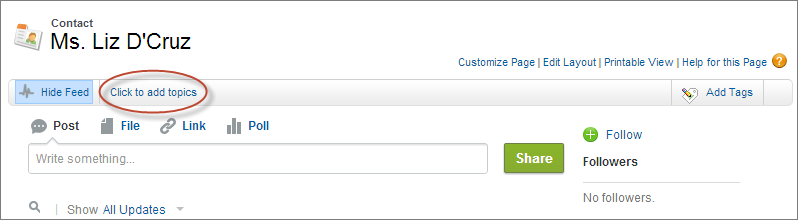
1. On the top of the record detail page under the record name, click **Click to add topics**. If the record already has topics, click **Topics**.
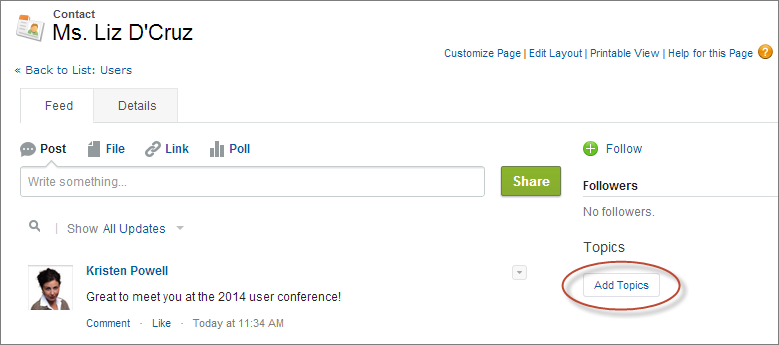
If your administrator enabled feed-based layouts, click **Add Topics** in the sidebar of the feed view.
2. In the topic editor, start typing your text. As you type, you can pick a topic from the list of suggestions, or keep typing to create your own unique topic. To add more than one topic, type a comma after each topic.
Commas ( , ) and closing square brackets ( \] ) automatically end a topic. Other punctuation, symbols, and separators are supported in topic names.
Records can have up to 100 topics.
3. When you’re done adding topics, click **Done** or press **Enter**.
You can now use topics you add to records to filter your list views. If your administrator enabled Chatter, topics added to records become links to topic detail pages, where the Records tab shows all associated records. While you can enable topics for tasks, the Records tab is not supported for tasks. Topics on posts on a record aren’t automatically added to a record’s topics; you must add the topics to the record. Topics are added to a file automatically when the topics are added to the post with the file attachment or to comments on the post with the file attachment.