
Save time and effort with the Salesforce Foundations setup page, your primary setup experience powered by Salesforce Go. After you review the considerations, turn on foundational features from a single page and manage feature and app availability. Your Salesforce Foundations license unlocks the entire page.
Required Editions
| View supported editions |
How It Works
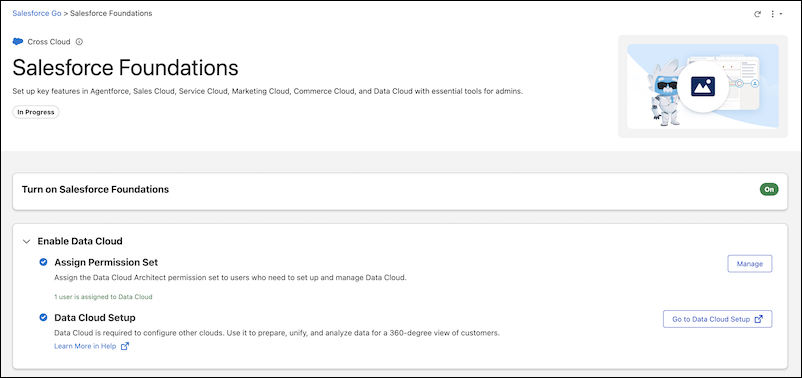
The Salesforce Foundations setup page, powered by Salesforce Go, brings your foundational setup options together on one page. From Setup, in the Quick Find box, enter Foundations and select Salesforce Foundations. Click Get Started, and then turn on the features you want directly from the setup page. You have full control over which features to add and which users can access apps.
After you turn on a feature, refresh the Salesforce Foundations setup page to see its updated status. You don't need to log out and back in.
Licenses and the Prerequisites
Your Salesforce Foundations license unlocks the entire Salesforce Foundations setup page, including the Home app, Email Builder, and the Foundations navigation. Other licenses, such as Data Cloud and Agentforce, don't control access. Features that require those licenses show their own messages.
If you have only a Foundations license, the page shows an On status and a Prerequisites section with an Update Licenses button. The On status means that your license gives you access to the entire page. The Prerequisites section appears until you add the missing licenses. If you have Foundations, Agentforce, Data Cloud, and Flex Credit licenses, the Prerequisites section doesn't appear.
| Issue | Resolution |
|---|---|
| The prerequisites section says that licenses aren't installed. | You selected only some of the recommended licenses on the previous Foundations setup page. Click Update Licenses to add the missing licenses. |
| You can't install an app from the Salesforce Foundations setup page. | Click Update Licenses to make sure that you have the licenses needed to unlock all Foundations functionality. |
| Agentforce for Sales or Agentforce for Service shows the message "To enable this feature, go to Salesforce Foundations and add the required products." | You don't have the required licenses. Return to the Salesforce Foundations setup page and add the required products. |
Required Permissions
Accessing the Salesforce Foundations setup page requires the View Setup and Configuration, Customize Application, and Modify All Data permissions.
To add the products that power key Salesforce Foundations features, you need access to Your Account. You must also have the Manage Billing or Your Account App Admin User permission set.
Some product settings on the Salesforce Foundations setup page require additional permissions before you can configure them. For example, to set up and manage Data Cloud, you need the Data Cloud Architect permission set, and, if you're working in a companion org, you'll need to log into your home org.