Salesforce Backup is a managed package that you install by using the link from your subscription order form.
Required Editions
| Available in: Lightning Experience |
| Available in: Professional, Enterprise, Performance, and Unlimited Editions with the Salesforce Backup & Recover add-on license. |
| User Permissions Needed | |
|---|---|
| To install the Salesforce Backup managed package: |
Modify All Data AND System Administrator |

Note This content relates to Salesforce Backup. Read about
Backup & Recover in Own from Salesforce.
Note Before you install the Salesforce Backup managed package, assign the Modify All Data
permission to the integration user. Automated processes via the integration user require
access to all supported objects.
- Find the order form that your organization received when you purchased Backup and Restore. It contains the installation URL.
- Click the URL, and then download the Salesforce Backup managed package.
-
From the Managed Package page, select Install for Admins Only.
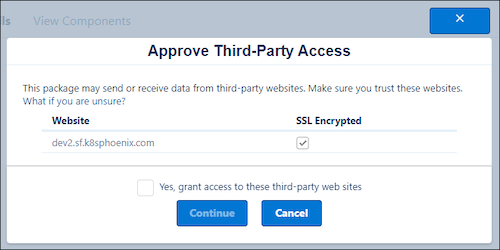
If you’re prompted to approve third-party access, select Yes, grant access to
these third-party web sites, and then click Continue.
Although
dev2.sf.k8phoenix.comisn’t a third-party URL, Salesforce uses this domain to support the backup and restore process.You receive an email notification that the package is installed.