---
schema_version: "1"
id: 75754c2df73938dcc6ea9f5e6dc193e9ae05aec26c2d0919f91c2899c1323dab
title: Publish and Manage a Legacy Salesforce Archive Policy
collection: admin
version: current
locale: en-us
portal_url: https://docs.salesforce.com/admin/current/en-us/xcloud/264-0-0/archive_manage_policy.md
canonical_url: https://help.salesforce.com/s/articleView?id=xcloud.archive_manage_policy.htm&release=264.0.0&type=5
source_site: help.salesforce.com
content_type: documentation
content_hash: e8d664a4a272b380c3aa423f65f4890143d6da3840a958534bb10a52681d81aa
description: To add your Legacy Salesforce Archive policy to the job queue, publish it. You can also edit, delete, or immediately run a policy.
products:
- Salesforce Platform
- Cross Cloud
release: "264"
---
# Publish and Manage a Legacy Salesforce Archive Policy
To add your Legacy Salesforce Archive policy to the job queue, publish it. You can also edit, delete, or immediately run a policy.
### Required Editions
Available in: Developer, Enterprise, Performance, and Unlimited Editions. Requires the Salesforce Archive license.
User Permissions Needed
To create, edit, and schedule Archive Policies:
Manage Archive Policies

Note This content relates to Legacy Salesforce Archive. Read about the Archive managed package in [Own from Salesforce](https://help.salesforce.com/s/articleView?id=platform.own_from_salesforce.htm&type=5&language=en_US).

Tip Make sure to publish your policy each time you update its object configuration. Otherwise, your changes aren't saved.
1. From the Archive Policies page, select the policy that you want to manage.
2. Select an option for your policy.
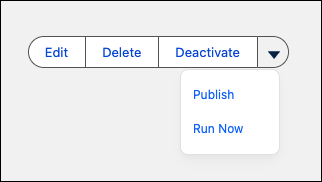
- **Edit** opens a window where you can change the policy name, description, and run frequency.
- **Publish** saves any recent changes to your policy and puts it in the job queue. Make sure to publish your policy each time you update it. Publishing also reactivates policies that were previously deactivated.
- **Deactivate** removes the policy from the job queue. The policy doesn't execute until you republish it. You can only deactivate policies that are published.
- **Delete** removes the policy from your org. Deleted policies can't be recovered.
- **Run Now** creates a new job session for the policy with an immediate runtime. If there's no other job in progress, the new job runs within five minutes after it's created. If another job is already in progress, the new job starts running afterwards.