Payouts are calculated for each record in the aggregate object. The admin can either use
the default Rebate Member Product Aggregate object to store aggregate records, or create a
custom object for the purpose. The aggregate values get updated each time a Data Processing
Engine is run to process the transactions as defined in a rebate type. Track the aggregate
records to view the total transaction quantity, total transaction amount, and other details for
each rebate type for a member in a specific payout period.
Required Editions
| Available in: Enterprise, Unlimited, and Developer
Editions that have Rebate Management enabled. |
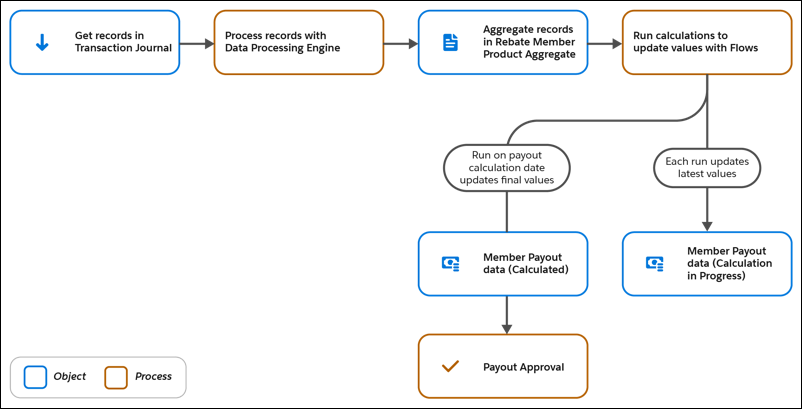
Transactions of a member for a single payout period for a specific rebate type are
filtered and processed with Data Processing Engine definitions. The results are written
back to the aggregate object. Based on how a program manager defines the values for the
Calculation Type and Calculation Definition fields of a Program Rebate Type record, the
following aggregate records are created.
- If the calculation type is Aggregate Based, the Data Processing Engine in the
Calculation Definition field aggregates the eligible transactions by product, by
member, or by the defined aggregation logic. The flow that runs this definition then
creates or updates the data in Rebate Member Product Aggregate records.
- If the calculation type is Aggregate Growth Based, the Data Processing Engine in the
Calculation Definition field aggregates the eligible transactions by member for the
year-on-year growth amount and percentage. The flow that runs this definition then
creates or updates the data in Rebate Member Product Aggregate records.
- If the calculation type is Per Transaction, the Data Processing Engine in the
Calculation Definition field filters the eligible transactions but doesn’t aggregate
the values for quantity or amount. The flow that runs this definition then creates
or updates the data in Rebate Member Product Aggregate records.
Payouts are updated based on how frequently a flow is scheduled to calculate payouts
(weekly, monthly, quarterly, each time a Transaction Journal record is created, or
custom). The values in the aggregate object are used for calculation, and the payout
values are updated for a member. During a payout period (month, quarter, year), the
Member Payout status is Calculation in Progress. On the payout calculation date for the
period, the status changes to Calculated. At this point, the payout amounts can be
submitted for approval through a standard approval process.
