
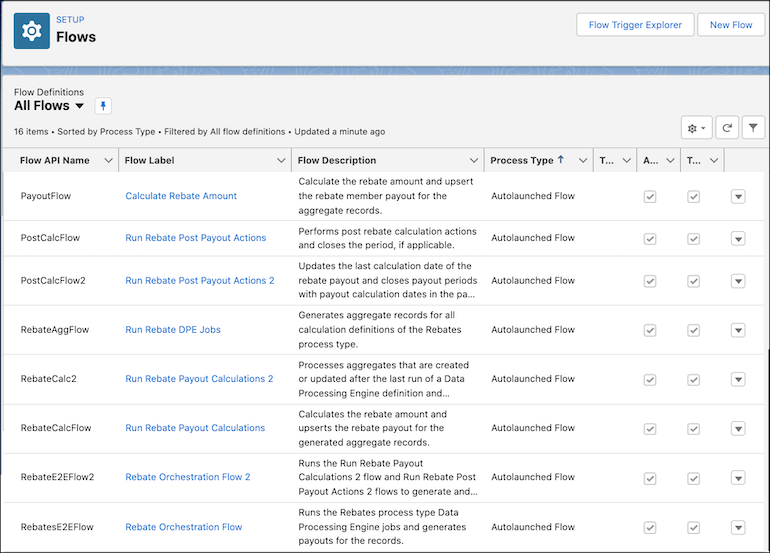
Rebate Management comes with Flow templates that help orchestrate rebate calculations. You can configure and use them for your end-to-end rebate calculations and extend the templates as required. The flows trigger the data processing engine definitions to update the aggregate records, and also trigger calculation processes to update the final payout amounts. Admins can schedule the flows at regular intervals.
Required Editions
| Available in: Enterprise, Unlimited, and Developer Editions that have Rebate Management enabled. |
Manage Flow Templates

It’s recommended that you clone the flow templates available with Rebate Management and run your cloned flows instead of the predefined flows. As and when the flow templates are updated in later releases, you can choose to update your cloned flows without affecting any current rebate calculation runs.
When you clone a template, the cloned template can be customized and then activated for rebate processing. You can also choose to create a flow from scratch, and add the required flow actions and data processing engine definitions to it. Activate the flow to save your customizations.
Additional Learning Resources for Flow Builder
Check out these resources to learn how to best use Flow Builder.
| Resource | Information Available |
|---|---|
| Flow Builder | A topic that helps you get familiar with the Flow Builder’s requirements and user interface. |
| Flow Concepts | Information about what a flow is made of and how it’s different from workflow rules. |
| Build a Simple Flow | A Trailhead project that helps you use the Flow Builder. |
| Run a Data Processing Engine Definition in Flows | A task topic on how to run data processing engine definitions with flows. |
| Flow Best Practices | Information about how to improve your experience in building and managing flows. |
| Troubleshoot Flows | Information about how to resolve issues with flows. |
- Rebate Orchestration Flow
Run the Rebate Orchestration Flow to calculate rebate amounts and process payouts. It includes other predefined Rebate flows as subflows. The flow searches for data processing engine definitions with Process Type as Rebates and triggers the aggregation of data. Then, the flow runs the calculation process to generate member payout amounts. - Rebate Orchestration Flow 2
Rebate Management includes a simpler and more scalable orchestration flow called Rebate Orchestration Flow 2. Just like the Rebate Orchestration Flow, this flow automates rebate records aggregation, calculation of rebate amounts, and payout processing. This flow includes a Calculate Rebate Payout for All Periods batch job that calculates the rebate payouts for aggregate records of all periods. The last execution date of the batch job is used to determine which aggregate records are used to calculate the rebate amounts and generate payouts. After payouts are successfully generated, a Data Processing Engine job closes the payout periods. This flow includes the other flows as subflows.