
Clone and use the data processing engine definitions for Rebate Management as-is, extend them to meet your business needs, or create definitions from scratch. To use a definition for a rebate type, activate the definition.
Required Editions
| Available in: Enterprise, Unlimited, and Developer Editions that have Rebate Management enabled. |
Clone Data Processing Engine Templates
Clone the Data Processing Engine templates readily available with Rebate Management. When you clone a template, the cloned definition can be activated and used as the calculation definition in a rebate type for rebate processing. You can customize the cloned definition to add or edit the nodes, aggregation logic, and variables.
The Insert Orders to Journals is also automatically available in the org, but the Process Type is Standard. If you want to use this definition as a calculation definition in a rebate type, make sure you change the Process Type to Rebates when you clone it.
Create Custom Data Processing Engine Definitions
Create a Data Processing Engine definition from scratch if the predefined templates don’t meet your requirements. When creating a data processing engine definition, for Process Type, select Rebates. Ensure that the source objects used in the definition are available in the org and that you have Read and Create permissions for the objects.
If the data source objects used in the definition require access to Setup objects, ensure they’re enabled. For example, from Setup in Order Settings, enable Order if Order is a data source object.
You can’t modify a data processing engine definition that’s selected as the calculation definition for an active rebate type record.
For detailed instructions, see Create a Data Processing Engine Definition.
Activate a Data Processing Engine Definition
Only active Data Processing Engine definitions can be used in a rebate type. The admin can clone and customize any of the predefined Data Processing Engine templates that come with Rebate Management, and activate the cloned definitions.
You can run an active definition with Flow Builder, or from within the Data Processing Engine builder. The Rebate Orchestration Flow includes Action elements for data processing engine jobs. Based on how frequently the flow is scheduled, the associated data processing engine definitions are run. If you run a definition from within the builder, define input variables specific to that definition.
For detailed instructions, see Activate Your Data Processing Engine Definition.
Prevent Data Processing Engine Issues Due to Missing Eligibility Fields
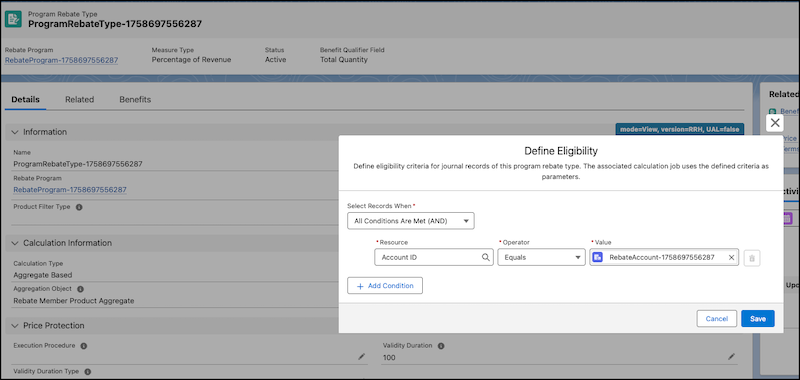
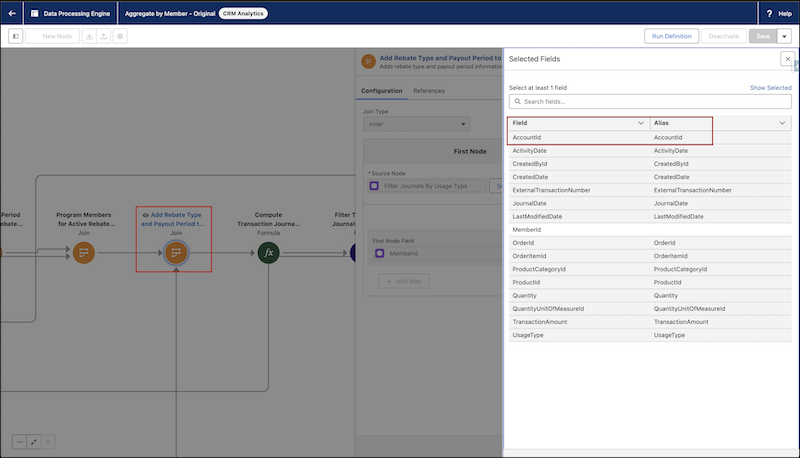
To ensure successful execution of a Data Processing Engine run, include all fields referenced in the eligibility criteria of a Program Rebate Type in every custom node that processes those fields. When fields used in eligibility filters, such as AccountId, aren't propagated from the source data node through all intermediate nodes, the Data Processing Engine may not process the data as intended. For smooth execution, ensure that:
- All required fields are selected in the source data node.
- The fields are included in every intermediate node along the data path.
- The fields are available in all custom nodes that apply the eligibility rules.
Additional Learning Resources for Data Processing Engine
Learn more about how to best use Data Processing Engine.
| Resource | Description |
|---|---|
| Data Processing Engines with Rebate Management | A Trailhead module that demonstrates how you can customize a DPE definition for a rebate use case. |
| Permissions to Work with Data Processing Engine | Information on permission sets and object access required for user profiles when you use DPE. |
| Run a Data Processing Engine Definition with Flows | Task-based topic on how you can run DPE definitions with Flow Builder. |
| Track Your Data Processing Engine Usage | Information on the type of data you can track with Data Pipelines. |
| Monitor Your Data Processing Engine Definition Runs | Topic explaining how to use Monitor Workflow Services to track the progress of your DPE runs. |
| Data Processing Engine Best Practices | Pointers on how to improve your experience working with DPE. |
| Data Processing Engine Limits | Considerations to keep in mind when you use DPE. |
| Troubleshoot Data Processing Engine Issues | Self-help for resolving errors in DPE. |
| Data Processing Engine Data Model | Architecture topic explaining object relationships in DPE. |
| Create definitions using Metadata API | A developer doc that explains how you can create a DPE definition by using APIs. |
| Run a Definition by Using a Custom Invocable Action | A developer doc that explains how you can run a DPE definition with an invocable action. |
| Know When a Definition Run is Complete by Using a Platform Event | A developer doc that explains how you can get notified when a DPE definition run is complete. |
| Get Member Details from Transaction Journals When Loyalty Management and Rebate Management Are Enabled | Critical information for orgs where both Loyalty Management and Rebate Management are enabled. |