
To gather details about locale use, like user count by locale, create a SOQL query
Required Editions
| Available in: both Salesforce Classic and Lightning Experience |
| Available in: all editions |
| User Permissions Needed | |
|---|---|
| To use the Developer Console: | API Enabled AND View All Data |
| To use code search and run SOQL or SOSL on the query tab: | API Enabled |
| To create, edit, and delete reports in private folders: | Create and Customize Reports |
| To create, edit, and delete reports in public and private folders: |
Report Builder OR Report Builder (Lightning Experience) |
- Click the gear icon (
 ). Using Classic? Click your name in the upper right corner.
 - Click Developer Console.
The developer console opens in a new window.
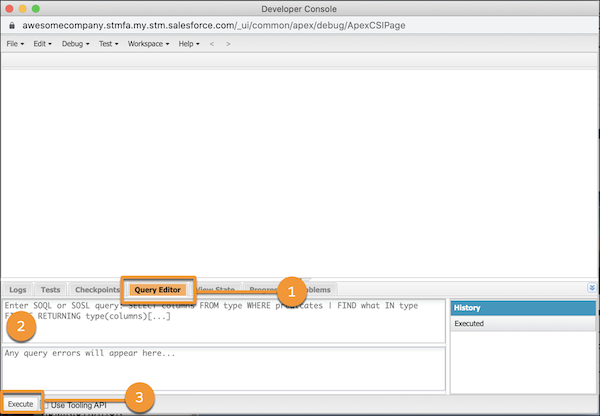
- To open the Query Editor panel, click Query Editor (1).
- In the Query Editor panel (2), enter this query.
SELECT toLabel(LocaleSidKey) LocaleName, LocaleSidKey, Count(id) UserCount FROM User where IsActive=true GROUP BY LocaleSidKey - Click Execute (3).
Your results display in the Query Results grid in the Developer Console workspace.
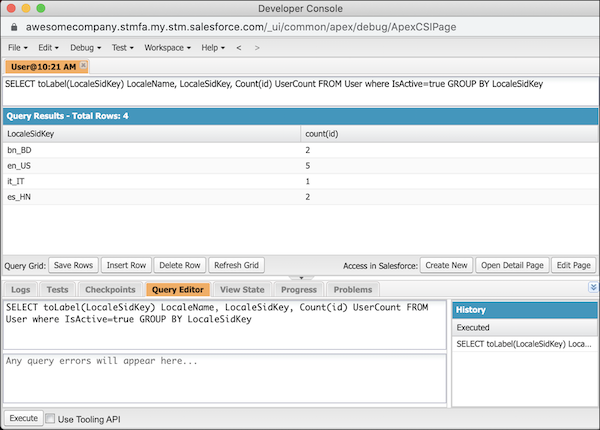
In this example, there are 4 locales in use across 10 users: 2 users with bn_BD, 5 users with en_US, 1 user with it_IT, and 2 users with en_HN.