---
schema_version: "1"
id: 2f60c25b049468f332ae2899a7df6e7014d9d4d1aea09bf77b18e3164a7475ad
title: Create Sharing Rules
collection: admin
version: current
locale: en-us
portal_url: https://docs.salesforce.com/admin/current/en-us/sfdo/264-0-0/cm_create_sharing_rules.md
canonical_url: https://help.salesforce.com/s/articleView?id=sfdo.cm_create_sharing_rules.htm&release=264.0.0&type=5
source_site: help.salesforce.com
content_type: documentation
content_hash: b93e42e240207fddae4faee53dbbe4b87005bc8401eb5963c389a31ee38efb36
description: Some organizations use a model where case managers share ownership of the client relationship. In this model, a variety of case managers deliver services to a client during the service period. Create sharing rules to let different case managers edit a client's case-related data.
products:
  - Nonprofit
release: "264"
---
# Create Sharing Rules

Some organizations use a model where case managers share ownership of the client relationship. In this model, a variety of case managers deliver services to a client during the service period. Create sharing rules to let different case managers edit a client's case-related data.

Here are a couple of examples of ways you could set up your case manager sharing rules.

- **[Example: Set Up Case Manager Sharing Rules](https://help.salesforce.com/s/articleView?id=sfdo.cm_create_sharing_rules.htm&release=264.0.0&type=5)**  
    If your case managers share ownership of client relationships, use sharing rules to grant edit permissions to all case managers. Before you get started, it's a good idea to map out which objects case managers need to edit.
- **[Example: Set Up Program Manager Sharing Rules](https://help.salesforce.com/s/articleView?id=sfdo.cm_create_sharing_rules.htm&release=264.0.0&type=5)**  
    If your program managers share ownership of programs, use sharing rules to extend edit permissions to all program managers. It's a good idea to map out which objects program managers need to edit.

## Example: Set Up Case Manager Sharing Rules

If your case managers share ownership of client relationships, use sharing rules to grant edit permissions to all case managers. Before you get started, it's a good idea to map out which objects case managers need to edit.

This table shows an example of sharing rules you can set up for objects that program managers typically access to manage client relationships.

<table class="slds-table slds-table_bordered slds-max-medium-table_stacked slds-m-bottom_small ">
          <colgroup>
            <col style="width:20%">
            <col style="width:20%">
            <col style="width:20%">
            <col style="width:20%">
            <col style="width:20%">
          </colgroup>
          <thead class="slds-text-title_caps ">
            <tr class="">
              <th scope="col" class="slds-cell-wrap" style="vertical-align:top;" id="d23997e96">
                <p style="margin-bottom:0;">Object</p>
              </th>
              <th scope="col" class="slds-cell-wrap" style="vertical-align:top;" id="d23997e102">
                <p style="margin-bottom:0;">Rule Label</p>
              </th>
              <th scope="col" class="slds-cell-wrap" style="vertical-align:top;" id="d23997e108">
                <p style="margin-bottom:0;">Owned by</p>
              </th>
              <th scope="col" class="slds-cell-wrap" style="vertical-align:top;" id="d23997e114">
                <p style="margin-bottom:0;">Share with</p>
              </th>
              <th scope="col" class="slds-cell-wrap" style="vertical-align:top;" id="d23997e120">
                <p style="margin-bottom:0;">Access Level</p>
              </th>
            </tr>
          </thead>
          <tbody>
            <tr class="">
              <td data-label="Object" class="slds-cell-wrap" style="vertical-align:top;" headers="d23997e96 ">
                <p style="margin-bottom:0;">Action Items</p>
              </td>

              <td data-label="Rule Label" class="slds-cell-wrap" style="vertical-align:top;" headers="d23997e102 ">
                <p style="margin-bottom:0;">Review Action Items</p>
              </td>

              <td data-label="Owned by" class="slds-cell-wrap" style="vertical-align:top;" headers="d23997e108 ">
                <p style="margin-bottom:0;">Creator</p>
              </td>

              <td data-label="Share with" class="slds-cell-wrap" style="vertical-align:top;" headers="d23997e114 ">
                <p style="margin-bottom:0;">All Case Managers</p>
              </td>

              <td data-label="Access Level" class="slds-cell-wrap" style="vertical-align:top;" headers="d23997e120 ">
                <p style="margin-bottom:0;">Read/Write</p>
              </td>

            </tr>
            <tr class="">
              <td data-label="Object" class="slds-cell-wrap" style="vertical-align:top;" headers="d23997e96 ">
                <p style="margin-bottom:0;">Assessments</p>
              </td>

              <td data-label="Rule Label" class="slds-cell-wrap" style="vertical-align:top;" headers="d23997e102 ">
                <p style="margin-bottom:0;">Review Assessment</p>
              </td>

              <td data-label="Owned by" class="slds-cell-wrap" style="vertical-align:top;" headers="d23997e108 ">
                <p style="margin-bottom:0;">Creator</p>
              </td>

              <td data-label="Share with" class="slds-cell-wrap" style="vertical-align:top;" headers="d23997e114 ">
                <p style="margin-bottom:0;">All Case Managers</p>
              </td>

              <td data-label="Access Level" class="slds-cell-wrap" style="vertical-align:top;" headers="d23997e120 ">
                <p style="margin-bottom:0;">Read/Write</p>
              </td>

            </tr>
            <tr class="">
              <td data-label="Object" class="slds-cell-wrap" style="vertical-align:top;" headers="d23997e96 ">
                <p style="margin-bottom:0;">Client Alerts</p>
              </td>

              <td data-label="Rule Label" class="slds-cell-wrap" style="vertical-align:top;" headers="d23997e102 ">
                <p style="margin-bottom:0;">Review Client Alert</p>
              </td>

              <td data-label="Owned by" class="slds-cell-wrap" style="vertical-align:top;" headers="d23997e108 ">
                <p style="margin-bottom:0;">Creator</p>
              </td>

              <td data-label="Share with" class="slds-cell-wrap" style="vertical-align:top;" headers="d23997e114 ">
                <p style="margin-bottom:0;">All Case Managers</p>
              </td>

              <td data-label="Access Level" class="slds-cell-wrap" style="vertical-align:top;" headers="d23997e120 ">
                <p style="margin-bottom:0;">Read/Write</p>
              </td>

            </tr>
            <tr class="">
              <td data-label="Object" class="slds-cell-wrap" style="vertical-align:top;" headers="d23997e96 ">
                <p style="margin-bottom:0;">Client Notes</p>
              </td>

              <td data-label="Rule Label" class="slds-cell-wrap" style="vertical-align:top;" headers="d23997e102 ">
                <p style="margin-bottom:0;">Review Client Note</p>
              </td>

              <td data-label="Owned by" class="slds-cell-wrap" style="vertical-align:top;" headers="d23997e108 ">
                <p style="margin-bottom:0;">Creator</p>
              </td>

              <td data-label="Share with" class="slds-cell-wrap" style="vertical-align:top;" headers="d23997e114 ">
                <p style="margin-bottom:0;">All Case Managers</p>
              </td>

              <td data-label="Access Level" class="slds-cell-wrap" style="vertical-align:top;" headers="d23997e120 ">
                <p style="margin-bottom:0;">Read/Write</p>
              </td>

            </tr>
            <tr class="">
              <td data-label="Object" class="slds-cell-wrap" style="vertical-align:top;" headers="d23997e96 ">
                <p style="margin-bottom:0;">Program Engagements</p>
              </td>

              <td data-label="Rule Label" class="slds-cell-wrap" style="vertical-align:top;" headers="d23997e102 ">
                <p style="margin-bottom:0;">Edit Program Engagements</p>
              </td>

              <td data-label="Owned by" class="slds-cell-wrap" style="vertical-align:top;" headers="d23997e108 ">
                <p style="margin-bottom:0;">Creator</p>
              </td>

              <td data-label="Share with" class="slds-cell-wrap" style="vertical-align:top;" headers="d23997e114 ">
                <p style="margin-bottom:0;">All Case Managers</p>
              </td>

              <td data-label="Access Level" class="slds-cell-wrap" style="vertical-align:top;" headers="d23997e120 ">
                <p style="margin-bottom:0;">Read/Write</p>
              </td>

            </tr>
            <tr class="">
              <td data-label="Object" class="slds-cell-wrap" style="vertical-align:top;" headers="d23997e96 ">
                <p style="margin-bottom:0;">Service Deliveries</p>
              </td>

              <td data-label="Rule Label" class="slds-cell-wrap" style="vertical-align:top;" headers="d23997e102 ">
                <p style="margin-bottom:0;">Edit Service Deliveries</p>
              </td>

              <td data-label="Owned by" class="slds-cell-wrap" style="vertical-align:top;" headers="d23997e108 ">
                <p style="margin-bottom:0;">Creator</p>
              </td>

              <td data-label="Share with" class="slds-cell-wrap" style="vertical-align:top;" headers="d23997e114 ">
                <p style="margin-bottom:0;">All Case Managers</p>
              </td>

              <td data-label="Access Level" class="slds-cell-wrap" style="vertical-align:top;" headers="d23997e120 ">
                <p style="margin-bottom:0;">Read/Write</p>
              </td>

            </tr>
            <tr class="">
              <td data-label="Object" class="slds-cell-wrap" style="vertical-align:top;" headers="d23997e96 ">
                <p style="margin-bottom:0;">Accounts</p>
              </td>

              <td data-label="Rule Label" class="slds-cell-wrap" style="vertical-align:top;" headers="d23997e102 ">
                <p style="margin-bottom:0;">Edit Accounts</p>
              </td>

              <td data-label="Owned by" class="slds-cell-wrap" style="vertical-align:top;" headers="d23997e108 ">
                <p style="margin-bottom:0;">Creator</p>
              </td>

              <td data-label="Share with" class="slds-cell-wrap" style="vertical-align:top;" headers="d23997e114 ">
                <p style="margin-bottom:0;">All Case Managers</p>
              </td>

              <td data-label="Access Level" class="slds-cell-wrap" style="vertical-align:top;" headers="d23997e120 ">
                <p style="margin-bottom:0;">Read/Write</p>
              </td>

            </tr>
            <tr class="">
              <td data-label="Object" class="slds-cell-wrap" style="vertical-align:top;" headers="d23997e96 ">
                <p style="margin-bottom:0;">Cases</p>
              </td>

              <td data-label="Rule Label" class="slds-cell-wrap" style="vertical-align:top;" headers="d23997e102 ">
                <p style="margin-bottom:0;">Edit Cases</p>
              </td>

              <td data-label="Owned by" class="slds-cell-wrap" style="vertical-align:top;" headers="d23997e108 ">
                <p style="margin-bottom:0;">Creator</p>
              </td>

              <td data-label="Share with" class="slds-cell-wrap" style="vertical-align:top;" headers="d23997e114 ">
                <p style="margin-bottom:0;">All Case Managers</p>
              </td>

              <td data-label="Access Level" class="slds-cell-wrap" style="vertical-align:top;" headers="d23997e120 ">
                <p style="margin-bottom:0;">Read/Write</p>
              </td>

            </tr>
            <tr class="">
              <td data-label="Object" class="slds-cell-wrap" style="vertical-align:top;" headers="d23997e96 ">
                <p style="margin-bottom:0;">Contacts</p>
              </td>

              <td data-label="Rule Label" class="slds-cell-wrap" style="vertical-align:top;" headers="d23997e102 ">
                <p style="margin-bottom:0;">Edit Contacts</p>
              </td>

              <td data-label="Owned by" class="slds-cell-wrap" style="vertical-align:top;" headers="d23997e108 ">
                <p style="margin-bottom:0;">Creator</p>
              </td>

              <td data-label="Share with" class="slds-cell-wrap" style="vertical-align:top;" headers="d23997e114 ">
                <p style="margin-bottom:0;">All Case Managers</p>
              </td>

              <td data-label="Access Level" class="slds-cell-wrap" style="vertical-align:top;" headers="d23997e120 ">
                <p style="margin-bottom:0;">Read/Write</p>
              </td>

            </tr>
          </tbody>
        </table>

- **[Define a Public Group of Case Managers](https://help.salesforce.com/s/articleView?id=sfdo.cm_create_sharing_rules.htm&release=264.0.0&type=5)**  
    To grant the appropriate access to case managers who share ownership of client relationships, first define a public group.
- **[Create a Case Manager Sharing Rule](https://help.salesforce.com/s/articleView?id=sfdo.cm_create_sharing_rules.htm&release=264.0.0&type=5)**  
    Learn how to create a sharing rule that shares Client Alerts written and owned by any case manager in the org with all case managers in the public group.

### Define a Public Group of Case Managers

To grant the appropriate access to case managers who share ownership of client relationships, first define a public group.

1. In Setup, enter Public Groups in the Quick Find box, then click **Public Groups**.
2. Click **New**.
3. Name your Public Group Case Managers.
4. In the Search dropdown list, choose **Users**.
5. Select the Users to add to the Case Manager Public Group and click **Add**.
6. Click **Save.**
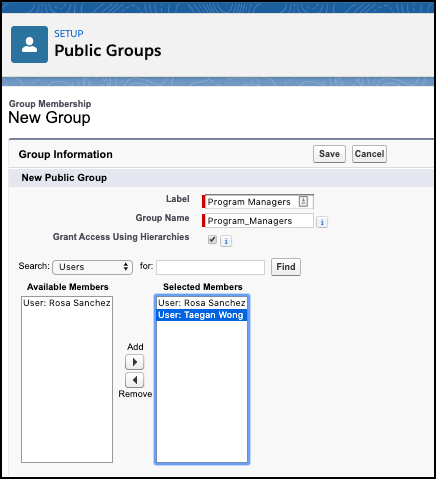
![Users added to Public Groups](https://sf-zdocs-cdn-prod.zoominsoftware.com/tdta-sfdo-case_management-264-0-0-production-enus/4bf5cafc-4c98-4543-b5bf-3b2a6d34e498/case_management/images/pubgrp1.png)

![Tip](https://sf-zdocs-cdn-prod.zoominsoftware.com/tdta-sfdo-case_management-264-0-0-production-enus/4bf5cafc-4c98-4543-b5bf-3b2a6d34e498/images/icon_tip.png)

Tip As part of your staff onboarding process, be sure to add new staff to the appropriate public groups so that they're assigned the appropriate sharing rules.

Next, define sharing rules for this group.

### Create a Case Manager Sharing Rule

Learn how to create a sharing rule that shares Client Alerts written and owned by any case manager in the org with all case managers in the public group.

To create a sharing rule that shares Client Alerts written and owned by any case manager in the org with all case managers in the public group:

1. In Setup, enter Sharing Settings in the Quick Find box, then click **Sharing Settings**. This is the same page used to define org-wide defaults.
2. In the Manage sharing settings for dropdown list, choose **Client Alert**.
    
    This shows the org-wide defaults and sharing rules for a single object at a time, which is handy if you have many custom objects.
3. In the Client Alert Sharing Rules area, click **New**.
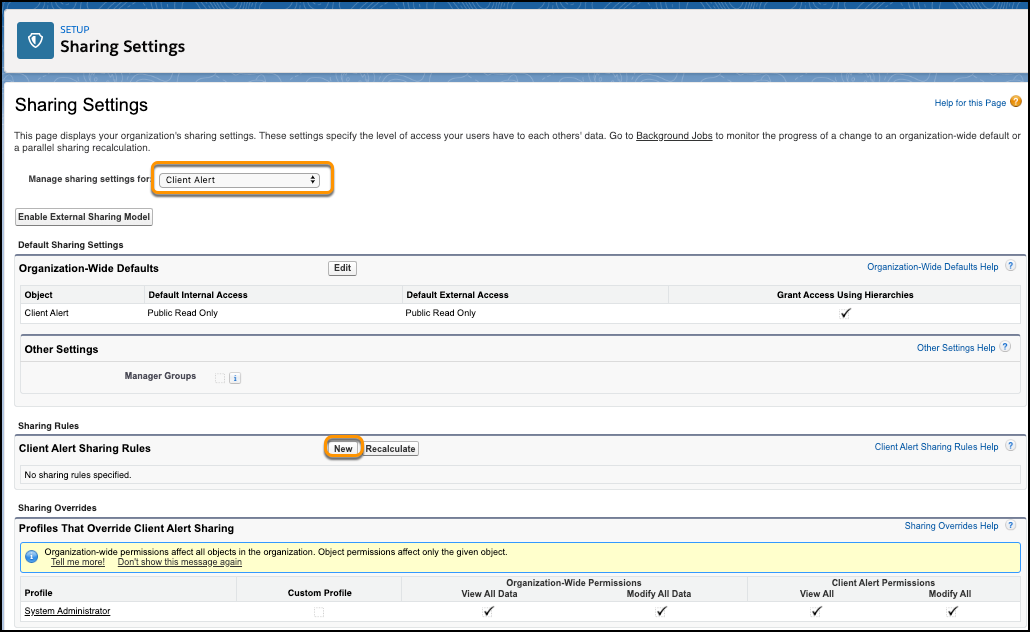
    
    ![Creating Client Alert Sharing Rules](https://sf-zdocs-cdn-prod.zoominsoftware.com/tdta-sfdo-case_management-264-0-0-production-enus/4bf5cafc-4c98-4543-b5bf-3b2a6d34e498/case_management/images/setupsharing.png)
4. In the Label field, enter Review Records.
    
    The Rule Name populates automatically.
5. For the Rule Type, select **Based on record owner**.
6. In the Select which records to be shared section, select **Public Groups**, then choose **Case Managers**.
7. In the Select users to share with section, select **Public Groups**, then choose **Case Managers**.
8. In the Select the level of access for the users section, select **Read/Write**.
9. Click **Save**.
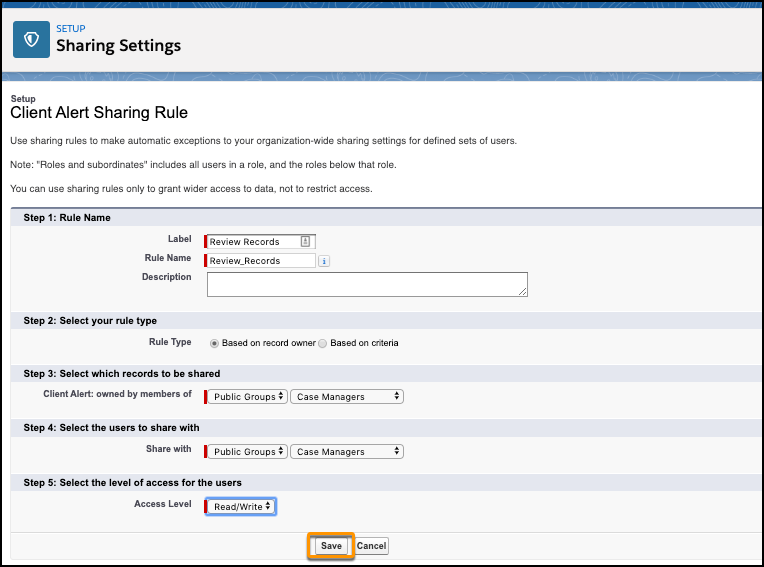
    
    ![Defining Client Alert Sharing Rule](https://sf-zdocs-cdn-prod.zoominsoftware.com/tdta-sfdo-case_management-264-0-0-production-enus/4bf5cafc-4c98-4543-b5bf-3b2a6d34e498/case_management/images/sharingsettings2.png)

Repeat these steps to set up sharing rules for Action Items, Assessments, Case Plans, Client Notes, Goals, Program Engagements, Service Deliveries, Accounts, Cases, and Contacts.

## Example: Set Up Program Manager Sharing Rules

If your program managers share ownership of programs, use sharing rules to extend edit permissions to all program managers. It's a good idea to map out which objects program managers need to edit.

This table shows an example of sharing rules you can set up for objects that program managers typically access.

<table class="slds-table slds-table_bordered slds-max-medium-table_stacked slds-m-bottom_small ">
          <colgroup>
            <col style="width:20%">
            <col style="width:20%">
            <col style="width:20%">
            <col style="width:20%">
            <col style="width:20%">
          </colgroup>
          <thead class="slds-text-title_caps ">
            <tr class="">
              <th scope="col" class="slds-cell-wrap" style="vertical-align:top;" id="d23997e692">
                <p style="margin-bottom:0;">Object</p>
              </th>
              <th scope="col" class="slds-cell-wrap" style="vertical-align:top;" id="d23997e698">
                <p style="margin-bottom:0;">Rule Label</p>
              </th>
              <th scope="col" class="slds-cell-wrap" style="vertical-align:top;" id="d23997e704">
                <p style="margin-bottom:0;">Owned by</p>
              </th>
              <th scope="col" class="slds-cell-wrap" style="vertical-align:top;" id="d23997e710">
                <p style="margin-bottom:0;">Share with</p>
              </th>
              <th scope="col" class="slds-cell-wrap" style="vertical-align:top;" id="d23997e716">
                <p style="margin-bottom:0;">Access Level</p>
              </th>
            </tr>
          </thead>
          <tbody>
            <tr class="">
              <td data-label="Object" class="slds-cell-wrap" style="vertical-align:top;" headers="d23997e692 ">
                <p style="margin-bottom:0;">Programs</p>
              </td>

              <td data-label="Rule Label" class="slds-cell-wrap" style="vertical-align:top;" headers="d23997e698 ">
                <p style="margin-bottom:0;">Edit Programs</p>
              </td>

              <td data-label="Owned by" class="slds-cell-wrap" style="vertical-align:top;" headers="d23997e704 ">
                <p style="margin-bottom:0;">Creator</p>
              </td>

              <td data-label="Share with" class="slds-cell-wrap" style="vertical-align:top;" headers="d23997e710 ">
                <p style="margin-bottom:0;">All Program Managers</p>
              </td>

              <td data-label="Access Level" class="slds-cell-wrap" style="vertical-align:top;" headers="d23997e716 ">
                <p style="margin-bottom:0;">Read/Write</p>
              </td>

            </tr>
            <tr class="">
              <td data-label="Object" class="slds-cell-wrap" style="vertical-align:top;" headers="d23997e692 ">
                <p style="margin-bottom:0;">Program Engagements</p>
              </td>

              <td data-label="Rule Label" class="slds-cell-wrap" style="vertical-align:top;" headers="d23997e698 ">
                <p style="margin-bottom:0;">Edit Program Engagements</p>
              </td>

              <td data-label="Owned by" class="slds-cell-wrap" style="vertical-align:top;" headers="d23997e704 ">
                <p style="margin-bottom:0;">Creator</p>
              </td>

              <td data-label="Share with" class="slds-cell-wrap" style="vertical-align:top;" headers="d23997e710 ">
                <p style="margin-bottom:0;">All Program Managers</p>
              </td>

              <td data-label="Access Level" class="slds-cell-wrap" style="vertical-align:top;" headers="d23997e716 ">
                <p style="margin-bottom:0;">Read/Write</p>
              </td>

            </tr>
            <tr class="">
              <td data-label="Object" class="slds-cell-wrap" style="vertical-align:top;" headers="d23997e692 ">
                <p style="margin-bottom:0;">Program Cohorts</p>
              </td>

              <td data-label="Rule Label" class="slds-cell-wrap" style="vertical-align:top;" headers="d23997e698 ">
                <p style="margin-bottom:0;">Edit Program Cohorts</p>
              </td>

              <td data-label="Owned by" class="slds-cell-wrap" style="vertical-align:top;" headers="d23997e704 ">
                <p style="margin-bottom:0;">Creator</p>
              </td>

              <td data-label="Share with" class="slds-cell-wrap" style="vertical-align:top;" headers="d23997e710 ">
                <p style="margin-bottom:0;">All Program Managers</p>
              </td>

              <td data-label="Access Level" class="slds-cell-wrap" style="vertical-align:top;" headers="d23997e716 ">
                <p style="margin-bottom:0;">Read/Write</p>
              </td>

            </tr>
            <tr class="">
              <td data-label="Object" class="slds-cell-wrap" style="vertical-align:top;" headers="d23997e692 ">
                <p style="margin-bottom:0;">Services</p>
              </td>

              <td data-label="Rule Label" class="slds-cell-wrap" style="vertical-align:top;" headers="d23997e698 ">
                <p style="margin-bottom:0;">Edit Services</p>
              </td>

              <td data-label="Owned by" class="slds-cell-wrap" style="vertical-align:top;" headers="d23997e704 ">
                <p style="margin-bottom:0;">Creator</p>
              </td>

              <td data-label="Share with" class="slds-cell-wrap" style="vertical-align:top;" headers="d23997e710 ">
                <p style="margin-bottom:0;">All Program Managers</p>
              </td>

              <td data-label="Access Level" class="slds-cell-wrap" style="vertical-align:top;" headers="d23997e716 ">
                <p style="margin-bottom:0;">Read/Write</p>
              </td>

            </tr>
            <tr class="">
              <td data-label="Object" class="slds-cell-wrap" style="vertical-align:top;" headers="d23997e692 ">
                <p style="margin-bottom:0;">Service Deliveries</p>
              </td>

              <td data-label="Rule Label" class="slds-cell-wrap" style="vertical-align:top;" headers="d23997e698 ">
                <p style="margin-bottom:0;">Edit Service Deliveries</p>
              </td>

              <td data-label="Owned by" class="slds-cell-wrap" style="vertical-align:top;" headers="d23997e704 ">
                <p style="margin-bottom:0;">Creator</p>
              </td>

              <td data-label="Share with" class="slds-cell-wrap" style="vertical-align:top;" headers="d23997e710 ">
                <p style="margin-bottom:0;">All Program Managers</p>
              </td>

              <td data-label="Access Level" class="slds-cell-wrap" style="vertical-align:top;" headers="d23997e716 ">
                <p style="margin-bottom:0;">Read/Write</p>
              </td>

            </tr>
          </tbody>
        </table>

- **[Define a Public Group of Program Managers](https://help.salesforce.com/s/articleView?id=sfdo.cm_create_sharing_rules.htm&release=264.0.0&type=5)**  
    To grant the appropriate access to program managers who share program ownership, first define a public group.
- **[Create a Program Manager Sharing Rule](https://help.salesforce.com/s/articleView?id=sfdo.cm_create_sharing_rules.htm&release=264.0.0&type=5)**  
    Create a sharing rule that allows all program managers to access programs owned by any program manager.

### Define a Public Group of Program Managers

To grant the appropriate access to program managers who share program ownership, first define a public group.

![Tip](https://sf-zdocs-cdn-prod.zoominsoftware.com/tdta-sfdo-case_management-264-0-0-production-enus/4bf5cafc-4c98-4543-b5bf-3b2a6d34e498/images/icon_tip.png)

Tip As part of your staff onboarding process, be sure to add new staff to the appropriate public groups so that they're assigned the appropriate sharing rules.

1. In Setup, enter Public Groups in the Quick Find box, then click **Public Groups**.
2. Click **New**.
3. Name your Public Group Program Managers.
4. In the Search dropdown list, choose **Users**.
5. Select the Users to add to the Case Manager Public Group and click **Add**.
6. Click **Save**.

Next, define sharing rules for this group.

### Create a Program Manager Sharing Rule

Create a sharing rule that allows all program managers to access programs owned by any program manager.

To create a rule that shares programs written and owned by any program manager in the org with all program managers:

1. In Setup, enter Sharing Settings in the Quick Find box, then click **Sharing Settings**.
2. In the Manage sharing settings for dropdown list, choose **Programs**.
3. In the Program Sharing Rules area, click **New**.
4. In the Label field, enter Review Records.
    
    The Rule Name populates automatically.
5. For the Rule Type, select **Based on record owner**.
6. In the Select which records to be shared section, select **Public Groups**, then choose **Program Managers**.
7. In the Select users to share with section, select **Public Groups**, then choose **Program Managers**.
8. In the Select the level of access for the users section, select **Read/Write**.
9. Click **Save**.

Repeat these steps for Programs Engagements, Program Cohorts, Services, and Service Deliveries.