---
schema_version: "1"
id: 3de8e1eb5a0241a006c0f665697f0a068b467977fa3dc72b464f74eb0fd8e9e7
title: View Historical Adherence Metrics
collection: admin
version: current
locale: en-us
portal_url: https://docs.salesforce.com/admin/current/en-us/service/264-0-0/workforce_engagement_view_adherence.md
canonical_url: https://help.salesforce.com/s/articleView?id=service.workforce_engagement_view_adherence.htm&release=264.0.0&type=5
source_site: help.salesforce.com
content_type: documentation
content_hash: c42ea80cdec155db737e068099122420d230986876a020ca2bc1cea69a0fe59c
description: Discover how your schedules compare with how agents actually spent their time. To improve scheduling accuracy going forward, view the historical adherence dashboard.
products:
  - Service Cloud
  - Digital Engagement
release: "264"
---
# View Historical Adherence Metrics

Discover how your schedules compare with how agents actually spent their time. To improve scheduling accuracy going forward, view the historical adherence dashboard.

### Required Editions

<table class="slds-table slds-table_bordered slds-max-medium-table_stacked slds-m-bottom_small edition"><colgroup><col></colgroup><tbody><tr class=""><td class="slds-cell-wrap" style="vertical-align:top;"><a href="https://help.salesforce.com/s/articleView?id=service.workforce_engagement_editions.htm&amp;release=264.0.0&amp;type=5" title="Learn about the Salesforce user interfaces, editions, and add-ons that support Workforce Management and Quality Management">View supported editions</a>.</td></tr></tbody></table>

<table class="slds-table slds-table_bordered slds-max-medium-table_stacked slds-m-bottom_small permission">
        <colgroup>
          <col style="width:50%">
          <col style="width:50%">
        </colgroup>
        <thead class="slds-text-title_caps ">
          <tr class="">
            <th scope="colgroup" class="slds-cell-wrap" colspan="2" style="text-align:center;vertical-align:top;" id="d23461e60">User Permissions Needed</th>
          </tr>
        </thead>
        <tbody>
          <tr class="">
            <td data-label="User Permissions Needed" class="slds-cell-wrap" style="vertical-align:top;" headers="d23461e60 ">To view historical adherence metrics: </td>

            <td class="slds-cell-wrap" style="vertical-align:top;" headers="d23461e60 ">Workforce Engagement Planner permission set</td>

          </tr>
        </tbody>
      </table>

When your Salesforce admin turns on historical adherence, we analyze past schedules and how agents have spent working time. Historical adherence considers up to 365 days of past data. After we complete this analysis, you can view the adherence dashboard.

![Note](https://sf-zdocs-cdn-prod.zoominsoftware.com/tdta-service-support_channels-264-0-0-production-enus/f3c4b3d2-ff86-4f7c-9fe2-3d8b23d35109/images/icon_note.png)

Note If an agent is assigned shifts with same start and end times but under different service territories or job profiles, we can't calculate historical adherence and show the dashboard.

1. From the App Launcher, click **Historical Adherence**.
    
    If you don’t see data right away, refresh the page, or return later. It can take some time to process historical data when your admin turns on this feature.
2. Select criteria to adjust the view.
    
    You can filter metrics by time intervals, service territories, and job profiles. You can also view data about each agent's time use if your admin enabled this option.
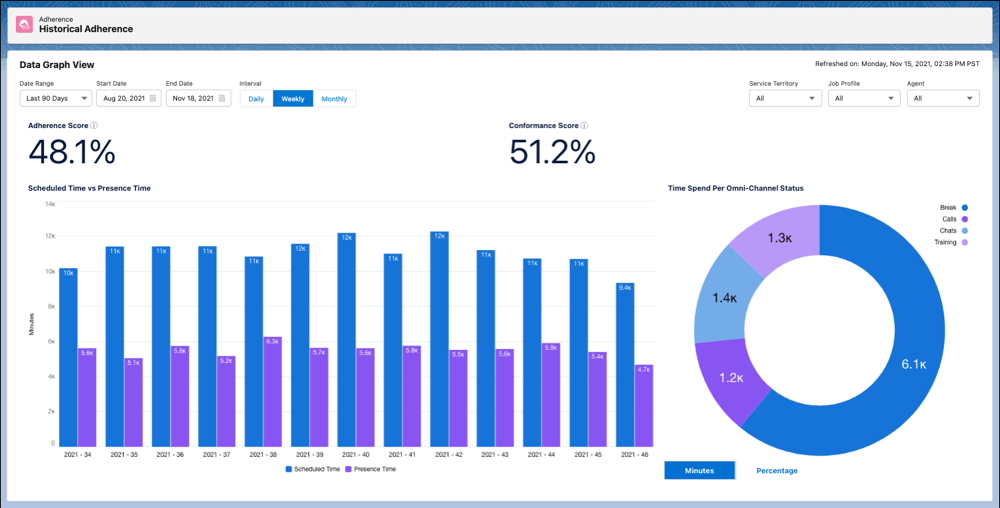
    
    ![The historical adherence dashboard shows metrics that compare schedules versus time use.](https://sf-zdocs-cdn-prod.zoominsoftware.com/tdta-service-support_channels-264-0-0-production-enus/f3c4b3d2-ff86-4f7c-9fe2-3d8b23d35109/support_channels/images/workforce_engagement/wem_adherence.png)

We sync data hourly for the adherence dashboard. If you make changes such as renaming agents or job profiles, check back and refresh the dashboard to see the updated names.