---
schema_version: "1"
id: dbfdbc77664313b5f835368788e34d6e58d2e46b1e78b9caf3b2bedaa08979c7
title: Add the Wrap Up Component to the Voice Call Record Page
collection: admin
version: current
locale: en-us
portal_url: https://docs.salesforce.com/admin/current/en-us/service/264-0-0/work_summaries_voice_wrapup_add.md
canonical_url: https://help.salesforce.com/s/articleView?id=service.work_summaries_voice_wrapup_add.htm&release=264.0.0&type=5
source_site: help.salesforce.com
content_type: documentation
content_hash: ce6ba3f6911b90208bad25f4bc3a5bb993c83b087fdb27ab975af60ad205e01c
description: To let service reps generate and view the call summaries, add the Wrap-Up component to the VoiceCall record page in the console.
products:
- Service Cloud
- Service Intelligence
release: "264"
---
# Add the Wrap Up Component to the Voice Call Record Page
To let service reps generate and view the call summaries, add the Wrap-Up component to the VoiceCall record page in the console.
### Required Editions
1. Open the Lightning App Builder.
2. Next to the voice call record page, click **Edit**.
3. To add the Wrap-Up component, drag Einstein Field Recommendations component on to the record page.
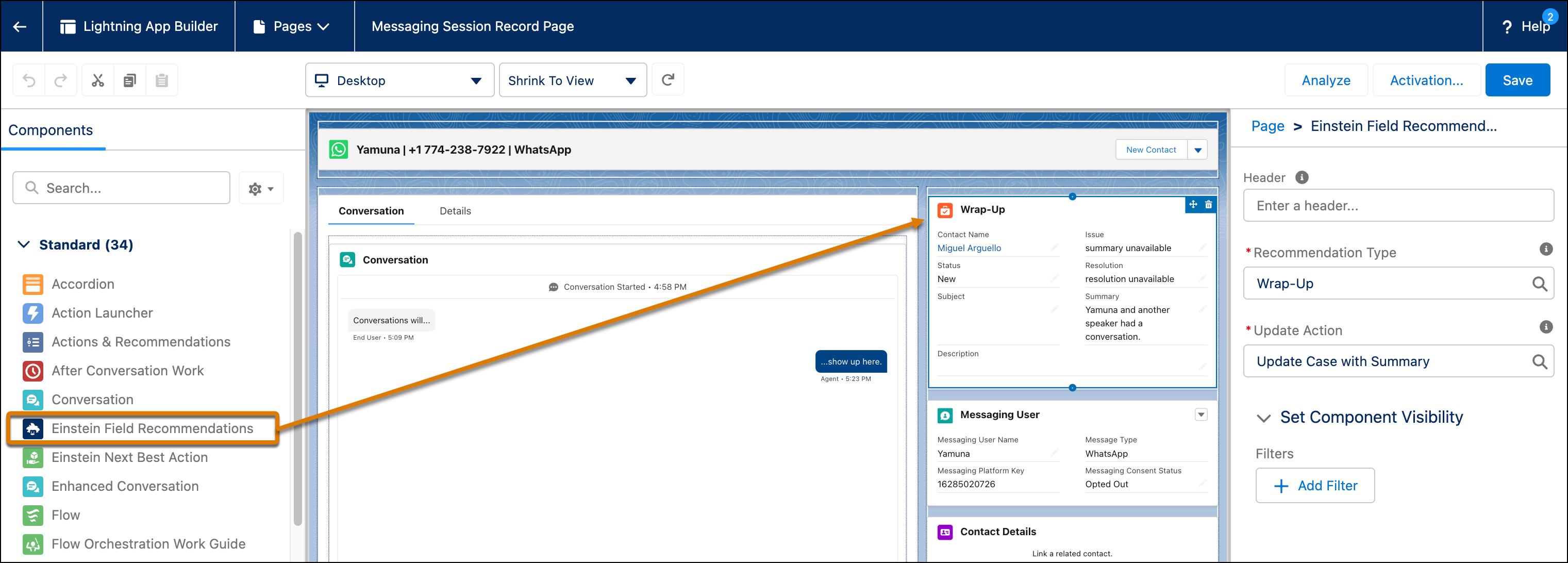
4. In the Recommendation Type field, select **Wrap-Up**.
5. In the Update Action field, select the update action that you created to store the summaries.
6. Click **Save** | **Activation**, and close the Org Defaults pop-up window.
#### See Also
- [Create a Quick Action to Store the Generated Voice Call Summaries](https://help.salesforce.com/s/articleView?id=service.work_summaries_voice_quick_action.htm&release=264.0.0&type=5 "Create a quick action that stores the generated voice call summaries in fields of a Salesforce object. For example, the action stores voice call summaries in VoiceCall object fields.")