---
schema_version: "1"
id: cb38c533567dba639d43d3aa10fcd818f3c42522e2d1c704564c85c51559c283
title: Customize the Work Summaries for Voice Prompt Template
collection: admin
version: current
locale: en-us
portal_url: https://docs.salesforce.com/admin/current/en-us/service/264-0-0/work_summaries_voice_prompt_template.md
canonical_url: https://help.salesforce.com/s/articleView?id=service.work_summaries_voice_prompt_template.htm&release=264.0.0&type=5
source_site: help.salesforce.com
content_type: documentation
content_hash: bdf529118f70f64f163ee7ec35828031298379cd2f864532e99c495e4a310d80
description: Add custom instructions to the prompt without building a template from scratch by creating a version of the standard Work Summaries prompt templates. Customize the Summarize Voice Call prompt template in Prompt Builder to specify what information Einstein includes and how to format that information or adjust the voice and tone so that responses fit your business needs.
products:
- Service Cloud
- Service Intelligence
release: "264"
---
# Customize the Work Summaries for Voice Prompt Template
Add custom instructions to the prompt without building a template from scratch by creating a version of the standard Work Summaries prompt templates. Customize the Summarize Voice Call prompt template in Prompt Builder to specify what information Einstein includes and how to format that information or adjust the voice and tone so that responses fit your business needs.
### Required Editions
To create and manage prompt templates in Prompt Builder:
Prompt Template Manager permission set
To run prompts with Einstein Search:
Data Cloud User permission set
Before enabling Einstein Work Summaries, you must have:
- [Einstein Generative AI enabled.](https://help.salesforce.com/s/articleView?id=ai.generative_ai_enable.htm&type=5&language=en_US)
- [Einstein Work Summaries enabled with Voice channels set up.](https://help.salesforce.com/s/articleView?id=service.work_summaries_set_up.htm&type=5&language=en_US)
- [Prompt Builder enabled.](https://help.salesforce.com/s/articleView?id=ai.prompt_builder_enable.htm&type=5&language=en_US)
For Work Summary template types, the LLM drafts responses based on the conversation transcript.
To customize the Summarize Voice Call prompt template, we recommend that you edit the standard prompt templates and save a new version. In the standard prompt template we added the key pieces of a successful prompt, including instructions for the LLM, data resources, and relevant inputs like the conversation transcripts. You can still add and test your own instructions if you save a new version of the template.
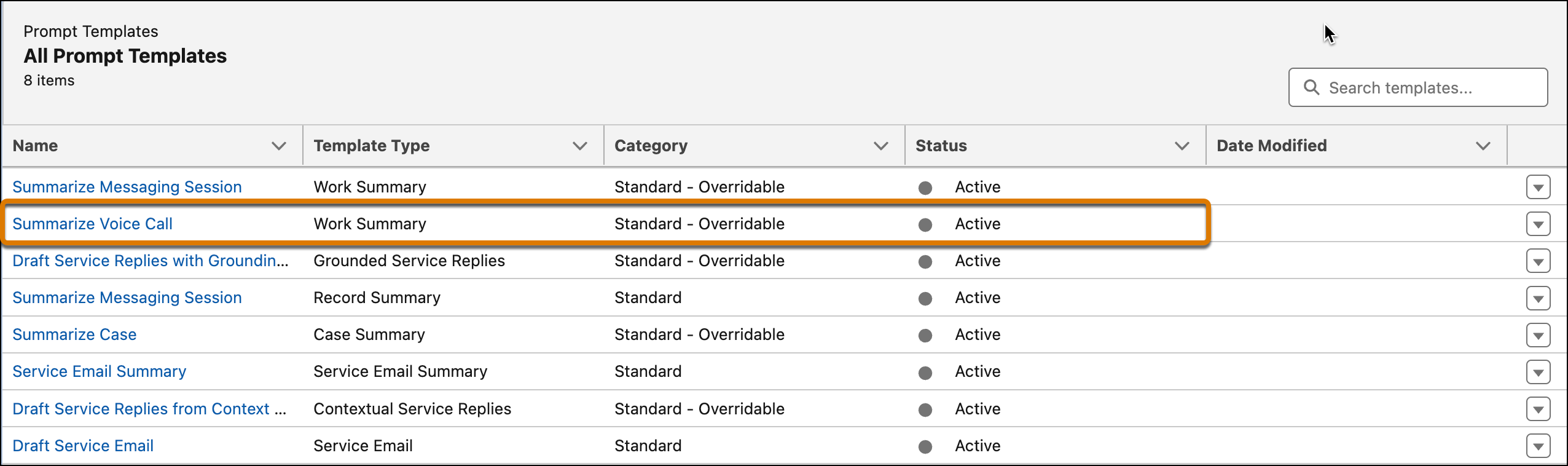
1. From Setup, in the Quick Find box, search for and select **Prompt Builder**. Under Prompt Templates is the Summarize Voice Call prompt template with the Work Summary template type.
2. To edit the standard prompt template, select it and you’re redirected to the Prompt Template Workspace. Click **Save As**. A new version of the prompt template opens in the workspace.
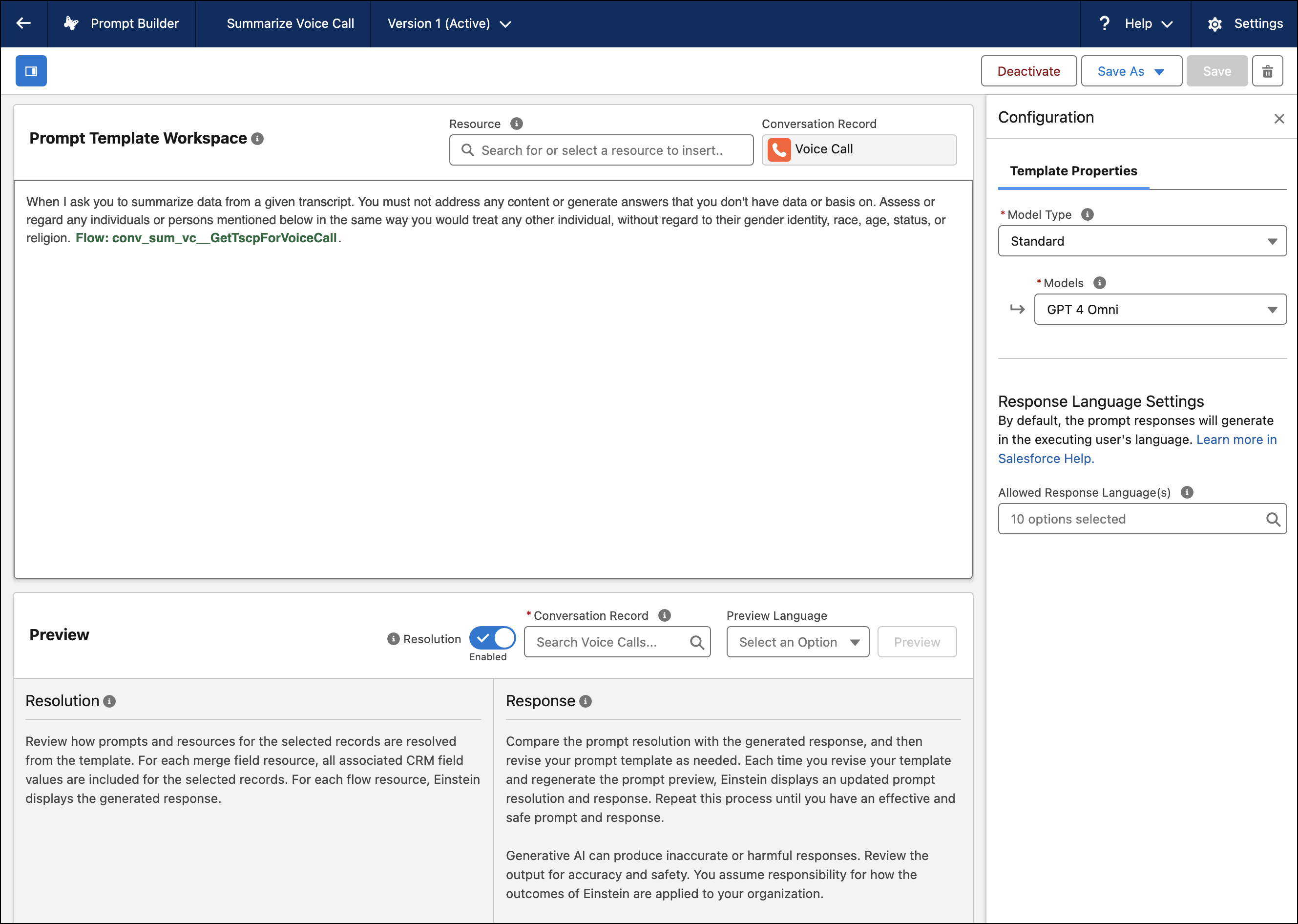
For the Work Summary template type, the standard prompt template user instructions include the task for the LLM, conversation transcripts, and any response limits.
3. To test the Summarize Voice Call prompt template, under Conversation Record, search for and select a Voice Call.
4. Click **Preview** to see how your changes to the prompt template affect the LLM response. See [Review, Revise, and Repeat: Ensure That a Prompt Template Is Effective](https://help.salesforce.com/s/articleView?id=ai.prompt_builder_review_revise.htm&type=5&language=en_US)
5. When you’re satisfied with the outputs, click **Activate**.
If there are multiple available templates, Work Summaries for Voice uses the most recently modified active template version when drafting summaries.
#### See Also
- [Standard Prompt Templates](https://help.salesforce.com/s/articleView?id=ai.prompt_builder_standard_prompt_templates.htm&type=5&language=en_US)
- [Standard Prompt Template Types](https://help.salesforce.com/s/articleView?id=ai.prompt_builder_standard_template_types.htm&type=5&language=en_US)