---
schema_version: "1"
id: b75016735489b4b02c5fd8b5364136324a10bea2e834aaae9c5c385be06a52c2
title: Set Up Health Check Stack for Provisioned Contact Centers
collection: admin
version: current
locale: en-us
portal_url: https://docs.salesforce.com/admin/current/en-us/service/264-0-0/voice_health_check_amazoncc.md
canonical_url: https://help.salesforce.com/s/articleView?id=service.voice_health_check_amazoncc.htm&release=264.0.0&type=5
source_site: help.salesforce.com
content_type: documentation
content_hash: 270c0b9b81648c5b0e44ad3d4cfdcee6ee4d45448497331c0312df38ff312731
description: To run service checks in a contact center, authorize Salesforce to install and run the HealthCheck Lambda function with the IAM role in your AWS account.
products:
- Service Cloud
- Digital Engagement
release: "264"
---
# Set Up Health Check Stack for Provisioned Contact Centers
To run service checks in a contact center, authorize Salesforce to install and run the HealthCheck Lambda function with the IAM role in your AWS account.
### Required Editions
This article applies to:
- Salesforce Voice with Amazon Connect
- Salesforce Voice with Partner Telephony from Amazon Connect
User Permissions Needed
To view the Amazon Contact Centers page:
Customize Application AND Manage Call Centers
To run service checks:
Salesforce Voice Contact Center Admin
1. From Setup, in the Quick Find box, enter **Contact Centers**, and then select **Amazon Contact Centers** or **Partner Telephony Contact Centers**.
2. Open the contact center for which you want to configure the health check stack.
3. In the Contact Center details page, turn on the **Contact Center Health** option.
4. Review the authorization message. By enabling this option, you authorize Salesforce to install and use a HealthCheck Lambda function with the IAM role.
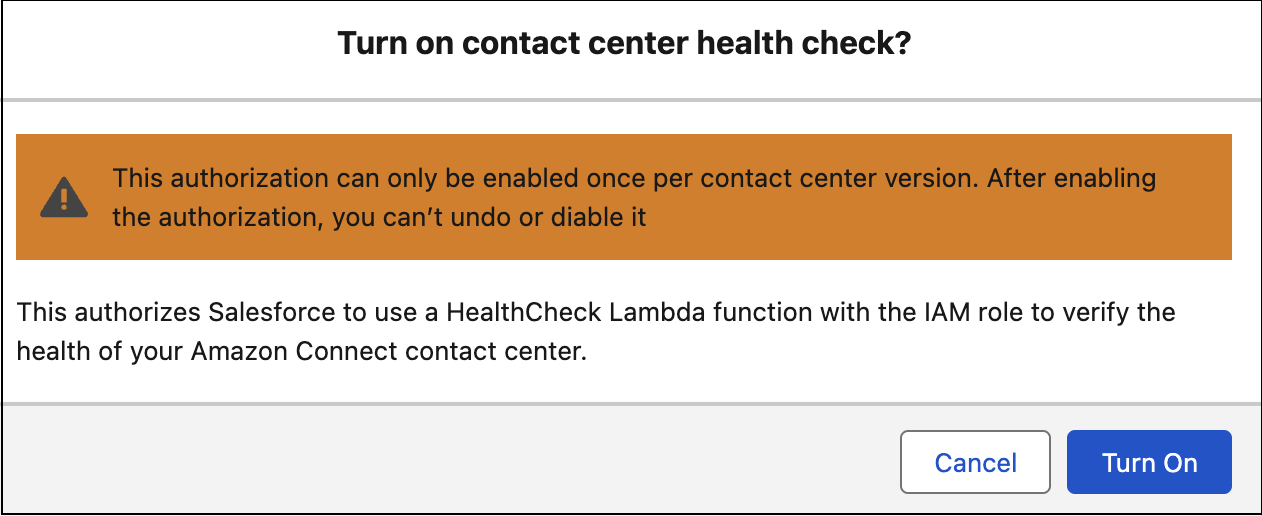
Starting in the Summer ‘26 release, you can enable the Contact Center Health option only if you’ve updated your contact center to the latest version.
5. Save your changes.
You receive an email with the results of the health check stack installation in your contact center. You can run the service check when Salesforce has installed the health check stack in the contact center.