You can use a headset for voice calls and to control call actions such as accept, mute,
unmute, and end calls. While most headsets work well, we've tested headset models from Jabra, Poly
(Plantronics), Logitech, and EPOS (Sennheiser). Though not every model from these brands is
tested, most of their headsets are expected to perform as required. Although the WebHID API is
used to support headsets, bluetooth headsets aren't supported. If your bluetooth headset doesn't
work and it has a USB adapter, it might help overcome this limitation.
Required Editions
This article applies to:
- Salesforce Voice with Amazon Connect
- Salesforce Voice with Partner Telephony
- Salesforce Voice with Partner Telephony from Amazon Connect
-
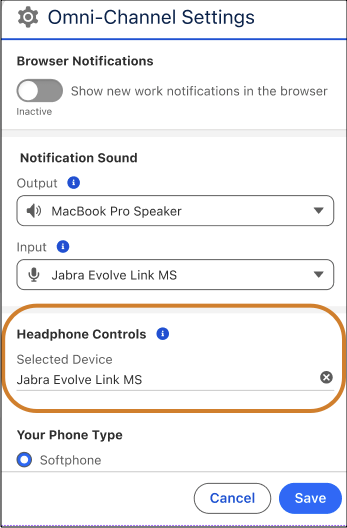
In the Omni-Channel settings, select the headset you want to connect with the device.
-
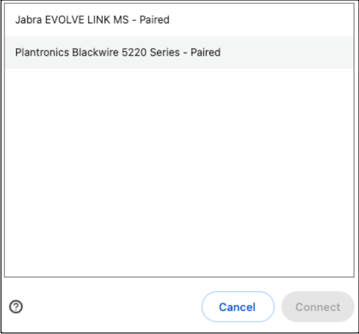
Select the headset from the list in the browser window and click Connect. The browser shows
only the supported and compatible headsets.
Mozilla Firefox doesn’t support headset call controls. Google Chrome and Microsoft Edge
support headset call controls.
You can now use the selected headset for voice
calls.
The selected headset remains paired and connected even if you switch tabs, restart
your system, or log out.
To pair and connect another headset, you must first remove the
currently connected headset from the Headphone Controls section in the Omni-Channel settings or
disconnect it from the browser window.
Only these HID devices are tested:
- Jabra Evolve Link MS
- Poly (Plantronics) Blackwire 3325 Teams
- Poly Plantronics - Blackwire 5220
- EPOS | Sennheiser Adapt 165 USB II
Though not every model from these brands is tested, most of their headsets are expected
to perform as required. Although the WebHID API is used to support headsets, bluetooth headsets
aren't supported. If your bluetooth headset doesn't work and it has a USB adapter, it might help
overcome this limitation.
- Use a Headset Enabled by Telephony Provider
If your telephony provider has enabled headset support in the managed package, you can use a headset for voice call, and control call actions such as accept, mute, unmute, and decline calls from the headset. You can use only the headset models and brands supported by your telephony provider.