---
schema_version: "1"
id: 8d00f84edc3bd7e6656be19e577c1ebb279c0fb406054cbc097db6394b6bfad8
title: Delete a Contact Center
collection: admin
version: current
locale: en-us
portal_url: https://docs.salesforce.com/admin/current/en-us/service/264-0-0/voice_delete_contact_center_resell.md
canonical_url: https://help.salesforce.com/s/articleView?id=service.voice_delete_contact_center_resell.htm&release=264.0.0&type=5
source_site: help.salesforce.com
content_type: documentation
content_hash: e669941bd0f832459ab1adc5f0741fc451966bba3e93197f2c8064393bff3cad
description: You can delete a contact center from your Salesforce org. For example, you can delete the contact center to change the AWS region that’s hosting your Amazon Connect instance or to clean up your Sandbox org. Before you can delete a contact center, you must delete the voice calls associated with the contact center.
products:
- Service Cloud
- Digital Engagement
release: "264"
---
# Delete a Contact Center
You can delete a contact center from your Salesforce org. For example, you can delete the contact center to change the AWS region that’s hosting your Amazon Connect instance or to clean up your Sandbox org. Before you can delete a contact center, you must delete the voice calls associated with the contact center.
### Required Editions
This article applies to:
- Salesforce Voice with Amazon Connect
- Salesforce Voice with Partner Telephony from Amazon Connect

Warning
Before you delete a contact center from a Salesforce org with Salesforce Voice with Amazon Connect or Salesforce Voice with Partner Telephony from Amazon Connect, consider these important points.
- Deleting a contact center from an org, deletes all the associated Salesforce resources but doesn’t delete any of the associated AWS artifacts.
- As a precaution, before you delete the contact center from a sandbox org, copy the custom Amazon Connect instance assets such as contact flows, and Lambda functions, that you want to use in your production org.
1. From Setup, in the Quick Find box, enter Contact Centers, and select **Amazon Contact Centers** or **Partner Telephony Contact Centers**, depending on your telephony system.
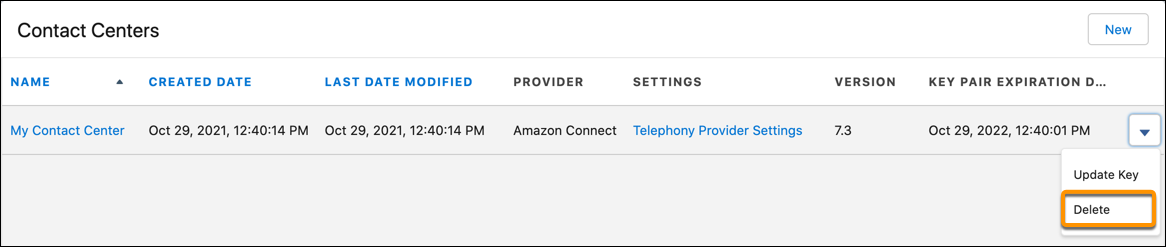
2. To delete the contact center, click the dropdown to the right of the contact center, and then select **Delete**.
#### See Also
- [Delete Voice Call Customer Data](https://help.salesforce.com/s/articleView?id=service.voice_delete_data.htm&release=264.0.0&type=5 "Delete customers’ personal identifiable information (PII) from your Salesforce Voice (formerly Service Cloud Voice) contact center.")
- [_Salesforce Help_: Try Salesforce Voice in Your Sandbox](https://help.salesforce.com/s/articleView?id=service.voice_sandbox.htm&language=en_US)