
To consistently manage incoming calls, create a default phone channel and associate it with a flow to process all incoming calls before routing them to call center queues. You can also use a default phone channel to link outbound calls to an End User record.
Required Editions
This article applies to:
- Salesforce Voice with Amazon Connect
- Salesforce Voice with Partner Telephony
- Salesforce Voice with Partner Telephony from Amazon Connect
| View supported editions. |
| User Permissions Needed | |
|---|---|
| To view the Amazon Contact Centers page: |
Customize Application AND Manage Call Centers OR Salesforce Voice Delegated Contact Center Admin |
| To create and manage a contact center: |
Salesforce Voice Contact Center Admin OR Salesforce Voice Delegated Contact Center Admin |
| To view the Partner Telephony Contact Centers page: |
Customize Application AND Manage Call Centers OR Salesforce Voice Delegated Contact Center Admin |
| To create and manage a contact center: |
Salesforce Voice Contact Center Admin (Partner Telephony) OR Salesforce Voice Delegated Contact Center Admin |
Before you create a phone channel:
- Create a Voice contact center
- For Amazon Connect users, claim your phone number in Amazon Connect
Unless you set up your contact center to route calls directly to and from reps, outbound calls can be linked only to a default phone channel.
- From Setup, in the Quick Find box, enter Amazon Setup or Partner Telephony Setup, depending on your telephony provider, and then select Amazon Setup or Partner Telephony Setup.
-
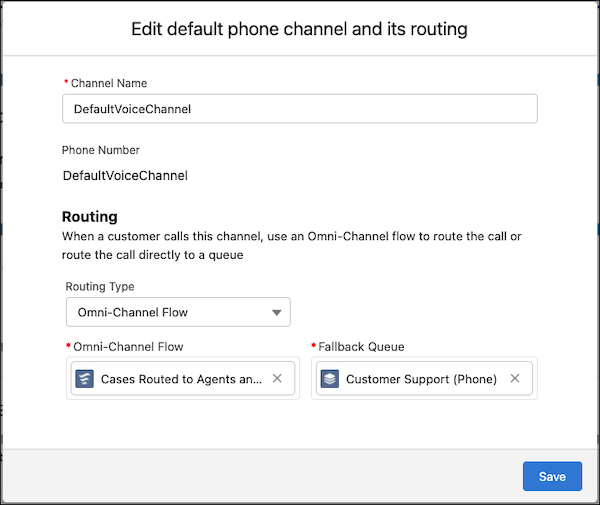
Under Configure Default Phone Channel, click Edit.

- By default, the default phone channel is named DefaultVoiceChannel. To rename it, enter a new channel name.
-
To set up default voice call routing regardless of the contact center, select a routing
type for the default phone channel, and select a queue or Omni-Channel flow.
- Save your changes.