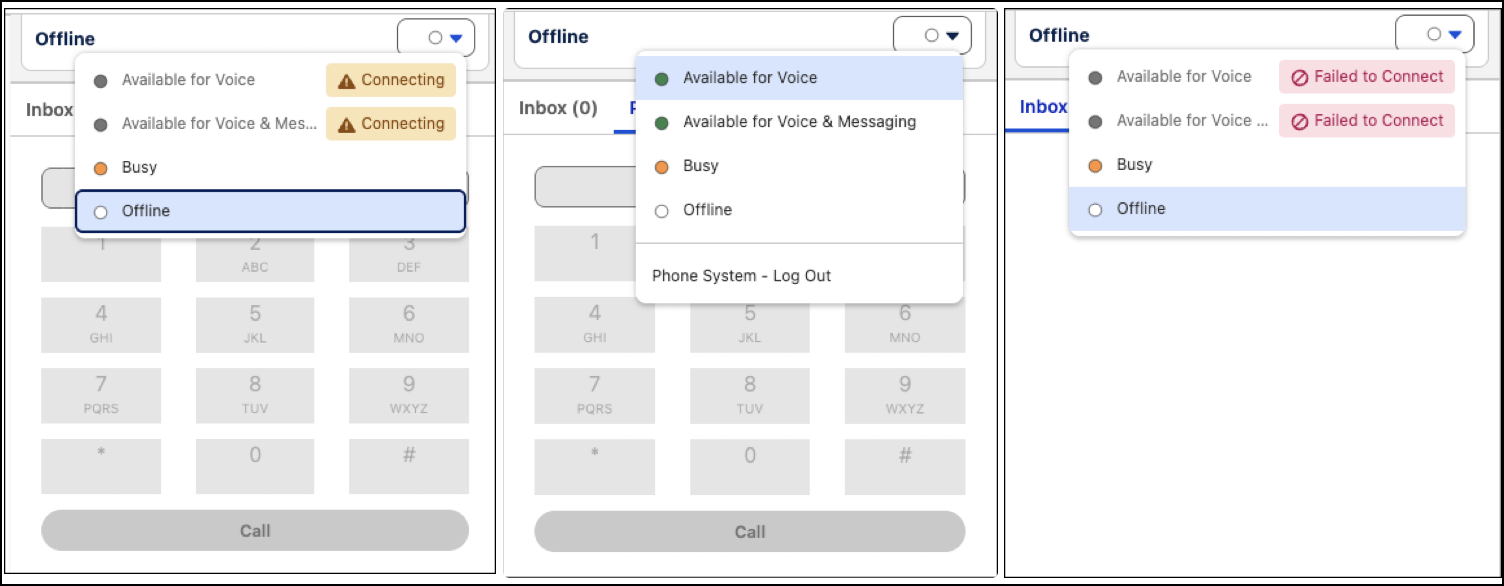
When reps log into Omni-Channel to take or make calls, Salesforce Voice with Telephony Providers uses single sign-on (SSO) to connect them to a partner telephony or CCaaS system. It can take a few seconds to complete SSO. To prevent Omni-Channel from assigning calls to a rep before SSO finishes, turn on Voice Connector Readiness Check. When turned on, Omni-Channel waits for the telephony connector to report readiness before allowing reps to accept inbound work or to make a call.
Required Editions
This article applies to:
- Salesforce Voice with Amazon Connect
- Salesforce Voice with Partner Telephony
- Salesforce Voice with Partner Telephony from Amazon Connect
| View supported editions. |
| User Permissions Needed | |
|---|---|
| To view the Amazon Contact Centers page: |
Customize Application AND Manage Call Centers OR Salesforce Voice Delegated Contact Center Admin |
| To create and manage a contact center: |
Salesforce Voice Contact Center Admin OR Salesforce Voice Delegated Contact Center Admin |
| To view the Partner Telephony Contact Centers page: |
Customize Application AND Manage Call Centers OR Salesforce Voice Delegated Contact Center Admin |
| To create and manage a contact center: |
Salesforce Voice Contact Center Admin (Partner Telephony) OR Salesforce Voice Delegated Contact Center Admin |
This feature is on by default for contact centers that use Omni-Channel Unified Routing, including Amazon contact centers and partner contact centers. To turn on Voice Connector Readiness Check for contact centers that use blended routing, follow these instructions. Blended routing means that a telephony or CCaaS partner system routes voice calls while Omni-Channel routes other channels.
Before you begin, make sure that reps have the Salesforce Voice Contact Center Rep permission set assigned and that they are added as users in the contact center. Without these steps in place, Omni-Channel prevents rep login for voice or blended (voice plus other channel) presence statuses.
-
From Setup, in the Quick Find box, enter
Contact Center, then select Amazon Contact Centers or Partner Contact Centers, depending on your telephony model. - Select the contact center.
- In the Contact Center Details, turn on Voice Connector Readiness Check.
- Save your work.
During SSO login, reps see a Connecting badge next to their Omni-Channel presence status to indicate that they aren’t yet available for calls. After SSO is complete and the voice connector finishes loading, the badge disappears. Reps are then available for calls or other work associated with the status.