---
schema_version: "1"
id: 06bd37c4609f98807adceffca54338aa3f80783911844d84919995214ad113e5
title: Salesforce Voice with Amazon Connect Customer
collection: admin
version: current
locale: en-us
portal_url: https://docs.salesforce.com/admin/current/en-us/service/264-0-0/voice_connect_customer_overview.md
canonical_url: https://help.salesforce.com/s/articleView?id=service.voice_connect_customer_overview.htm&release=264.0.0&type=5
source_site: help.salesforce.com
content_type: documentation
content_hash: 1171f160048a379a12d4ae663494d926d28a73392b7476ec3be4888abe81c907
description: Amazon Connect Customer is an Amazon Web Services (AWS) offering that brings AI capabilities to your Salesforce Voice with Amazon Connect experience.
products:
- Service Cloud
- Digital Engagement
release: "264"
---
# Salesforce Voice with Amazon Connect Customer
Amazon Connect Customer is an Amazon Web Services (AWS) offering that brings AI capabilities to your Salesforce Voice with Amazon Connect experience.
### Required Editions
This article applies to:
- Salesforce Voice with Amazon Connect

Important Amazon Connect Customer is available as a paid, usage-based add-on that is billed at 2.1× the standard base rate of your Salesforce platform minutes. Enabling the feature increases the consumption rate of Salesforce platform minutes accordingly. For more information, see the Frequently Asked Questions About Salesforce Voice with Amazon Connect Customer section.
Previously known as Unlimited AI, Connect Customer consists of additional AI features that are available in your contact center. By default, Salesforce Voice with Amazon Connect includes the Amazon Connect Customer Basic functionality. To access additional AI features, you can manually enable Connect Customer.
- **[Turn On Amazon Connect Customer from the AWS Console](https://help.salesforce.com/s/articleView?id=service.voice_connect_customer_overview.htm&release=264.0.0&type=5)**
Use the AWS console to turn on Amazon Connect Customer and access Amazon's AI features in your contact center.
- **[Turn on Amazon Connect Customer Using the AWS CLI](https://help.salesforce.com/s/articleView?id=service.voice_connect_customer_overview.htm&release=264.0.0&type=5)**
Use the AWS CLI to turn on Amazon Connect Customer and access Amazon's AI features in your contact center.
- **[Frequently Asked Questions About Salesforce Voice with Amazon Connect Customer](https://help.salesforce.com/s/articleView?id=service.voice_connect_customer_overview.htm&release=264.0.0&type=5)**
To learn more about Amazon Connect Customer and its billing impact, see these frequently asked questions.
## Turn On Amazon Connect Customer from the AWS Console
Use the AWS console to turn on Amazon Connect Customer and access Amazon's AI features in your contact center.
### Required Editions
User Permissions Needed
To turn on Amazon Connect Customer:
Salesforce Voice Contact Center Admin

Note Enabling Connect Customer increases the consumption rate of Salesforce platform minutes. For billing details, see the Frequently Asked Questions About Salesforce Voice with Amazon Connect Customer section.
1. Log in to the AWS console.
2. Change the region to the one where you created your contact center.
3. In the **Search** bar, enter and select **Amazon Connect Customer**.
4. On the resulting page, select your contact center instance from the list.
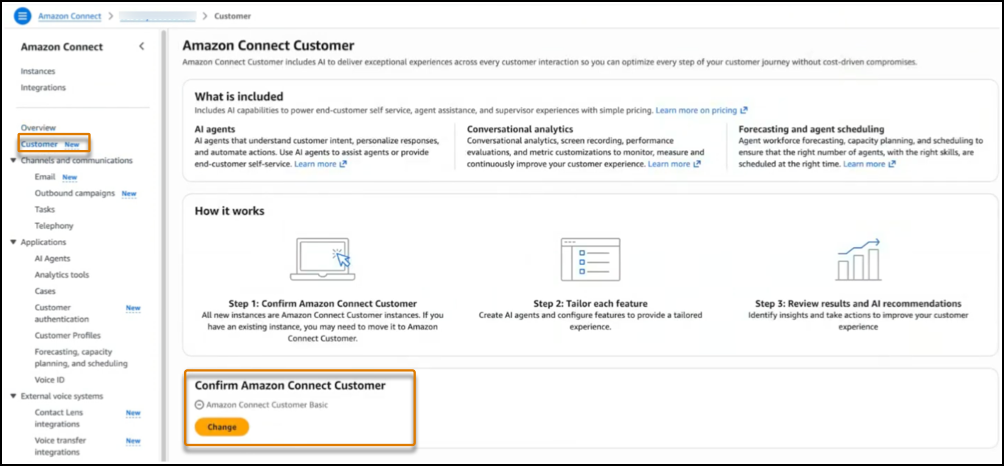
5. In the navigation panel, click **Customer**.
6. Review your Amazon Connect model in the **Confirm Amazon Connect** section. If the section displays **Amazon Connect Customer Basic**, Connect Customer is disabled.
7. Click **Change** to enable Amazon Connect Customer. The label switches to **Amazon Connect Customer** to confirm the change.
## Turn on Amazon Connect Customer Using the AWS CLI
Use the AWS CLI to turn on Amazon Connect Customer and access Amazon's AI features in your contact center.
### Required Editions
User Permissions Needed
To turn on Amazon Connect Customer:
Salesforce Voice Contact Center Admin
Before You Begin:
- Check that AWS CLI is installed and configured with the appropriate permissions.
- Have your Amazon Connect instance ID ready.
- Know the AWS region where your instance is located, for example, us-east-1.

Note Enabling Connect Customer increases the consumption rate of Salesforce platform minutes. For billing details, see the Frequently Asked Questions About Salesforce Voice with Amazon Connect Customer section.
1. Run this command to check the current model of your contact center instance.
```
aws connect describe-instance-attribute \
--instance-id \
--attribute-type "MAX_PACKAGE" \
--region
```
- If the value is `true`, Connect Customer is enabled.
- If value is `false`, your instance uses Amazon Connect Customer Basic, the standard consumption-based model.
2. Run this command to change your instance model.
```
aws connect update-instance-attribute \
--instance-id \
--attribute-type "MAX_PACKAGE" \
--value true \
--region
```
Set the value to `true` to enable Connect Customer, or `false` to disable it.
3. Run the command from step 1 again to verify the change in the AWS environment.
## Frequently Asked Questions About Salesforce Voice with Amazon Connect Customer
To learn more about Amazon Connect Customer and its billing impact, see these frequently asked questions.
### What is Amazon Connect Customer?
Amazon Connect Customer (previously known as Unlimited AI) is an AWS feature set that provides additional AI capabilities for your contact center. Previously, Amazon had enabled these capabilities across all customer instances without prior notice.
To prevent unexpected Salesforce platform minutes, we're proactively disabling Connect Customer across all accounts starting Winter '27. Connect Customer is now an opt-in service that you can turn on at an additional cost.
### Is Amazon Connect Customer a Salesforce or AWS feature?
Amazon Connect Customer is an AWS feature that is compatible with Salesforce Contact Center.
### Is Amazon Connect Customer included with Salesforce Voice with Amazon Connect?
No. By default, Salesforce Voice with Amazon Connect includes Amazon Connect Customer Basic, the standard consumption-based model.
### How much does Amazon Connect Customer cost?
Amazon Connect Customer is available as a paid, usage-based add-on, billed at 2.1× the standard base rate. Usage charges are included in your Salesforce telephony bill. For every minute of platform usage with Connect Customer turned on, you are charged 2.1 times your normal per-minute rate.
### How is usage calculated when Connect Customer is turned on?
Your total platform minutes are calculated using this formula:
Total Platform Minutes = Standard Minutes + (AI Minutes × 2.1)
For example, if you use 300 minutes in a month with Connect Customer turned on the entire time, you consume 630 platform minutes (300 × 2.1 = 630).
If you turn Connect Customer on and off during the month, only the minutes from the period it is turned on are multiplied by 2.1.
Here's an example.
- Standard contact center minutes (Connect Customer turned off for the first 10 days): 100 minutes
- AI contact center minutes (Connect Customer turned on for the last 20 days): 200 minutes
- Calculation: 100 + (200 × 2.1) = 100 + 420 = 520 platform minutes
- You consume 520 Salesforce platform minutes total, even though only 300 actual minutes were used.
### Do all my calls automatically use AI features once I enable Amazon Connect Customer?
Once enabled, AWS classifies all activity within the instance as AI-type usage. Salesforce applies the consumption multiplier to all platform minutes used while the feature is active.
### Can I enable or disable Amazon Connect Customer at any time?
Yes, you can turn it on or off at any time. Your monthly consumption considers the accelerated rate for the period that was turned on and the standard rate for the period it was turned off. As a best practice, we recommend that you don't frequently turn this feature on and off.
### Can the accelerated rate change?
The current consumption multiplier of 2.1x can be changed to reflect improvements or service enhancements. Customers will be notified in advance of any rate changes.
#### See Also
- [_Amazon Documentation:_ Connect Customer Overview](https://docs.aws.amazon.com/connect/latest/adminguide/enable-nextgeneration-amazonconnect.html)