---
schema_version: "1"
id: 5a386bd89ae1b25fcc5cf7d079a24e52e07bf2ff18ea2ebb9be3a24b25b9a8f8
title: Interrupt a Voice Call with Supervisor Barge-In
collection: admin
version: current
locale: en-us
portal_url: https://docs.salesforce.com/admin/current/en-us/service/264-0-0/voice_barge_in.md
canonical_url: https://help.salesforce.com/s/articleView?id=service.voice_barge_in.htm&release=264.0.0&type=5
source_site: help.salesforce.com
content_type: documentation
content_hash: 9bd771c96c6a023b00211f64247c7031161bc53c6a95dfbcf8239a25f811a697
description: To quickly respond to a rep's flag or to deescalate an ongoing voice call, barge in and take over the call.
products:
  - Service Cloud
  - Digital Engagement
release: "264"
---
# Interrupt a Voice Call with Supervisor Barge-In

To quickly respond to a rep's flag or to deescalate an ongoing voice call, barge in and take over the call.

### Required Editions

This article applies to:

- Salesforce Voice with Partner Telephony

<table class="slds-table slds-table_bordered slds-max-medium-table_stacked slds-m-bottom_small edition"><colgroup><col></colgroup><tbody><tr class=""><td class="slds-cell-wrap" style="vertical-align:top;"><a href="https://help.salesforce.com/s/articleView?id=service.voice_editions.htm&amp;release=264.0.0&amp;type=5" title="Learn about the user interfaces, editions, and add-ons that support Voice solutions by Salesforce.">View supported editions</a>.</td></tr></tbody></table>

<table class="slds-table slds-table_bordered slds-max-medium-table_stacked slds-m-bottom_small permission">
        <colgroup>
          <col style="width:50%">
          <col style="width:50%">
        </colgroup>
        <thead class="slds-text-title_caps ">
          <tr class="">
            <th scope="colgroup" class="slds-cell-wrap" colspan="2" style="text-align:center;vertical-align:top;" id="d23551e69">User Permissions
              Needed</th>
          </tr>
        </thead>
        <tbody>
          <tr class="">
            <td data-label="User Permissions Needed" class="slds-cell-wrap" style="vertical-align:top;" headers="d23551e69 ">To open Command Center for Service:</td>

            <td class="slds-cell-wrap" style="vertical-align:top;" headers="d23551e69 ">Salesforce Voice Contact Center Supervisor</td>

          </tr>
          <tr class="">
            <td data-label="User Permissions Needed" class="slds-cell-wrap" style="vertical-align:top;" headers="d23551e69 ">To barge in to a voice call:</td>

            <td class="slds-cell-wrap" style="vertical-align:top;" headers="d23551e69 ">Salesforce Voice Contact Center Rep (Partner Telephony)</td>

          </tr>
        </tbody>
      </table>

1. Open Command Center for Service.
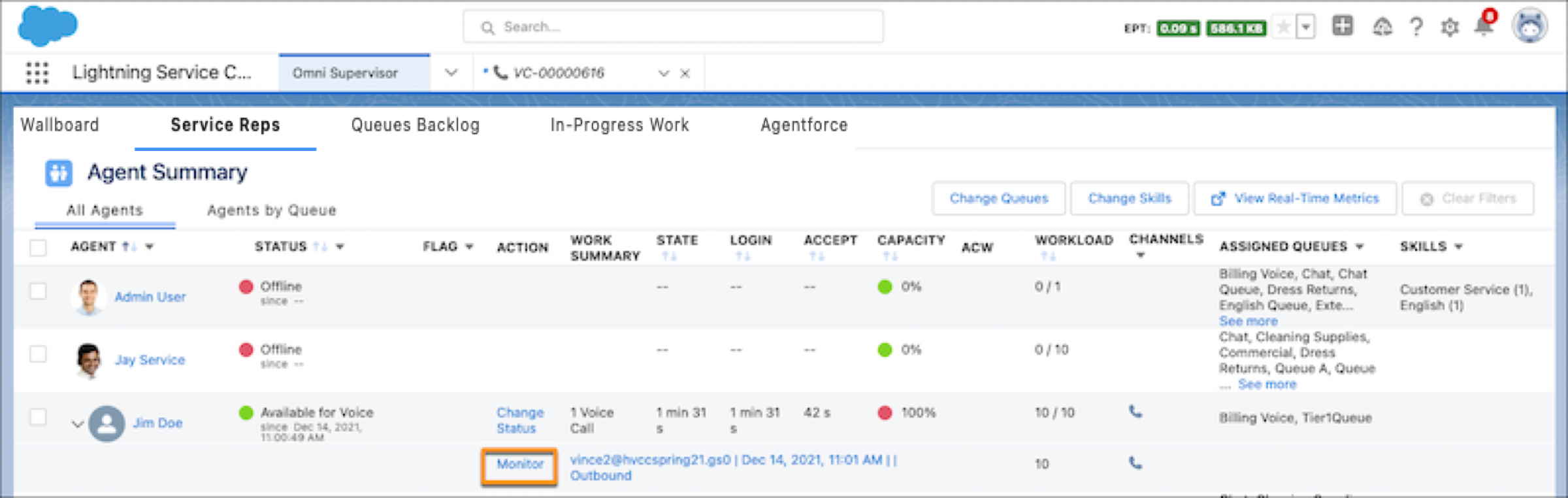
2. From the Service Reps tab, expand a call, and click **Monitor**.
    
    ![Monitor button in Command Center for Service highlighted](https://sf-zdocs-cdn-prod.zoominsoftware.com/tdta-service-support_channels-264-0-0-production-enus/f3c4b3d2-ff86-4f7c-9fe2-3d8b23d35109/support_channels/images/voice/voice_monitor_call.png)
3. Click **Listen In**.
4. Click **Barge In**. When a supervisor barges in to a call, the rep is notified but the customer isn’t.