---
schema_version: "1"
id: 9a77850d37e18009e518cbbb238ae318ceece5845cfbbdf6a220a9f8040b76bf
title: Add a Voice Channel to a Partner Contact Center
collection: admin
version: current
locale: en-us
portal_url: https://docs.salesforce.com/admin/current/en-us/service/264-0-0/voice_add_voice_to_messaging_contact_center.md
canonical_url: https://help.salesforce.com/s/articleView?id=service.voice_add_voice_to_messaging_contact_center.htm&release=264.0.0&type=5
source_site: help.salesforce.com
content_type: documentation
content_hash: a685b75cefe9e2f7781dcc7abde0f473efd42eb9be0936f010b40a4a501fc8b5
description: After you set up a partner contact center with Messaging channel support for Bring Your Own Channel for CCaaS, you can add a Salesforce Voice channel to the contact center.
products:
- Service Cloud
- Digital Engagement
release: "264"
---
# Add a Voice Channel to a Partner Contact Center
After you set up a partner contact center with Messaging channel support for Bring Your Own Channel for CCaaS, you can add a Salesforce Voice channel to the contact center.
### Required Editions
This article applies to:
- Salesforce Voice with Partner Telephony
Salesforce Voice Contact Center Admin (Partner Telephony)
To enable Voice in a partner contact center that already has Messaging support, you must have a Service Cloud User license, a Salesforce Voice Partner Telephony add-on license, and a Digital Engagement add-on license.
Before you begin, install a managed package from a CCaaS provider to support Bring Your Own Channel for CCaaS and Service Cloud Voice.

Tip If you want to add Messaging to a partner telephony contact center instead of the other way around, see [Add a Messaging Channel to a Partner Telephony Contact Center](https://help.salesforce.com/s/articleView?id=service.byoc_ccaas_add_messaging_to_voice_contact_center.htm&type=5&language=en_US).
1. From Setup, enter Partner Telephony Contact Centers in the Quick Find box, and then select **Partner Telephony Contact Centers**.
2. Click **New**.
3. Select your CCaaS provider and select **Next**.
4. Select **Use an existing Contact Center**.
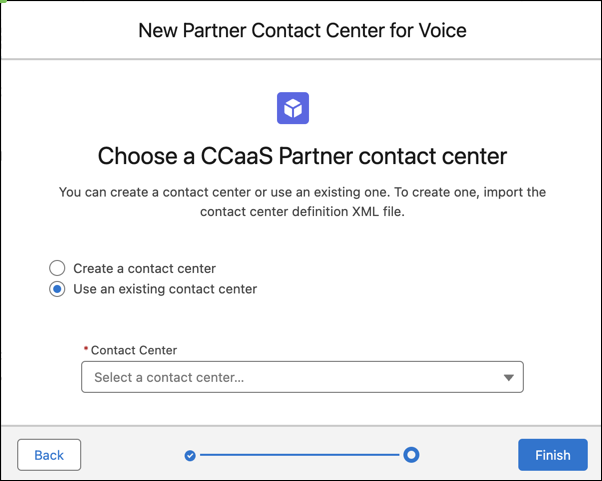
5. Select the messaging-only partner contact center to which you want to add Service Cloud Voice.
The contact center now supports partner telephony as well as Bring Your Own Channel for CCaaS Messaging channels.
You can now create a phone channel in this contact center. To support multiple phone numbers in the same contact center, create additional voice channels.
#### See Also
- [Create a Phone Channel](https://help.salesforce.com/s/articleView?id=service.voice_create_phone_channel.htm&release=264.0.0&type=5 "To configure call routing for voice calls, including Omni-Channel flows and queue routing, and to determine when to create an End User record, create a phone channel. After you create a phone channel, you can set up a caller ID tool to create or reuse an End User record and choose whether to associate the End User record with the number dialed.")