---
schema_version: "1"
id: e2ccd7fa37685ab498d39b44edc1a81ea8ae8308e06258527462483b1d3444bd
title: LWR Service Catalog Site Guidelines
collection: admin
version: current
locale: en-us
portal_url: https://docs.salesforce.com/admin/current/en-us/service/264-0-0/svc_site_lwr_guidelines.md
canonical_url: https://help.salesforce.com/s/articleView?id=service.svc_site_lwr_guidelines.htm&release=264.0.0&type=5
source_site: help.salesforce.com
content_type: documentation
content_hash: dea501f89596921be334ba97b64bfa954d44132b5aeb50e67e000a4165592bf4
description: Review the provided guidelines before using the LWR framework to build your Service Catalog Site.
products:
  - Service Cloud
release: "264"
---
# LWR Service Catalog Site Guidelines

Review the provided guidelines before using the LWR framework to build your Service Catalog Site.

### Required Editions

<table class="slds-table slds-table_bordered slds-max-medium-table_stacked slds-m-bottom_small edition"><colgroup><col></colgroup><tbody><tr class=""><td class="slds-cell-wrap" style="vertical-align:top;"><a href="https://help.salesforce.com/s/articleView?id=service.service_editions_reference.htm&amp;language=en_US" target="_blank">View supported editions</a>.</td></tr></tbody></table>

<table class="slds-table slds-table_bordered slds-max-medium-table_stacked slds-m-bottom_small ">
        <colgroup>
          <col style="width:50%">
          <col style="width:50%">
        </colgroup>
        <thead class="slds-text-title_caps ">
          <tr class="">
            <th scope="col" class="slds-cell-wrap" style="vertical-align:top;" id="d181291e57">Feature Area</th>
            <th scope="col" class="slds-cell-wrap" style="vertical-align:top;" id="d181291e60">Guidelines</th>
          </tr>
        </thead>
        <tbody>
          <tr class="">
            <td data-label="Feature Area" class="slds-cell-wrap" style="vertical-align:top;" headers="d181291e57 ">Site functionality</td>

            <td data-label="Guidelines" class="slds-cell-wrap" style="vertical-align:top;" headers="d181291e60 ">
              <ul>
                <li>The Enables Data Categories in LWR Sites setting and Manage Data Categories system
                  permission must be enabled for you to use data categories in your site.</li>

                <li>The BYO (LWR) template has a standard home page that you must configure and style using
                  standard components. Support of Service Catalog custom components and recommended styling
                  on this page isn’t provided.</li>

                <li>Standard site navigation for Service Catalog isn’t available. Users can access your
                  catalog items only through search. More information is provided in the table rows that
                  follow.</li>

                <li>Catalog items without an assigned data category don’t automatically show in your
                  catalog. They’re accessible only through search.</li>

                <li>Catalog items that use fulfillments with an attachment input type make the entire
                  automation inoperable. The catalog item doesn’t show in your site.</li>

              </ul>
            </td>

          </tr>
          <tr class="">
            <td data-label="Feature Area" class="slds-cell-wrap" style="vertical-align:top;" headers="d181291e57 ">Component Usability</td>

            <td data-label="Guidelines" class="slds-cell-wrap" style="vertical-align:top;" headers="d181291e60 ">
              <ul>
                <li>The Service Catalog Grid component is available for use only on the Network Data
                  Category detail object page.</li>

                <li>The Service Catalog Record Detail Component is available for use only on the Service
                  Catalog Item Definition detail object page.</li>

                <li>The Service Catalog Record Detail and Service Catalog Grid (beta) components contain
                  the standard Record Detail and Grid components respectively. Use these components to
                  configure and style the Service Catalog components.</li>

                <li>The Service Catalog Grid component doesn’t list items in the same row at the same
                  height. We recommend that you use the site-level CSS to adjust the height.</li>

              </ul>
            </td>

          </tr>
          <tr class="">
            <td data-label="Feature Area" class="slds-cell-wrap" style="vertical-align:top;" headers="d181291e57 ">Network Data Category object page</td>

            <td data-label="Guidelines" class="slds-cell-wrap" style="vertical-align:top;" headers="d181291e60 ">
              <ul>
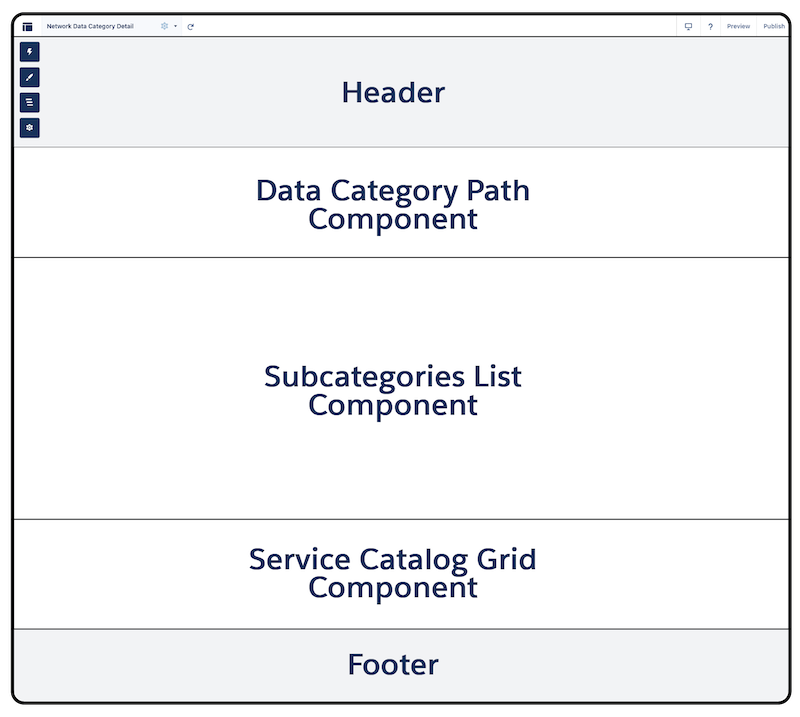
                <li>The object page surfaces data categories in LWR sites. For Service Catalog, the page
                  surfaces catalog items and their associated data categories in your site with the Network
                  Data Category Detail object page variation.</li>

                <li>Several components are required on the page and must be configured in this
                  page layout. We guide you through the process. See <a href="https://help.salesforce.com/s/articleView?id=service.svc_site_pages_setup_lwr.htm&amp;release=264.0.0&amp;type=5" title="Create and configure the Service Catalog site pages for customers to browse your catalog.">Set Up the Service Catalog Site Pages</a>. <div><img style="width:300px;" src="https://sf-zdocs-cdn-prod.zoominsoftware.com/tdta-service-support-264-0-0-production-enus/dd14551c-a772-4db6-9a1d-d84df8df2980/support/images/service_catalog/svc_ndc_layout.png" alt="Network Data Category page structure and Service Catalog components layout"></div>
                </li>

              </ul>
            </td>

          </tr>
        </tbody>
      </table>