
Learn the role of subagents in Service Assistant and review guidelines for creating them.
Required Editions
| View supported editions. |

- This section provides reference guidance for the creation of subagents in Service Assistant. Setup guidance follow the general Agentforce subagents setup, which is included in Set Up Service Assistant.
- Service Assistant is only supported in the legacy Agentforce Builder. Starting in July 2026, the requirement that new agents can only be created in the new Agentforce Builder doesn’t apply to Service Assistant. You can continue to create and configure a Service Assistant agent in the legacy builder until further notice. See Create Agents in the New Builder Only Starting July 2026.
- Beginning in April 2026, agent topics are now called subagents. There are no changes to functionality. During this transition, you may see a mix of the new and previous terms in our documentation. See Topics Are Now Subagents.
This video outlines the best practices and configuration guidance found in this article and in Subagent Best Practices and Subagent Strategy. It provides an overview of how to create subagents and how to optimize them when you use knowledge grounding. Review all of the information in this article and subsequent articles for more specific details and guidance.
Subagents and Service Assistant
In Agentforce, AI agents use subagents, actions, and instructions (known as agent assets) to categorize user interactions and determine what specific tasks they need to complete for users. AI agents typically assist customers in resolving general issues and finding self-service solutions without the need for a service rep, like changing a password or making an appointment.
In contrast, Service Assistant is an agent that gives specific and detailed guidance to your service reps so they can resolve customer cases directly. To make sure the guidance in a service plan is accurate and specific, you need to create subagents and instructions that precisely detail your service policies for each case type, such as “Return Request” or “Credit Card Declined.” Having detailed and specific subagents help Service Assistant determine what instructions are relevant for inclusion in a service plan based on case details.
Keep in mind that we don't provide any preconfigured subagents for Service Assistant. You must create you own subagents and instructions following the provided guidelines.
Guidelines for Writing Service Assistant Subagents
We suggest reviewing these guidelines on how to write both subagents and instructions for Service Assistant. The guidelines highlight how to structure your subagents and instructions for Service Assistant so that the resolution guidance in a service plan is relevant to the case and your policies.
Here are a few guidelines for creating subagents for Service Assistant.
| Guideline | Details | Example |
| Proivde subagents with a clear and specific names. | Subagents should have a name that speficies the exact Case type you're trying to address. | Instead of using “Customer Inquiry”, use “Order Status Inquiry”. Customer Inquiry is too broad as it covers a wide range of cases. |
| Eliminate overlapping subagents. | Make sure your subagents are distinct from one another. Overlapping subagents make it hard for the agent to classify cases meaningfully. |
Instead of including both “Manage Reservations” and “Confirm Reservation” as separate subagents, rename them to make the differences explicit. You can avoid overlap by consolidating them into one “Reservation Management” subagent. |
| Keep subagents singular. | Subagents work best when they encompass only one definition or concept. Combining different ideas into one subagent can result in inappropriate service plans. | Instead of combining two concepts into a single subagent like “Returns and Exchanges,” separate each concept into its own subagent, “Returns” and “Exchanges." |
| Provide encompassing subagent descriptions. |
Use a single high-level subagent for a wide range of related issues by explicitly listing variations and keywords in the subagent's description field. This way you don’t need to create separate subagents for each specific variation of transactions. When you have subtypes defined in the description, Service Assistant is better able to match a single subagent to multiple transaction declined case types. |
Subagent: Transaction Declined Description: Guide service reps in helping customers resolve declined credit card transactions. Issues are related to authorization failures, including declining reason codes such as insufficient funds, suspected fraud, incorrect card details, travel blocks, and daily spending limits Subagent: Return Request Description: Guide service reps through processing a customer's return request, including verifying eligibility and initiating the return in the system. Questions are related to return requests, which includes proof of return, return windows, product condition, and refund status. |
Guidelines for Writing Service Assistant Instructions
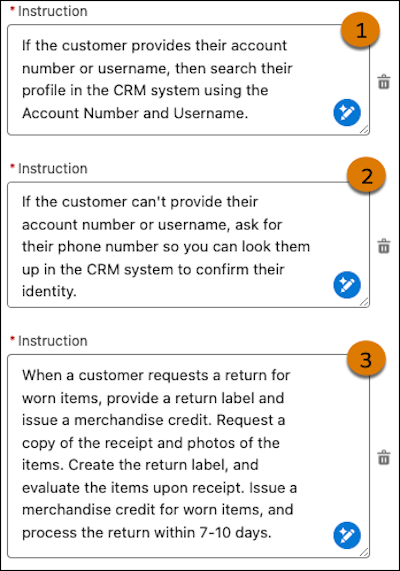
When writing instructions for Service Assistant, think about the steps a service rep must complete for a particular case. Translate those steps into instructions with specificity and accuracy to your service policies and practices. Here's a set of sample instructions for a "Process Return" subagent with details that follow.
| INSTRUCTION GUIDELINE | CONTEXT |
|---|---|
| (1) Use clear, conditional statements | Include conditional language in your instructions to consider the possible scenarios that can occur when working a case. This ensures that all the relevant information is accounted for and available for the agent to decide what to include in a plan. If the information isn’t included in the instructions, it won’t be in the plan. |
| (2) State the actions that follow preceding instructions and be clear about expected outcomes. |
Instructions should match the standard workflow for the specific issue. In the example, the instruction states what occurs given the previous instruction. Include language such as “When you have…”, and “After…”. For instructions that are mandatory for working the case, use language such as “Always include this as a step in the plan”. This makes sure that the information is always included in a plan. Keep in mind that you don’t need to add instructions in a logical order. Agentforce agents reference each instruction as standalone information, which allows them to understand and apply instructions without additional context. Service Assistant can logically organize all instructions into a sequenced service plan. |
| (3) Specify your service policies and practices |
When writing instructions, be specific and refer to your company's established guidance for the given case type. Cover all your service policies and standards for a given case and outline the criteria and conditions that must be met for the instruction to apply to the given case. Make sure that each instruction only refers to one piece of information from your policy or procedures for working the Case type. Don’t combine multiple pieces of information in one instruction. Be sure to include your guidelines for tone, and specify any sample scripts or templates available to the service rep to aid them in working the case. |
| (4 - not shown in image) Omit sensitive and personally identifiable information. |
Avoid including sensitive or confidential information in your instructions. That way, you make sure the information is safe to share and referenced by Service Assistant without concerns about privacy or security.
|
Sample Service Assistant Subagent
To better understand how to create subagents for Service Assistant, here’s an example “Return Request” subagent. The example is detailed, but the amount of information in your subagents and instructions varies based on the case type and complexity.
To save time creating subagents and instructions, we recommend using Agentforce Data Libraries. The feature adds information from your knowledge articles as steps in a service plan, reducing the amount of details you need to include in instructions. See Grounding Service Assistant with Knowledge (Optional).
- Service Assistant Subagent Best Practices
Learn our recommended best practices for creating subagents in Service Assistant. - Subagent Strategy for Service Assistant
Learn how to strategize the implementation of your Service Assistant subagents for optimal granularity and knowledge grounding.