
Learn our recommended best practices for creating subagents in Service Assistant.
Required Editions
| View supported editions. |
- Center subagents around real customer issues
- Provide descriptions and scopes that capture issue subtypes
- Don’t create agent-function instructions
- Don’t combine multiple steps into a single instruction
- Reference actions directly and state when to use them
- Don’t tell the agent to search your knowledge articles

Center subagents around real customer issues
- Provide precise, distinct titles that specify the exact issue type you’re addressing. Specific titles like “Return Request” help Service Assistant accurately categorize the record and form initial plan steps based on the instructions.
- Try to keep subagents specific to a singular category. Instead of combining concepts into a subagent like "Returns and Exchanges," separate them into distinct subagents, like “Returns” and “Exchanges.”
- Keep subagents broad enough to serve as meaningful categories, but avoid categories that are too generic. For example, "Account Issue" and “Customer Issue” are too broad because they can cover a wide range of issues. Instead, use categories like “Billing Dispute”, “Transaction Decline”, or “Account Security.”
- Avoid creating subagents that describe the features Service Assistant is already built to perform. A subagent titled “Case resolution assistance”, “Draft Service Plan”, “Resolve Issue”, or “Resolve Record” prevents Service Assistant from accurately categorizing records that have specific issues. Here’s an example of a general subagent that’s not suited for use in Service Assistant.
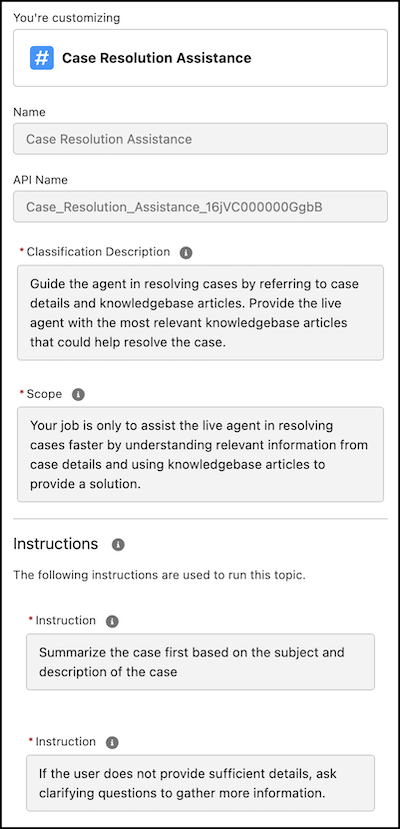
Provide descriptions and scopes that capture issue subtypes
Use a single high-level subagent for a wide range of related issues by explicitly listing variations and keywords in the subagent’s Description and Scope fields.
For example, in a “Transaction Decline” subagent description, list specific authorization failures the subagent covers, like insufficient funds, suspected fraud, and travel blocks. This way you don’t need to create separate subagents for each specific subtype of transactions. When you have subtypes defined in the description, Service Assistant is better able to match a single subagent to different types of issues related to transaction declines.
| Subagent Part | Example |
|---|---|
| Label | Transaction Declined |
| Description | Guide service reps in helping customers resolve declined credit card transactions. Questions are related to authorization failures, including declining reason codes such as insufficient funds, suspected fraud, incorrect card details, travel blocks, and daily spending limits. |
| Scope | Your job is to assist service reps in identifying the reasons behind declined transactions and providing the necessary steps to either allow the charge or secure the customer’s account. You must not handle inquiries outside of declined transactions and account security. |
When you encompass different subtypes in your description, use instructions to document the workflow processes for each subtype using conditional language, like “If..., then...” and “When..., then...”. See the example in Grounding Service Assistant with Topics.
Alternatively, to limit the effort of manually transcribing instructions for multiple subtypes, you can use knowledge grounding through Agentforce Data Libraries to add the specific subtype information directly from your articles into the service plan. When using knowledge grounding, your instructions don’t need as much detail and can be more broad. See the example in Topic Strategy and review our knowledge grounding guidance in Grounding Service Assistant with Knowledge.
Here’s another example of a high-level subagent that specifies its subtypes in the description.
| Subagent Part | Example |
|---|---|
| Label | Processing Returns |
| Description | Guide service reps through processing a customer's return request, including verifying eligibility and initiating the return in the system. Questions are related to return requests, which include proof of return, return windows, product condition, and refund status. |
| Scope | Your job is to assist service reps in processing customer return requests. This includes verifying return eligibility based on purchase date, item condition, and applicable return policies. It also includes identifying the reason for the return, determining whether a refund, exchange, or store credit applies, and guiding reps through the steps to initiate, approve, or escalate a return as needed. You must not handle inquiries outside of returns. |
Don’t create agent-function instructions
To ensure optimal performance, don’t create instructions that direct Service Assistant to execute its built-in reasoning, such as:
- “Summarize the record.”
- “Analyze the record details to provide resolution guidance.”
- “Draft a service plan based on the record details.”
- “Use knowledge articles to create the plan.”
Service Assistant performs these tasks automatically. Instead, create instructions that document your specific business processes and service policies.
Don’t combine multiple steps into a single instruction
Each instruction needs to outline a singular task or process that's required for resolving the issue. Do not put multiple steps in one instruction, like this.
| Subagent Part | Example: Incorrect Instruction Structure |
|---|---|
| Instruction |
|
Instead, break that down into three distinct, individual instructions.
| Subagent Part | Example: Correct Instruction Structure |
|---|---|
| Label | Processing Returns |
| Instruction | Search the Authorization Log in the system using the card details to identify the system Response Code. |
| Instruction | If the response code is Suspected Fraud, follow the Fraud Verification Script. Read the merchant name and amount to the customer, and if they confirm it is valid, remove the temporary block. |
| Instruction | If the decline is International Restriction, check if a travel notice is on file. If no notice exists, verify the customer's location and add a Travel Note to the account to allow future charges in that region. |
Reference actions directly and state when to use them
Service Assistant supports standard and custom Agentforce actions. To make sure an action appears in a plan step, reference it by name in your instructions and explicitly state when Service Assistant needs to use it, such as at the first step, at the final step, or after a specific condition is met. Direct references work best for mandatory steps that always happen. For situational steps, write clear action descriptions and let Service Assistant match the action to the record context. See Actions in Service Assistant.
Here are some examples of instructions that reference actions.
- As a first step, always retrieve the traveler’s record using the Get Record action. The traveler’s name is collected in an input field before the action runs.
- As a final step, after gathering information about visas, vaccines, and entry requirements, always draft and send an email to the customer. Summarize the work completed, including entry requirements, vaccine requirements, and other details. Use the Draft and Revise Email action.
When you reference actions in your instructions, keep these tips in mind.
- Use the action label, not the action API name. Referencing the API name causes errors in step creation.
- If the action needs information from the service rep, state what is collected and turn on Collect data from user for the action’s input field.
- After an action runs, Service Assistant sometimes asks the service rep how to proceed instead of moving to the next step. To keep the plan moving, state what happens next, like “After the action completes, immediately proceed to verify entry requirements.”
- Service Assistant runs actions automatically. For actions that need the service rep’s approval first, such as issuing a refund, turn on Require User Confirmation for the action.
Don’t tell the agent to search your knowledge articles
- Service Assistant uses Agentforce Data Libraries to create plan steps automatically. Creating instructions to reference the knowledge bases isn’t needed.
- Don’t include statements like “Use the Answer Questions with Knowledge action” in your instructions. For dyanmic plans, Service Assistant automatically searches your knowledge base each time it creates a plan step.