
Learn how to use related records as a grounding source for Service Assistant for Messaging to create more contextual and detailed plan steps.
Required Editions
| View supported editions. | |
 This article applies to: This article applies to:
|
Service Assistant for Messaging |
 This article doesn't apply to: This article doesn't apply to:
|
Service Assistant for Case and Voice |
Service Assistant grounds service plans for messaging in several standard data sources to create the steps of a service plan: the messaging chat, subagents, knowledge articles, and actions. Optionally, you provide more grounding data from related records with a customizable Messaging Session Related Record Details prompt template that Salesforce provides.
The Messaging Session Related Record Details prompt template includes these default grounding fields for Case and Account.
- Case: Case Number, Subject, Description, Priority, Status, Origin, and Type
- Account: Name and Description
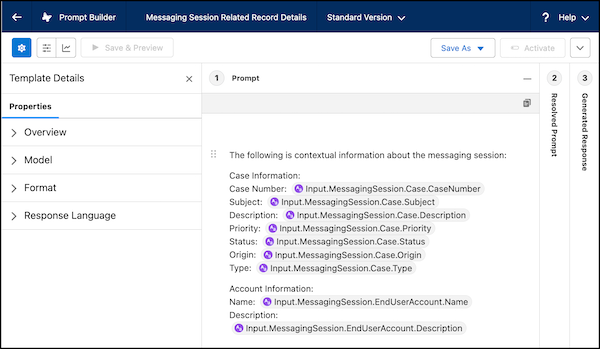
The prompt template is a standard template and is active by default. Use the template as is or modify it to add more objects and fields.
When the prompt template is active, Service Assistant grounds on the data, along with your other grounding sources, to build service plan steps. Because Service Assistant performs a fresh search of all grounding sources when it creates a step, it automatically references the related-record data for each step.
When your grounding fields change or you update the prompt template, Service Assistant captures the updated data and references it when it creates the next step. Changes to fields or the prompt template don't trigger Service Assistant to regenerate the current plan step automatically.
Keep in mind that not every step is grounded in or references the related-record data. Service Assistant reviews the grounded data in relation to the context of the active conversation. If the data isn't relevant to the conversation, the data isn't incorporated in the plan steps.
Setting Up Related Record Grounding for Messaging
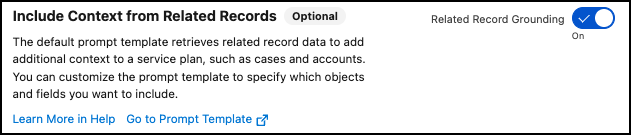
To use related record grounding, turn on Include Context from Related Records on the Messaging tab of the Service Assistant Setup page, and configure the prompt template. When the feature is turned on and the prompt template is active, Service Assistant automatically references the template during plan generation.
From Prompt Builder, review the Messaging Session Related Record Details prompt template. Use the template as is or modify it to meet your business requirements. Add more Case or Account fields, or add custom objects and fields.
Grounding Data Access and Permissions
To include related record data in a messaging service plan, both the ServicePlanner User (agent user) and service reps require read access to all objects and fields included in the prompt template.
If you pass record data to the prompt template using input resources such as a flow or Apex action, the ServicePlanner User and service reps also require access to the fields, objects, and Apex classes that those resources reference.
We recommend providing access through a Messaging Record Grounding custom permission set. Service reps also need the Prompt Template User permission set. The ServicePlanner User's access lets Service Assistant retrieve and pass the data into the plan, and the service rep's access lets that data appear in the service plan. Grant service reps access to the objects and fields set in your configuration according to your data access and sharing rules.
These permissions are in addition to the Service Assistant Mandatory Permissions and Service Assistant for Messaging Permissions. This table outlines all permissions required for related record grounding.
| Person | User license | Permissions |
|---|---|---|
| Service Assistant Admin | Salesforce |
|
| ServicePlanner User (agent user) | Einstein Agent |
|
| Service Rep | Salesforce |
|
Considerations for Messaging Related Record Grounding
- Service Assistant grounds only on text-based field data, including picklists and checkboxes. Any files or images included in the record aren't used for grounding.
- Grounding doesn't require a related record to be closed or ended. Service Assistant can ground on a related record in any state.
- Prompt Builder supports only single-level object and field relationship references from the messaging session.
- Multilevel references across relationships aren't supported, such as Input: MessagingSession.Case.Account.Name.
- If you set up multiple Service Assistant agents for messaging, all agents reference the same prompt template.