
Review our recommendations for how to best use quick actions with Agentforce subagents and instructions.
Required Editions
| View supported editions. |

The provided guidance for writing Quick Action instructions makes sure Service Assistant has enough information to effectively surface them in a plan step. However, because quick actions and subagent instructions work together to build a service plan, it’s important to understand how to use both together so that your quick actions consistently show in the right plan steps.
There are two ways to use both instruction types: keep them separate or make them dependent using direct references. The independent method is our recommended approach, but the dependent approach is also effective. We recommend trying out both. Which one works best depends on each particular use case.
Approach 1: Independent Instructions
In this recommended approach, subagent instructions and quick action instructions have distinct and separate roles.
Subagent Instructions
In this approach, subagent instructions describe your high-level policy, process, or case scenario. It shouldn’t mention the specific quick action name or use keywords from the quick action name or instruction. This no-duplication rule enables Service Assistant to analyze the scenario described in the subagent and find the most semantically relevant quick action.
Quick Action Instructions
In this approach, quick action instructions contain all the action logic that describes how to accomplish a specific task. They must be self-contained and define the action’s general function, specific conditions for its use, and final outcome. Because quick actions contain these details, Service Assistant can confidently match the quick action to the right steps formed from the subagent instructions.
Examples and Key Take Away
Here are examples of instructions that follow the independent method and show both recommended formats for writing quick action instructions. These are the key takeaways.
- The subagent instruction describes a general business process, while the quick action provides the exact guidance on how to complete a specific task in that process.
- The key to this independent approach is that the subagent covers a broad category, like a billing issue. This is a general category that encompasses many different workflows and processes for billing issues. Meanwhile, the quick action is a specific tool that handles just one part of that larger process, like initiating a billing dispute.
- Although in the examples the subagent and the action are clearly related, they’re kept separate to their specific uses. The instructions don’t reference each other.
| Quick Action | Related Subagent and Instruction | Quick Action Instruction Examples |
|---|---|---|
|
Initiate Billing Dispute Type: Flow |
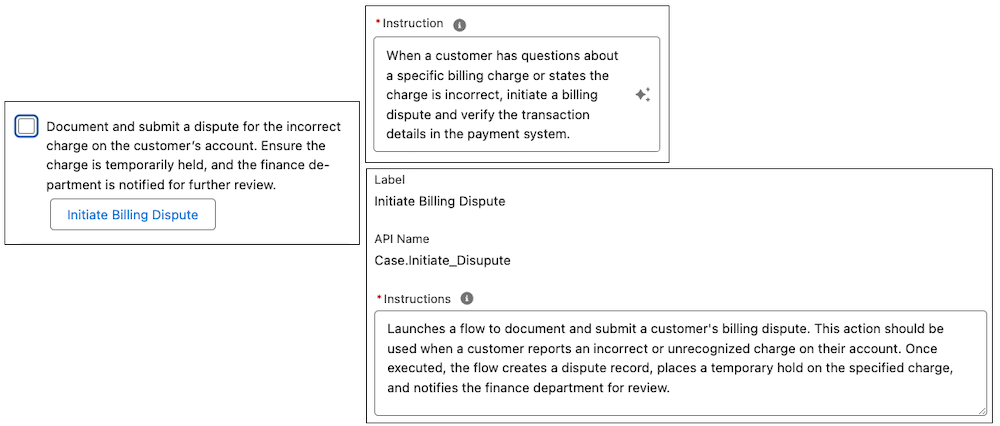
Subagent: Billing Issue Instruction: When a customer has questions about a specific charge on their bill or indicated the charge is incorrect, initiate a billing dispute and verify the transaction details in the payment system. |
Condensed format: Launches a flow to initiate and submit a billing dispute when a customer reports an incorrect or unrecognized charge on their account. Detailed format: Launches a flow to document and submit a customer's billing dispute. This action should be used when a customer reports an incorrect or unrecognized charge on their account. Once executed, the flow creates a dispute record, places a temporary hold on the specified charge, and notifies the finance department for review. |
|
Request Order Cancellation Type: Flow |
Subagent: Order Cancellations Instruction: If a customer inquires about changing or stopping a recently placed order, first check the order's current fulfillment stage in the system. |
Condensed format: Initiates a flow to submit an order cancellation request when a customer expresses to cancel an order and the order is still valid for cancellation. Condensed format: Launches a flow to submit an order cancellation request. This action is intended for use when the customer expresses a desire to cancel an order and the order's status is confirmed as still cancellation. Once executed, the cancellation request is submitted for processing, and the case is updated with the new status. |

Here’s an example of the independent approach with a quick action instruction and its related subagent instruction showing in a plan step.
Approach 2: Dependent Instructions
In the dependent instructions approach, the roles of both sets of instructions are intentionally overlapped and directly reference each other.
Subagent Instructions
In this approach, the subagent instruction not only defines your specific policy or process but also acts as a direct trigger to call the quick action. It explicitly states the Quick Action name, telling Service Assistant which tool to use for the step. For example, it uses explicit language such as “Use the file billing dispute quick action.” To establish a match, we recommend wording the subagent instruction to mirror or duplicate the key details found in the Quick Action instruction, such as its function, conditions, and outcome.
Quick Action Instructions
In this approach, the Quick Action instruction contains all the action logic, defining the function, conditions, and outcome. For this approach to work effectively, the Quick Action must have a specific name that the subagent instruction can reference. Also, the instruction aligns closely with what is described in the subagent’s instruction.
The key to this approach is the tight coupling and duplication of action logic. The coupling prevents ambiguity and helps Service Assistant make a confident match based on the explicit reference in the subagent instruction. Due to the tight coupling, we recommend using the detailed format to write the quick action instruction.
Examples
Here are examples of instructions that follow the dependent method.
| Quick Action | Related Subagent and Instruction | Quick Action Instruction Examples |
|---|---|---|
|
Notification of Refund Type: Send Email |
Subagent: Process Refund Instruction: When the refund process is completed, use the Notification of Refund tool to inform the customer that the refund has been processed and provide any additional information they may need. |
Concludes the refund process by drafting and sending a notification email to the customer. This action is used directly from a service plan step once refund is initiated. It provides the customer with final confirmation and transaction details, and a note is logged to the case record. |
|
File Billing Dispute Type: Flow |
Subagent: Billing Dispute Instruction: When a customer reports an incorrect charge on their invoice and wishes to formally contest it, use the Initiate Billing Dispute tool to launch the guided flow and file the dispute. |
Launches a flow to formally file a customer's billing dispute. This action is used when a customer reports an incorrect charge on their invoice and wishes to contest. Once executed, the flow creates a new dispute case record, notifies the billing department, and provides the customer with a dispute confirmation number. |
|
Verify Customer Identity Type: Update Record |
Subagent: Credit Card Issue Instruction: Before investigating the issue, verify the customer’s identity using the Verify Customer Identity tool. |
Launches a flow at the start of a customer interaction dealing with issues related to credit issues to confirm the customer’s identity according to company policy. After the flow is executed, it guides the service rep through the verification steps and logs the outcome (Verified or Not Verified) on the case record. |
Here’s an example of the dependent approach with a quick action instruction and its related subagent instruction showing in a plan step.
.png)