
Learn about the Service Assistant component, where service reps work through a service plan and receive additional resolution support with agent chat and optional capabilities.
Required Editions
| View supported editions. | |
 This article applies to: This article applies to:
|
|
Service Assistant Agent, Component, and Plans
Service reps receive issue resolution assistance in the Service Assistant component, a Lightning web component that shows as a panel on the case, messaging, or voice record pages. The component is powered by the Service Assistant agent, the proactive AI agent on the record. The agent monitors the record in real time to provide step-by-step resolution guidance with a service plan. It also executes a set of optional capabilities that help service reps resolve issues.
Together, the agent, the panel component, and its capabilities form the core parts of Service Assistant.
- AI Agent, Plans, and Capabilities: Service Assistant is a proactive AI agent that guides service reps through issue resolution in real time with a service plan. A service plan is the core capability of Service Assistant that provides step-by-step guidance grounded in the record data and your grounding sources, such as knowledge articles. Service Assistant monitors the record throughout its lifecycle and updates the plan as the record changes. To give reps more support, you can extend Service Assistant with optional capabilities, such as Case Catch-Up & Insights and Service Replies. Service Assistant orchestrates the service plan and these capabilities together in real time.
- Agent Panel & Component: Service Assistant is contained within a Lightning web component as an agent panel on the case, messaging, or voice record pages. The component is the surface layer where service reps work with the Service Assistant agent to receive resolution guidance through a service plan. The component surfaces any Service Assistant capabilities you turn on, each as its own card. The agent panel also has an agent chat box where service reps can receive on-demand support from Service Assistant, such as asking questions about record details, looking up knowledge, and running actions.
- Adaptive Experience: The agent, the component, and the capabilities you turn on make up the Adaptive Experience. Because the agent monitors the record, updates the service plan in real time, and proactively surfaces capabilities, Service Assistant provides an adaptive, real-time issue resolution experience for service reps.
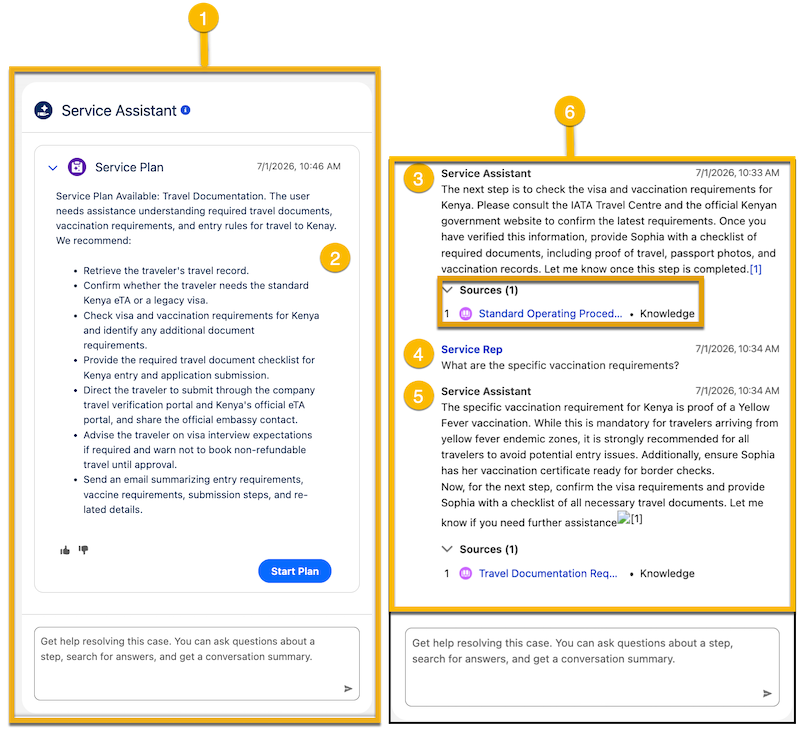
Here’s an overview of the component UI with a service plan. Because the service plan is the core feature of Service Assistant, it provides a cohesive overview of how the component works. The UI shown is the same for Service Assistant for Case, Messaging, and Voice.
| Part | Details |
|---|---|
| Service Assistant Panel (1): | Contains both the service plan interface and the agent chat. It's a central workspace where service reps get resolution guidance through a service plan. Service reps can receive additional support through capabilities, such as Case Catch-Up & Insights and Service Replies, that show as cards alongside the service plan. See examples in Service Assistant Capabilities. |
| Service Plan and Capability Cards (2): |
The service plan shows as a card in the center of the panel. Each capability you turn on also shows as its own card in the component. Service Assistant supports two plan types.
Service reps first see a service plan summary that describes the issue and gives an overview of the suggested resolution pathway. The summary UI is the same for both guidance and dynamic plans. However, for guidance plans, service reps select Draft Plan to receive a static checklist of steps that fills the center of the panel. For dynamic plans, service reps select Start Plan to begin a step-by-step, conversational walkthrough of the service plan. For Service Assistant for Voice, there’s no Start Plan button. The plan starts automatically by default. You can also turn on the same experience for Service Assistant for Messaging by turning on Start Plans Automatically from the Messaging section of the Setup page. Service Assistant for Case always shows a Start Plan button. |
| Service Plan Steps (3): |
Service Assistant creates a service plan based on the latest record data, sub agent instructions, and knowledge articles. How the plan updates depends on the plan type and the record type.
For more details in Service Assistant Record Processing and Grounding with Record Data. |
| Agent Chat (4-5): |
Agent chat facilitates two-way collaboration between the service rep and Service Assistant, where service reps can ask questions, request knowledge information, and launch actions, such as drafting an email. Agent chat is available for both guidance plans and dynamic plans. The chat is turned on by default for dynamic plans. To turn it on for guidance plans, select Chat with Service Assistant on the Service Assistant Setup page. Every interaction is saved to the plan history and component feed, so Service Assistant stays aware of the full conversation, including the actions it surfaced or executed and the knowledge information it presented. |
| Component Feed History (6): |
Component feed history shows the full interaction between the service rep and Service Assistant, including the plan summary, each step, the actions surfaced or executed, and the knowledge information presented. Service Assistant is grounded in this feed, so it stays aware of everything that happened while working on the record. The component also shows other capabilities that extend Service Assistant when they're set up and turned on, such as Case Catch-Up & Insights and Service Replies. Capabilities are shown in the feed, but they aren't tracked or referenced by Service Assistant. Service Assistant doesn’t ground service plans on any information provided by capabilites, and service reps can’t ask service assistant questions about the capability information using the agent chat. See examples in Service Assistant Capabilities. |
Guidance Plans UI
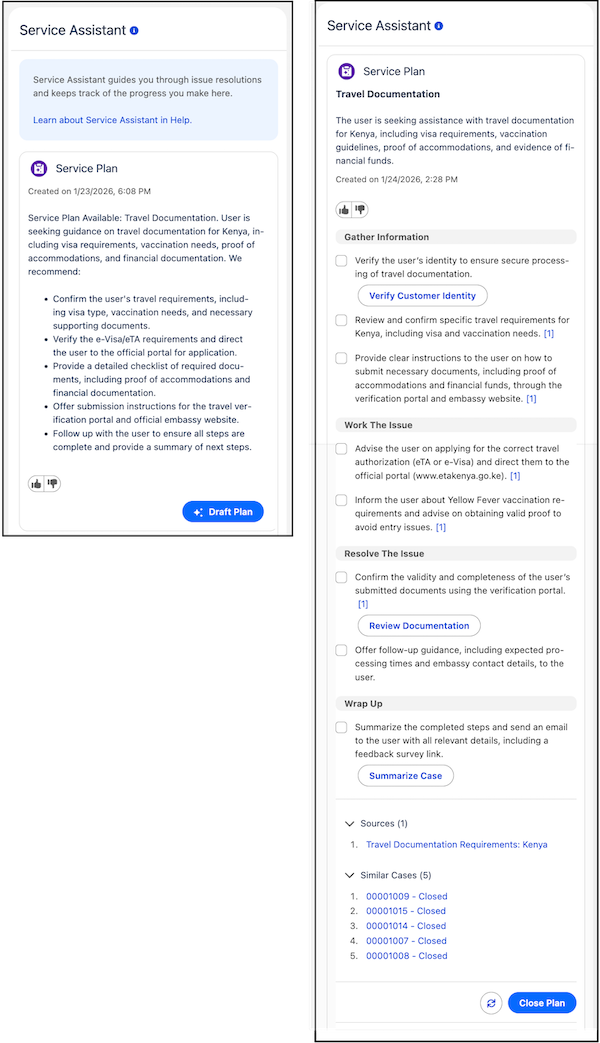
A guidance plan uses the same component layout as a dynamic plan, with one difference in how the plan is created. The plan summary works the same way: Service Assistant summarizes the record and gives an overview of the suggested resolution pathway. Instead of selecting Start Plan, a service rep selects Draft Plan to generate the full checklist at once, and selects Redraft Plan to update it. Guidance plans are supported for cases only.
A guidance plan is static, and Service Assistant is reactive. It responds only when a service rep asks for help through the agent chat. It doesn't proactively propose knowledge articles, actions, or other content in the component feed. This behavior differs from a dynamic plan, where Service Assistant proactively surfaces guidance, knowledge, and actions in the feed as the record changes.
The agent chat and the component feed aren't turned on by default for guidance plans. To use them, turn on Chat with Service Assistant from the Service Assistant Setup page.
Along with the checklist of steps, a guidance plan can surface these features in the component. All features are optional. See Extend Service Assistant for Case.
- Knowledge sources: Steps created from knowledge articles are cited with a number at the end of the step, such as [1]. The numbers link to a Sources section at the bottom of the component that lists every article used to create the plan. See Grounding Service Assistant with Knowledge.
- Quick actions: Buttons within a plan step that let a service rep complete a task without leaving the component, such as changing the case status or summarizing the case. See Grounding with Quick Actions.
- Similar cases: A list of cases related to the active case, shown at the bottom of the component. The list is a reference tool only. The cases aren't used to ground the plan. See Set Up Similar Cases.
- Translation: Guidance plans support translation into the service rep's preferred language through Real-Time Translations. See Service Plan Translation.
Agent Chat
Agent chat provides a conversational interface in the Service Assistant component to provide direct collaboration between service reps and the Service Assistant agent. Available for both guidance and dynamic plans, this feature lets service reps ask questions, request summaries of the record or service plan, look up knowledge base information, and launch Agentforce actions.
The agent chat is grounded in the entire record history and all component feed activity, such as the service plan steps, actions executed, and the conversation history between Service Assistant and the service rep. This grounding gives service reps a quick way to ask for a summary of the plan and the record.
For dynamic service plans, agent chat is turned on by default for cases, messaging, and voice. For guidance plans, manually turn on agent chat from the Case tab of the Service Assistant Setup page.
To use agent chat, add the General CRM subagent to Service Assistant, which enables Service Assistant to perform general tasks, such as querying other records, surfacing actions on demand, and sending emails.
Find more details in Agent Chat for Service Assistant.
Service Assistant Capabilities
Based on the record data and the capabilities you turn on, Service Assistant executes the relevant capabilities directly in the component, alongside the service plan. Each capability is set up independently, so you can choose which capabilities you want to use and each capability shows as its own card in the component.
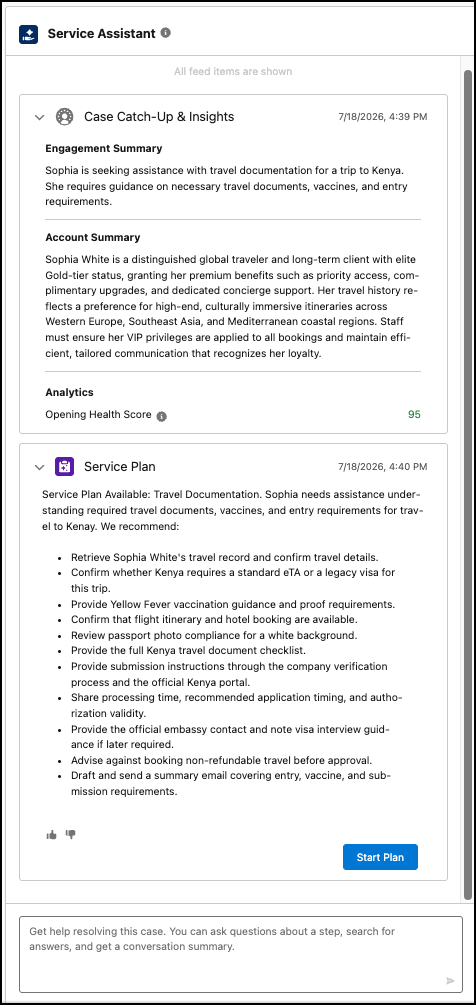
Case Catch-Up generates a summary of the case history with key insights: a customer engagement summary, an account summary, customer sentiment analysis, and a case health score. The capability gives service reps immediate context on the case right as they start working on the issue. This capability is available for cases only and shows as a collapsible card above the service plan.
Service Replies for Service Assistant
The general Service Replies feature is available directly in the Service Assistant component alongside the service plan. The feature surfaces AI-generated suggested reply cards in the component during active messaging sessions. Service reps can post or edit a reply before sending it to the customer.
.png)
If you have an existing Service Replies implementation, you only need to turn on Service Replies for Service Assistant on the Service Replies Setup page. When you turn on the feature, Service Replies are only surfaced in the Service Assistant component. The standard Service Replies component is disabled.
Service Replies and service plans operate independently. Suggested replies aren't used as grounding for service plans, and plan steps aren't used to generate suggested replies. When a service rep posts a reply, it enters the conversation and becomes available as context for future plan steps. See Service Replies for Service Assistant.