
Learn how to use Messaging Session and Voice Call records as a grounding source for Service Assistant for Case.
Required Editions
| View supported editions. | |
 This article applies to: This article applies to:
|
Service Assistant for Case with guidance and dynamic plans |
 This article doesn't apply to: This article doesn't apply to:
|
Service Assistant for Messaging and Voice |

Enhancing Service Plans with Related Records
When messaging session and voice call records are attached to a case, Service Assistant analyzes the transcripts to create a case summary that details what took place in the conversation and drafts a service plan that continues from where the conversation ended.
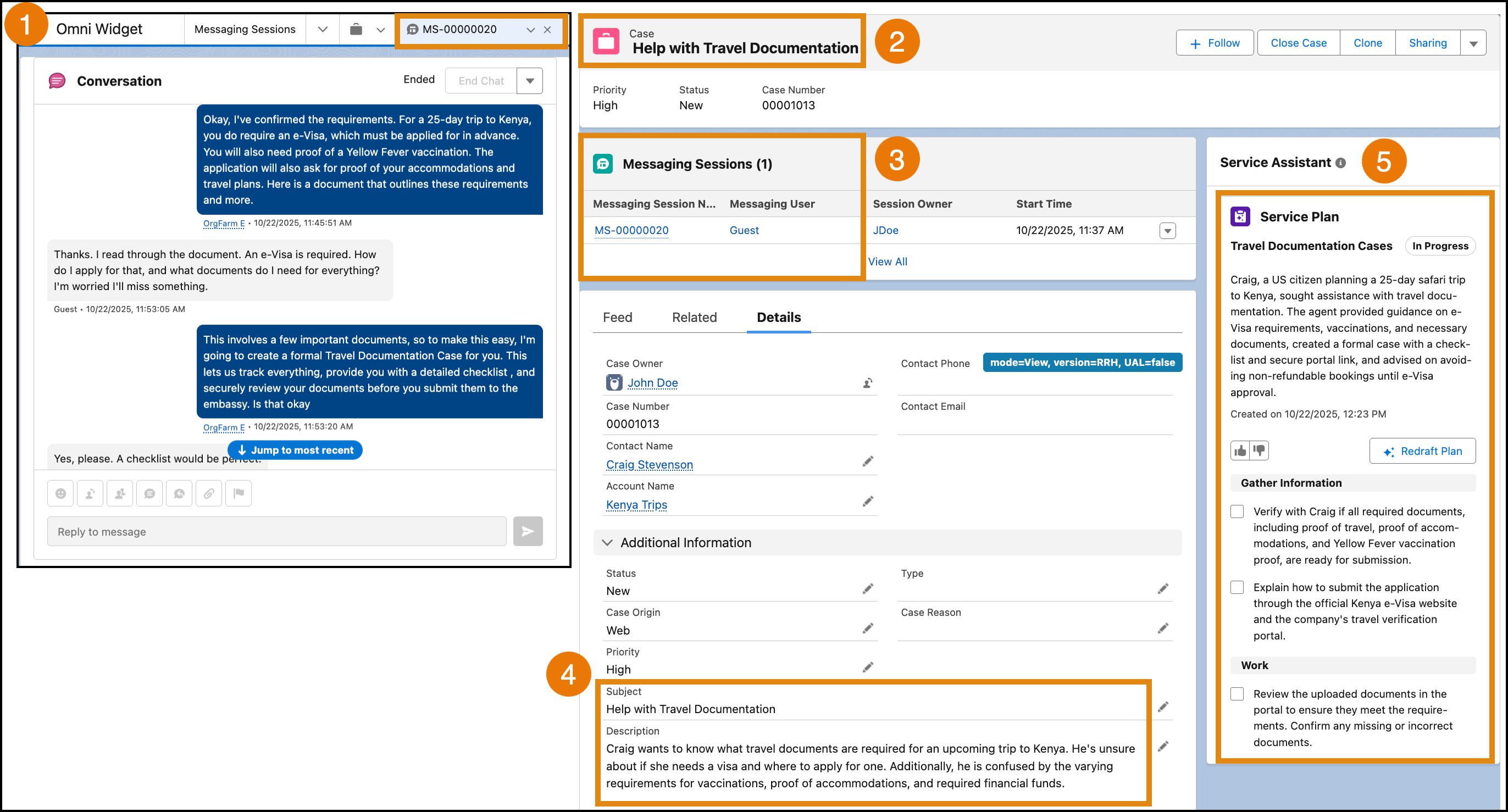
Here's an example of how related record grounding works for a case created from a messaging session.
- A service rep and customer complete a messaging session, where the service rep identifies the customer's issue and takes initial steps (1).
- The service rep creates a case from the messaging session (2).
- When a service rep drafts a guidance plan or starts a dynamic plan, Service Assistant reviews the messaging transcript from the attached record with the case's subject, description, and any other fields included in your Service AI grounding configuration (3-4).
- Using the context from both the messaging session and the case, Service Assistant drafts a service plan that builds on the progress already made in the messaging session (5). For dynamic plans, the related record information is used as context to inform the entire plan workflow. Service Assistant references the information with your other grounding sources each time it generates a new step.

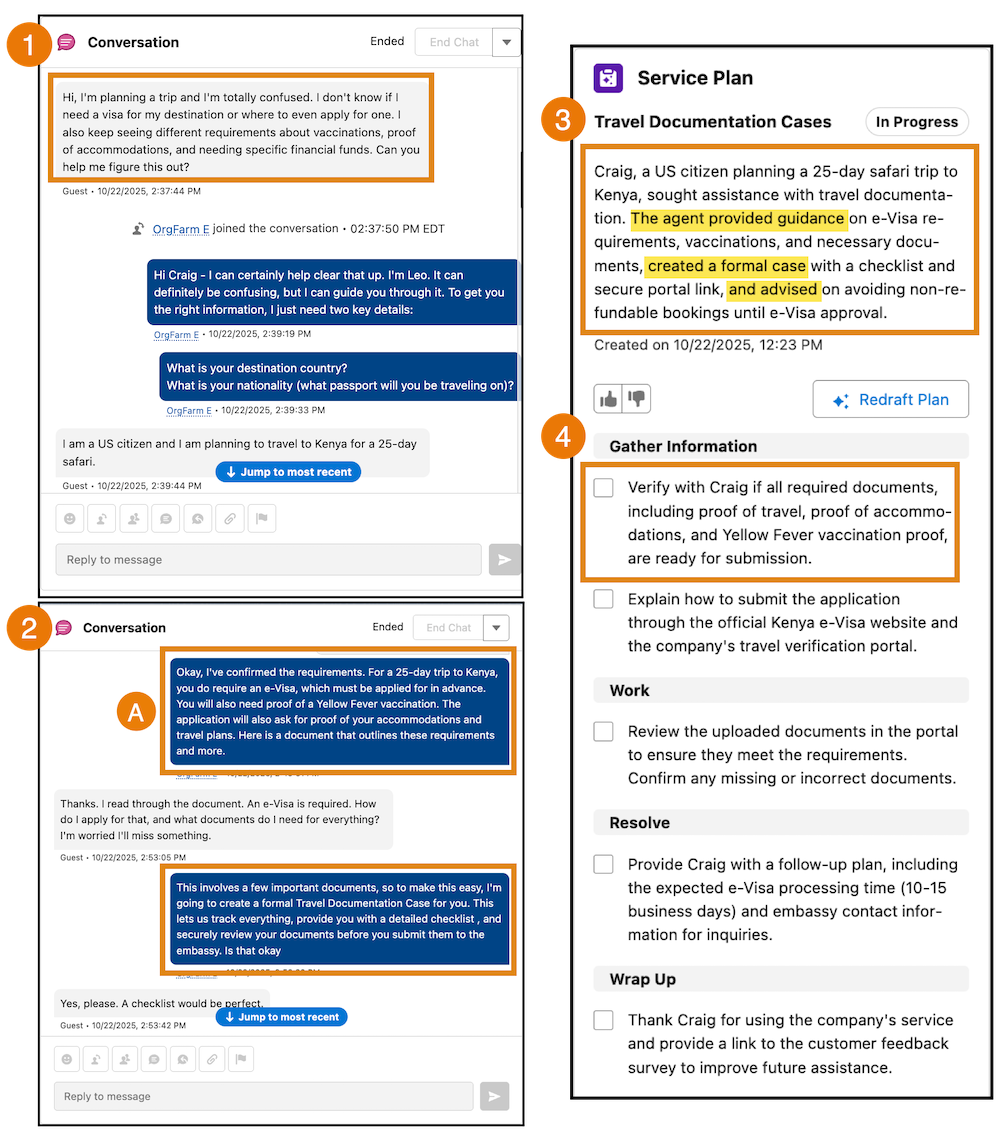
Looking closer at the example, you see how Service Assistant grounds on the related record. Service Assistant uses the record transcript (1-2) to:
- Create a case summary that outlines the completed tasks from the messaging session (3).
- Start the first step from where the messaging session left off. For example, the first step is to "Verify that Craig's documents are ready for submission" (4). Service Assistant doesn't repeat the task of informing the customer of what documents they need because this step was completed in the messaging session (A).
By grounding on the record data, Service Assistant provides more context-specific case resolution guidance for service reps.
Setting Up Service Assistant Related Record Grounding
To ground Service Assistant in messaging and voice records, turn on the feature from the Case tab of the Service Assistant Setup page.

Then, assign the ServicePlanner User the Conversation Grounding Access custom permission set. Service reps don't require any additional permissions to see record content included in a service plan, but they do require record-level access to open and view the Messaging Session or Voice Call record. See Required Permissions and Record Grounding Data Access for specific permissions details.
For the exact setup steps, see Set Up Related Record Grounding for Case (Optional).
Grounding Scenarios
When the feature is turned on, Service Assistant analyzes the transcripts of the messaging and voice records attached to a case to draft service plans in these scenarios.
| Scenario | Details | Considerations |
|---|---|---|
| A new case is created from a Messaging Session or Voice Call. | The related record is automatically attached to the case. Service Assistant includes the information from the related record in both the plan summary and the drafted service plan. The preceding examples show this scenario. |
|
| A Messaging Session or Voice Call record is added to an existing case that contains a drafted service plan. | The record is considered new information and the Redraft Plan button shows. If a service rep redrafts the plan, Service Assistant analyzes the record transcript and updates the plan steps with data from the transcript. |
|
| A messaging or voice recording is added to a case prior to turning messaging and voice record grounding from the Setup page and the case has an existing case summary or a drafted service plan. |
Grounding on the record depends on the state of the service plan.
|
|
Required Permissions
To draft and view service plans that contain information from messaging or voice records, the listed permissions are required. The permissions are specific to the use of this feature and are in addition to all mandatory permissions listed in Permissions and Licensing for Service Assistant.
| Persona | User License | Permissions |
|---|---|---|
| Service Assistant Admin | Salesforce |
Service Planner Builder permission set. Admins require only the Service Planner Builder permission set to turn on Messaging Session or Voice Call record grounding on the Service Assistant Setup page. |
| ServicePlanner User (agent user) |
Einstein Agent |
Service Assistant requires a custom permission set to access the transcripts of messaging and voice records attached to a case for incorporation into the service plan. Recommended custom permission set name: Conversation Grounding Access Permissions to include:
|
| Service Rep | Salesforce |
None. Conversation data from a related record attached to a case is always included in service plans because its incorporation is determined by the ServicePlanner User's permissions. See the next section. |
Record Grounding Data Access
When using Messaging Session and Voice Call records as a grounding source, the addition of the record information into the service plan relies on the ServicePlanner User's permissions. Therefore, the service plan can contain information from the related record that the service rep can't access.
Using the ServicePlanner User's permissions makes sure that all relevant messaging and voice record data is included, resulting in the most detailed service plan possible. For more details on plan creation using the ServicePlanner User's permissions, see Grounding Data Access.
Opening and viewing the Messaging Session or Voice Call record from the case still adheres to your organization's sharing rules. Service reps need record-level access to open and view the records attached to the case.
Generally, we recommend configuring the ServicePlanner User's permissions to align with the data access and sharing rules required for your service reps.
Considerations for Related Record Grounding
Here are a few details for grounding Service Assistant in messaging and voice records.
Supported Records for Grounding
- Messaging Sessions and Voice Calls are the only non-case related records supported for grounding.
- Service Assistant grounds on messaging and voice records created from all supported messaging channels and voice telephony models. See Messaging Channels and Voice Telephony Models.
- A Messaging Session record needs the status Ended to be used as a grounding source.
- A Voice Call record needs the status Completed to be used as a grounding source.
- Adding multiple Messaging Sessions or Voice Call records to a case for grounding is supported.
- Adding both a Messaging Session and Voice Call record to a case for grounding is supported.
- Service Assistant processes the full transcript of a Messaging Session or Voice Call record. There's no limit on the number of conversation entries used for grounding.
Grounding Limitations
- Service Assistant references only the text transcript from the related records as a grounding source.
- Attachments (such as images or files) included in the related records aren't used as grounding sources.