Understand how the amount and accuracy of information in knowledge articles and subagents work together to create a service plan.
Required Editions
| View supported editions. |

- This section contains reference guidance for knowledge grounding. Setup and testing guidance is provided in Set Up Knowledge Grounding (Optional). Additional testing and troubleshooting guidance is provided in Testing Knowledge.
- Beginning in April 2026, agent topics are now called subagents. There are no changes to functionality. During this transition, you may see a mix of the new and previous terms in our documentation.
Balancing Knowledge and Subagent Information
Ensuring accurate and relevant service plans using knowledge articles and subagents is all about striking the correct balance of information. The amount of detail depends on the case type and complexity, but generally, having more information in your knowledge base is better than translating all your policies and standards into lengthy subagent instructions. This means that you can spend less time writing those instructions and create service plans directly from your knowledge articles if they follow our recommended Knowledge Grounding Best Practices. Generally, clear and comprehensive knowledge articles enable Service Assistant to create a much more effective service plan than one based on subagent instructions alone.
Here are a few scenarios for creating service plans based on the amount of information found in both the knowledge articles and subagents. These scenarios assume the case contains ample detail, which enables the agent to select the most relevant subagents, instructions, and knowledge content for the service plan. If the case lacks enough information, the agent still references these resources to create a service plan, but the plan is sometimes not as effective.
Detailed Knowledge Articles, Subagents, and Instructions
When subagents and instructions are detailed and paired with well-written articles, the service plan is comprehensive. Service reps have all the details to handle cases from start to finish, adhering to your company’s policies and procedures. An example of a subagent with detailed instructions is shown in Sample Service Assistant Subagent.
However, service plans produced from detailed subagent instructions and knowledge articles are sometimes too detailed for service reps to execute quickly. Very detailed service plans are helpful for more complex cases rather than general ones. Therefore, when using knowledge articles and subagents together, it’s best to have detailed knowledge articles and moderately detailed instructions.
Detailed Knowledge Articles, Moderate Instructions
When subagents and instructions contain moderate details, the service plan can have the correct amount of information but could lack enough specific guidance. To enhance these subagents and instructions without spending time writing detailed instructions, your knowledge articles must be well organized, descriptive, and precise, and must contain up-to-date information. Most importantly, your articles and subagents shouldn’t contain conflicting or duplicate information. For exact details, see Best Practices for Grounding Service Assistant in Knowledge and Prepare your Data for Agentforce Data Libraries.
When general, high-level instructions are paired with detailed knowledge articles, Service Assistant automatically fills in the information gaps to produce a comprehensive service plan. Here is an example of a subagent using a general instruction framework. Notice how these broad instructions are automatically supplemented with the more detailed information contained in the “Handling Returns” knowledge article.
| SUBAGENT PART | EXAMPLE |
| Label | Transaction Decline |
| Description | Guide service reps through processing a customer's return request, including verifying eligibility and initiating the return in the system. Questions are related to return requests, which include proof of return, return windows, product condition, and refund status. |
| Scope | Your job is to assist service reps in processing customer return requests. This includes verifying return eligibility based on purchase date, item condition, and applicable return policies. It also includes identifying the reason for the return, determining whether a refund, exchange, or store credit applies, and guiding reps through the steps to initiate, approve, or escalate a return as needed. You must not handle inquiries outside of returns. |
| Instruction 1 | Verify the customer's identity. |
| Instruction 2 | Review and validate the purchase record to confirm the item's return eligibility. |
| Instruction 3 | Provide clear instructions on how to initiate a return, including any required documentation or steps. Confirm if the item is a final sale item. This must always be in a plan. |
| Instruction 4 | Document the guidance and write a summary to the customer that states when, if, and how they will get a refund. |
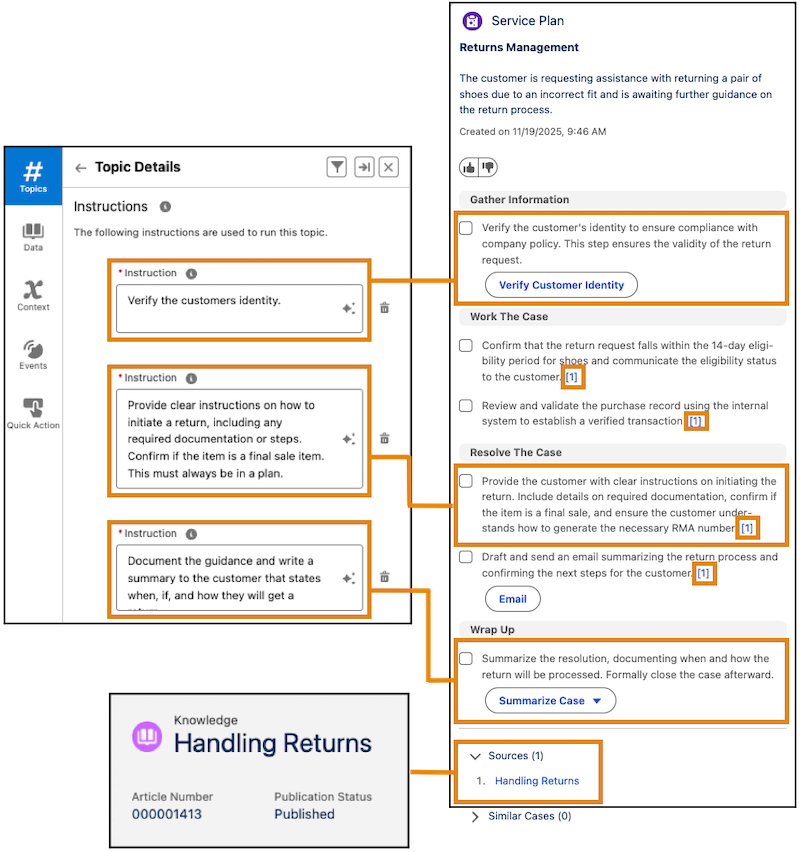
When you have Show Sources enabled in your data library, Service Assistant cites each step that is created from your knowledge base. Notice that most of the steps in the example come from the knowledge article, as indicated by the citations of [1] at the end of the plan steps. Here are details about service plan steps created from knowledge articles.
- Each step created from a knowledge article is cited with a number at the end of the step in the form of [1]. The citation contains a hyperlink to the corresponding entry in the Sources section at the bottom of the component that lists the name of the knowledge article.
- The list of sources displays the name of the knowledge article used to create the plan steps.
- Each entry in the Sources section contains a link to the article used to create the step. In the example, each citation in the Sources section links to the article that created the steps: Handling Returns.
- When a knowledge article is used to create multiple steps, the article is cited in all steps with the same citation number.
- A step can be created from both a subagent and a knowledge article, as shown in the first step under Resolve the Case. The first part of the sentence comes from the subagent, and the last part comes from the Handling Returns knowledge article.
- A step can be created from multiple knowledge articles. This is indicated when you see two or more citations at the end of a step, like [1][2].
No Knowledge Articles, Only Instructions
When no knowledge articles match the case, the steps in the plan are based on the information from the subagent instructions that match the case. Because no articles are referenced, it’s important that those instructions have enough information and specificity to provide a helpful service plan. Remember that subagent instructions help guide Service Assistant to determine what it includes as steps in a service plan.
Detailed Instructions
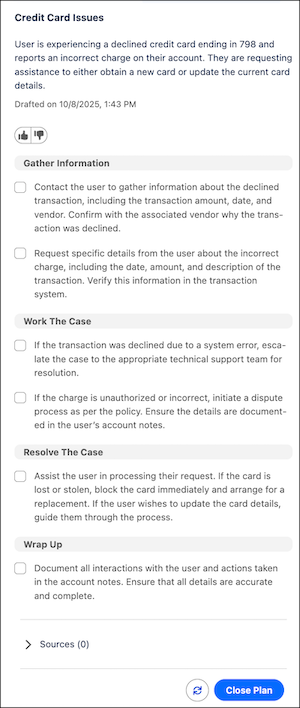
If the instructions are detailed, then the service plan has a high level of accuracy and helpfulness for the service rep. Here’s an example of a detailed service plan created only with subagent instructions. For more specific guidance, see Grounding Service Assistant with Subagents.
Moderate Instructions
If the instructions are moderately detailed, the plan might cover the main processes for working the case, but it may lack specific details where the service rep has to look elsewhere for guidance. This is where knowledge grounding fills the gaps, as shown in the previous section of this page.
Incomplete Instructions
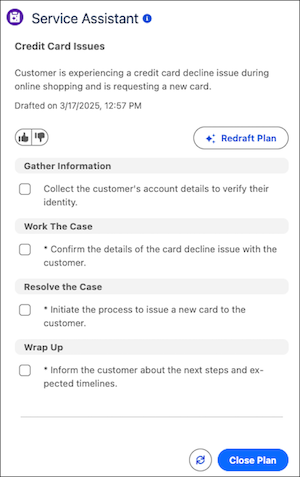
If the instructions don't contain a lot of detail or aren't specific, the service plan might not be useful as it may contain very broad information and lack your specific policies for working the case.
For example, when there's basic or very little information in your instructions, Service Assistant can propose its own steps that aren't based on your grounding sources. Such steps are indicated with an *. The information you provide in your grounding sources acts as guardrails for Service Assistant when it creates a service plan that's only grounded in your unique data.