
Learn how to control when Service Assistant creates a service plan.
Required Editions
| View supported editions. | |
 This article applies to: This article applies to:
|
Service Assistant for Case and Messaging. |
What's Eligibility Criteria?
A service plan is created only when a case or messaging session meets defined eligibility criteria, a set of requirements that determine whether a record is eligible for a service plan. Eligibility criteria give you control over which records get a service plan.
Setting eligibility criteria is mandatory and is included as a setup step on the Service Assistant Setup page for both Case and Messaging. You set eligibility criteria within an autolaunched flow. To get you started, we provide flow templates on the Flows Setup page.
- Case: Check Service Plan Eligibility. By default, the template contains a condition where the Priority record field is set to High.
- Messaging: Check Service Plan Eligibility for Messaging Session. By default, the flow requires that the session isn't set to Ended and isn't inactive.
You can use your own flow. If you use your own flow, it must be an autolaunched flow and have one string input and one boolean output.
For example, in the Decision element of the flow template, you can set condition requirements to have service plans available only for cases that originate from email or are assigned to a particular queue.
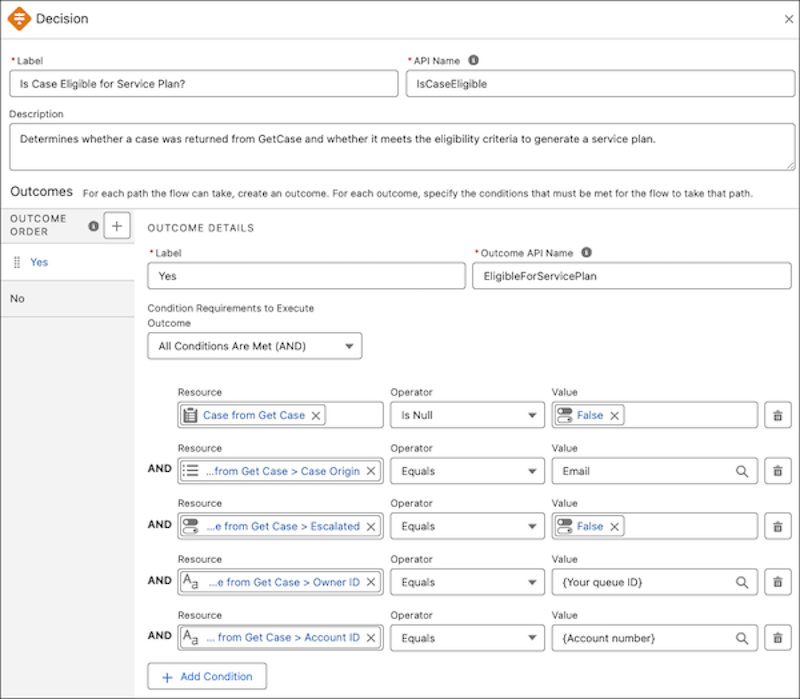
For messaging sessions, the chat must contain enough context for Service Assistant to identify the issue before it begins monitoring and plan processing. Both the conditions in your eligibility flow and this context requirement must be met before Service Assistant initiates a service plan.
Video Walkthrough
For a walkthrough of eligibility criteria and how it relates to service plan generation, watch this video. The video applies to both Service Assistant for Case and Messaging. To open the video in full screen, see Service Plan Eligibility Criteria.
Flow Execution and Permissions
In Service Assistant, service plans are always created in the context of the ServicePlanner User's (agent user) permissions, which have a higher level of data access than service reps. This access ensures that plans always have the most detail possible. See Service Plan Data Access. For guidance plans or dynamic plans for Case, the flow always runs using the ServicePlanner User's Run Flows app permission after the record is opened.
The automatic eligibility flow execution doesn't apply to Messaging. Service reps require direct access to the flow so that it executes when the Messaging Session record page opens. We don't recommend granting the Run Flows permission unless it aligns with your company's security standards. Instead, grant access through a custom permission set.
To grant access through a Messaging Eligibility Flow Access custom permission set:
- Restrict the flow's default general access.
- Create a custom permission set that has the flow enabled.
- Assign the permission set to both the admin and service reps.
Alternatively, restrict the flow's default general access and then assign the flow to the Standard User profile if that aligns with your company's security standards.
Considerations
After a record meets your eligibility criteria, Service Assistant starts plan processing by summarizing the case, assigning a subagent, and creating initial plan steps. For customers who use guidance plans for Case and have the Einstein for Service license, your Einstein Requests and Data 360 credits are consumed in this process. There's no consumption for customers with the Agentforce for Service license for dynamic plans for Case or Messaging. See Service Assistant Billing and Consumption.
Eligibility Criteria Use Cases
How you set eligibility criteria depends on the case types you're using Service Assistant for. Here are a few example use cases to help you define your own eligibility criteria.
| I want eligibility criteria for… | So that… | Sample Configuration |
|---|---|---|
| Email-only cases | Service plans are available only for cases that originate from email. |
|
| High-priority cases | Critical issues are handled with more structured support from a service plan. |
|
| Specific queues |
Service reps in a Tier 2 support queue or higher receive dedicated assistance for working high-value or sensitive cases. For example, a travel agency can have a dedicated queue for travel disruptions or executive clients so that service reps have dedicated support for resolving these cases. |
|
| Messaging sessions from a specific channel | Service plans are available only for customers reaching out through a specific messaging channel, such as WhatsApp or Enhanced Chat. |
|
| Messaging Session or Cases with specific products | Service plans are available only for cases related to certain products, so that service reps have access to the specific information they need for each product. This way, they can provide accurate and efficient support without spending time hunting down the necessary details. |
|