
Learn when the “Service Assistant is working on it…” status indicator shows for dynamic plans in Service Assistant for Case, Messaging, and Voice, and when it doesn’t, so you can set expectations for your service reps.
Required Editions
 This article applies to: This article applies to:
|
Service Assistant for Case with dynamic plans. |
 This article doesn’t apply to: This article doesn’t apply to:
|
Service Assistant for Messaging and Voice. |
Status Indicator
The status indicator “Service Assistant is working on it…” lets service reps know that Service Assistant is active, processing the record details, and generating the service plan. In Service Assistant for Case, it shows automatically when a rep opens a case record that meets your eligibility criteria to indicate that Service Assistant is generating the plan summary. The status indicator is on by default and requires no setup.
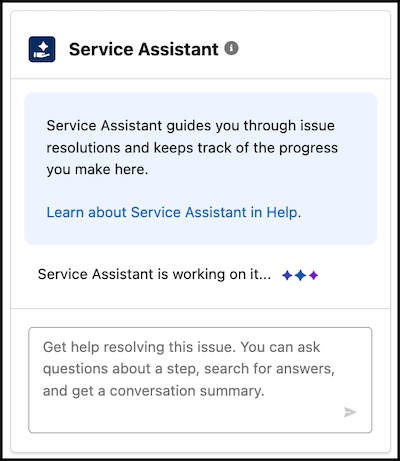
In Service Assistant for Case, reps see the status indicator when they:
- Open a case record page and the case meets your eligibility criteria.
- Click Start Plan.
- Complete a step and Service Assistant generates the next step.
- Confirm an action.
- Enter a request in the agent chat and wait for a response, such as a request to look up knowledge or run an action.
Service Assistant for Messaging and Voice behaves differently. It doesn’t show a status indicator when a rep first opens a record that meets your eligibility criteria and the chat or call transcript has messages. The component stays static until Service Assistant identifies an issue, and then automatically shows the plan summary for messaging and the first step of the plan for voice.
When the plan starts, the status indicator shows each time Service Assistant creates a step. It also shows when a rep enters a message in the agent chat, so the rep knows Service Assistant is processing the request.
Status Indicator Limitations
In some scenarios, the status indicator for case doesn’t show, or its presence is limited. Share this information with your reps so they know what to expect. Each scenario includes a demo that shows what reps see when they work a dynamic plan for a case.
Scenario: Ineligible Record
When a rep opens a record that doesn’t meet your eligibility criteria, the rep sees an ineligibility error message instead of the status indicator. If the record is later updated to become eligible, the status indicator still doesn’t show. Ineligible record demo video.
Scenario: A Capability Card Appears Before the Plan Summary
When a capability card, such as Case Catch-Up & Insights, appears before the plan summary shows, the indicator disappears as soon as the card appears. The plan summary continues to generate, but no indicator shows while it does. Capability card demo video.
Scenario: Service Assistant Regenerates the Current Step
When new case information arrives, Service Assistant regenerates the current step. The updated step shows automatically, with no indicator that Service Assistant is processing the new information and creating a new plan step. New case information includes a new email, a grounding field update, or a new or edited comment. Which updates regenerate the step depends on your Update Plan Context settings. Case data update demo video.